
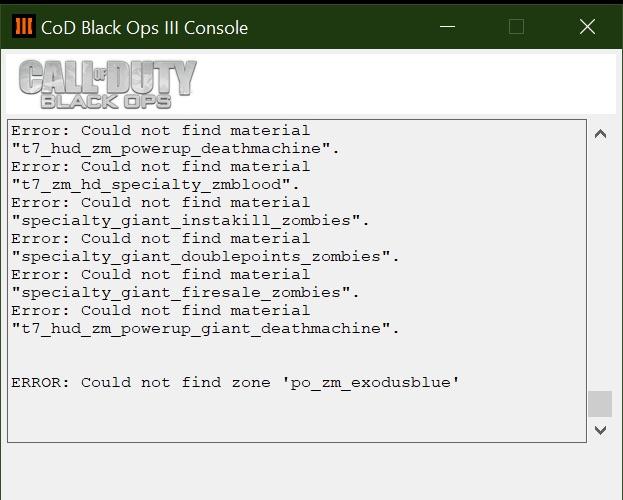
My girlfriend can’t play custom zombies with me. This pops up every time she tries launching the map, solo or with me. She can play official maps no problem, but not this one. Any help? I should add that this is her first ever custom map she tried to play
5 Comments
Been a while since I’ve played BO3 but does it let you download campaign/MP and zombies separately? She might need everything downloaded.
Try verifying game files, unsubscribing and resubscribing to the custom map, and if those don’t work try reinstalling the game
it looks like its missing dependencies, check the workshop if it needs other add ons to work or transfer your workshop files to her
Most mods/maps won’t work if the game language isn’t set to English.
Judging by “ERROR: Could not find zone ‘po_zm_exodusblue’, her game language isn’t set to English in Steam.
The following explains the cause of the problem:
> [The creator of the mods are able to decide which languages to support. Its up to the creators of the modes to decide which language to support. Most of the time they need to be contacted and asked to update their mod with the necessary languages.](https://steamcommunity.com/app/311210/discussions/0/1333474229067373306/#c1333474229070924757)
Below is a list I’ve comprised of the solutions that can be followed to fix this error:
Fixes for the following error messages when loading custom maps:
> **Fatal Error**
> ERROR: sound bank – name: *modName.lang*, zone: *modName*, game lang: *language*, sound lang: *lang* failed to load
> **Fatal Error**
> ERROR: Could not find zone ‘*lang_modName*’
Example errors:
> ERROR: sound bank – name: zm_ccube.ea, zone: zm_ccube, game lang: englisharabic, sound lang: ea failed to load
> ERROR: Could not find zone ‘ea_zm_giant’
Potential fixes:
1. Change the game language to English (en).
2.
Preferably before following this method, follow this video: https://youtu.be/ptU29D7MXhE This is so that the changes don’t get reverted back automatically.
Onto the method:
https://youtu.be/vtwaghqdLtU
Or
> So I had to Delete these:
> -ea_zm_ccube.xpak
> -ea_zm_ccube.ff
>
> And Rename these:
> -en_zm_ccube.xpak to ea_zm_ccube.xpak
> -en_zm_ccube.ff to ea_zm_ccube.ff
Generalising the second method:-
– Delete or move or rename or make copies of the following files that start with the language abbreviation that’s stated in the error (example: ea_) if they exist:
*lang_modName*.xpak
*lang_modName*.ff
– Rename the following files:
en_*modName*.xpak to *lang_modName*.xpak
en_*modName*.ff to *lang_modName*.ff
Edit:
Keep in mind that the 1st video from the 2nd method states in its description that if one player chooses to follow the video’s instructions, then all players that want to play with that player will have to follow the video’s instructions as well in order to play together.