I got it second hand without packaging so I can’t RMA it. Have tried BIOS updates, DDU and much more. I know it’s not the slot because I’m using my old 750Ti in the same slot, and it runs without issues. Can this be fixed?
Affectionate-Year185
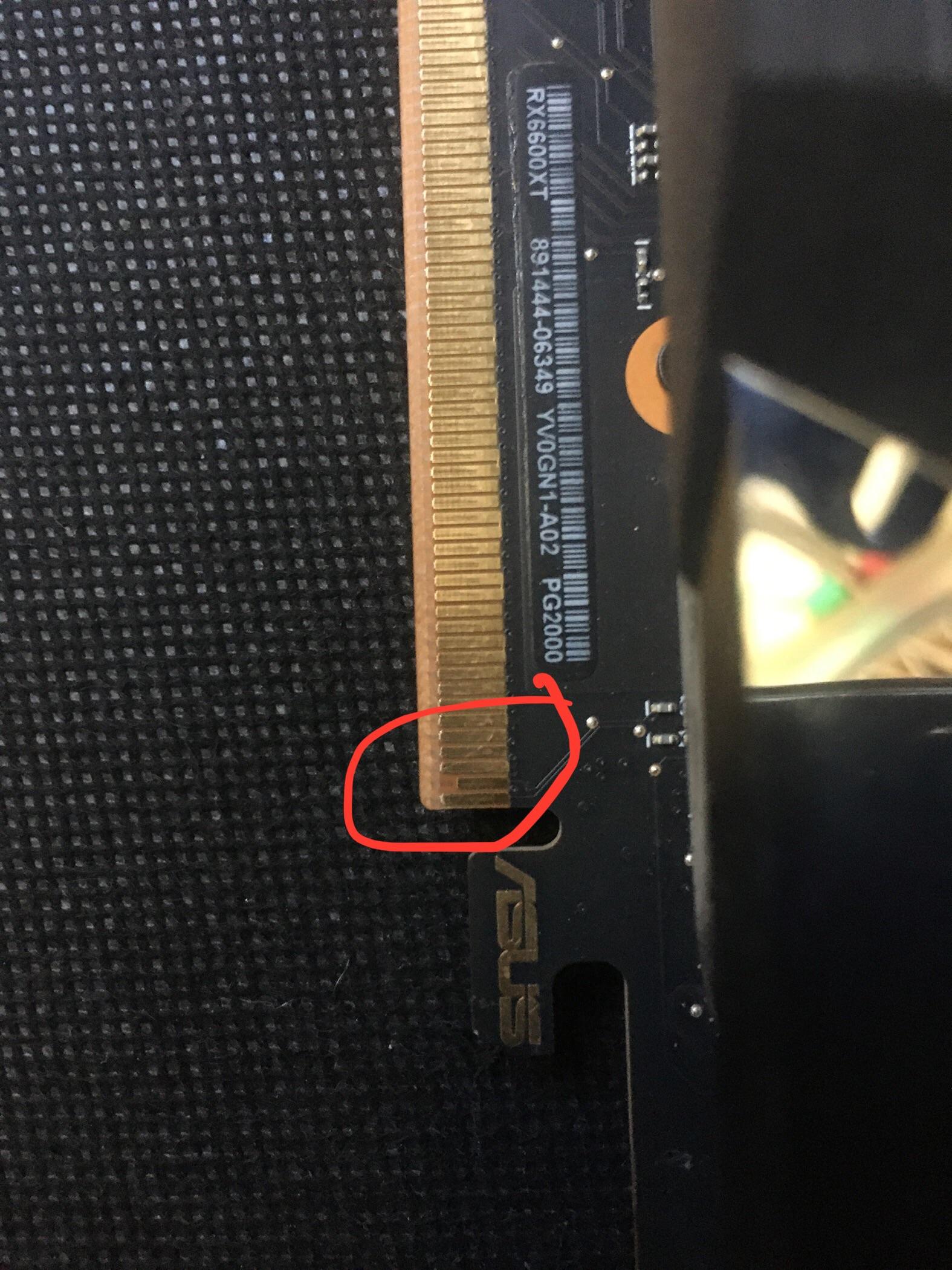
That pin is not the problem, it’s normal for GPUs to have some shorter pins, it must be something else
Strelok_2033
Well that is why you don’t buy Second hand pc parts
liaminwales
Normal, it’s shorter so the ground pin makes contact first.
lndig0__
I’m pretty sure the GPU isn’t plugged in in the image, that may be the issue.
Rollcuin
You download the drivers?
an_0w1
>GPU not detected by BIOS or Windows.
Are you using integrated graphics to check this? If your not then it is detected and the issue is something else.
BoxAhFox
ive read ur comments, heres my best guess:
ur 750ti does not need extra power from psu, so it works
ur 660xt does, so i would check your cable coming from the psu. swap the cable if u have a spare and ur psu is fully modular. also swap which port its plugged into on ur psu
if ur psu is non modular, try using the other pair on the same cable if it can reach
(this is ENTIRELY gpu dependant it seems, sometimes gpus will run without this extra power but severly undervolted. my 6650xt i beleive does NOT run at all, whereas my 1060 6gb will. or maybe other way around, i would have to test)
thats all i have, and it is entrely based on the fast that ur 750ti works, while ur 6600xt doesnt. if that dont work i have zero clue, very strange indeed
tldr: check psu power to gpu
xxcodemam
I’m trying to keep track of your comments here.
You’re saying it was working for the last 4 months, and suddenly stopped?
In this very rig, with all of the same PC parts, nothing changed?
Domspun
What happened? Did it stopped working while using the PC or you just powered up one day and got no output?
IuseArchbtw97543
not the reason, normal.
​
Check if there is a BIOS setting related to sharing bandwith between nvme and pci slots
MonPokyMon
Don’t know how versed you are with PC, so I will suggest checking if you connected you HDMI or Displayport directly to the card and not the the Mobo.
SarcasticGamer
Last time something like this was posted it just wasn’t seated all the way.
nocciolinopanevino
had the same issue and i tried changing power cables
THErealROFLCOPTER
check the GPU it in a different PC with a sufficient power supply and working PCIE Slot, could be your Mainboard or PSU causing the issue
Maxziro_
Read through all your comments. Best bet is to change to a new psu or try to find the psu cables that match your psu instead of a third party.
HeroWarrior303
Thanks to everybody here, I’ve determined that buying a new 8-pin cable of my GPU is probably my best bet. Thank you to everybody!
deep8787
Most of the common troubleshooting has been covered tbh.
You can try and clear the BIOS by removing and reinserting the CMOS battery. No harm in trying it.
But I am leaning towards that the card died :/
Mr_dubsom
Maak de pinnen proper met alcohol, benzeen of aceton. Een product dat ontvet en verdampt ! Niets anders
abcdefGerwin
You could try to put it in a different pci-e slot. The one youre currently could somehow be damaged or filthy

22 Comments
It’s a [sense pin](https://en.wikipedia.org/wiki/PCI_Express), not damaged.
GPU: Asus Radeon 6600XT Dual OC
I got it second hand without packaging so I can’t RMA it. Have tried BIOS updates, DDU and much more. I know it’s not the slot because I’m using my old 750Ti in the same slot, and it runs without issues. Can this be fixed?
That pin is not the problem, it’s normal for GPUs to have some shorter pins, it must be something else
Well that is why you don’t buy Second hand pc parts
Normal, it’s shorter so the ground pin makes contact first.
I’m pretty sure the GPU isn’t plugged in in the image, that may be the issue.
You download the drivers?
>GPU not detected by BIOS or Windows.
Are you using integrated graphics to check this? If your not then it is detected and the issue is something else.
ive read ur comments, heres my best guess:
ur 750ti does not need extra power from psu, so it works
ur 660xt does, so i would check your cable coming from the psu. swap the cable if u have a spare and ur psu is fully modular. also swap which port its plugged into on ur psu
if ur psu is non modular, try using the other pair on the same cable if it can reach
(this is ENTIRELY gpu dependant it seems, sometimes gpus will run without this extra power but severly undervolted. my 6650xt i beleive does NOT run at all, whereas my 1060 6gb will. or maybe other way around, i would have to test)
thats all i have, and it is entrely based on the fast that ur 750ti works, while ur 6600xt doesnt. if that dont work i have zero clue, very strange indeed
tldr: check psu power to gpu
I’m trying to keep track of your comments here.
You’re saying it was working for the last 4 months, and suddenly stopped?
In this very rig, with all of the same PC parts, nothing changed?
What happened? Did it stopped working while using the PC or you just powered up one day and got no output?
not the reason, normal.
​
Check if there is a BIOS setting related to sharing bandwith between nvme and pci slots
Don’t know how versed you are with PC, so I will suggest checking if you connected you HDMI or Displayport directly to the card and not the the Mobo.
Last time something like this was posted it just wasn’t seated all the way.
had the same issue and i tried changing power cables
check the GPU it in a different PC with a sufficient power supply and working PCIE Slot, could be your Mainboard or PSU causing the issue
Read through all your comments. Best bet is to change to a new psu or try to find the psu cables that match your psu instead of a third party.
Thanks to everybody here, I’ve determined that buying a new 8-pin cable of my GPU is probably my best bet. Thank you to everybody!
Most of the common troubleshooting has been covered tbh.
You can try and clear the BIOS by removing and reinserting the CMOS battery. No harm in trying it.
But I am leaning towards that the card died :/
Maak de pinnen proper met alcohol, benzeen of aceton. Een product dat ontvet en verdampt ! Niets anders
You could try to put it in a different pci-e slot. The one youre currently could somehow be damaged or filthy
This question over and over.