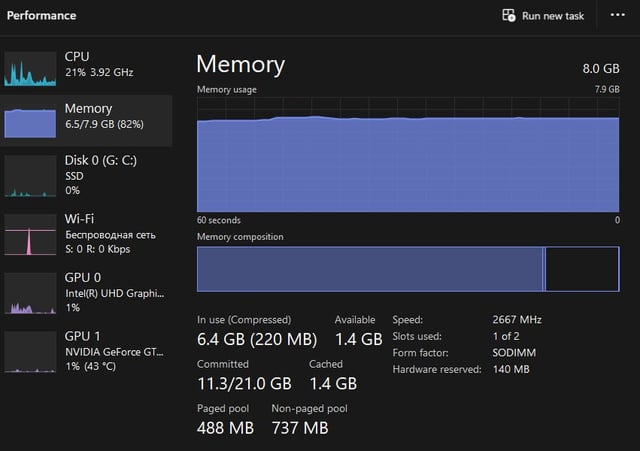
As you can see on the screenshots I use only about 2,5 GB of memory, but totally memory is loaded with 6,5 GB. Where are the missing 4 GB and could I optimise it?

As you can see on the screenshots I use only about 2,5 GB of memory, but totally memory is loaded with 6,5 GB. Where are the missing 4 GB and could I optimise it?
30 Comments
Chrome?
I guess Firefox and chrome ?
What are you even using both at the same time?
The missing 4gb is most probably being used to run the Windows and it’s background services
Windows.
8GB is almost nothing for windowz~
user fault for using 8GB & windowz.
8 GB is insufficient today.
i forgot
The correct answer is cache. Windows uses bit for running processes, but that’ll be less than 2gb, probably less than 1gb on a mostly clean installation.
The rest of it is cache of whatever sort, supporting quickly launching programs or files that are used a lot.
If that memory is needed for something else, windows will start clearing parts of that cache quickly.
It’s mostly noticable on systems with 8gb ram, and up to 16gb ram it’ll grab most of the available ram for cache. With 32gb and above you’ll notice it kind of stops halfway or lower.
Now, this is a good thing, there’s no point in leaving that ram unused, if it could be used to speed up starting applications and generally make everything feel snappier.
Why do people still have 8gb of ram in 2023… 32gb is the new minimum without stuttering in games.
In the balls .cit
I wanna tell you but i forgot
Unused ram is wasted ram.
Use mem reduct.
I am using it, sorry.
Why are you using google chrome? It hogs up your memory, at this point you should be using Firefox
I don’t remember.
Between having firefox and chrome and windows processes/bloatware yeah that’s about it really, 8GB RAM is on the lower end and most systems either upgrade to 16-32GB, does make a significant difference especially in games.
Depending on your main use case and what you actually use/want from Windows, you can go through and trim a lot of the bloatware crap out, it does take some techy know how with editing/deleting registry keys to stop it coming back but it’s nothing too major.
What RAM?
8gbs of ram is fairly low in 2023, but I’m also noticing multiples of both Chrome and Firefox running ending those might help with performance a little bit
igpu vram
Preallocated memory for System use. If you fire up a very memory intense application and close it, you’ll see that only around 3GB is left. I think windows does this as a kind of spare memory for important processes
Obviously in the shadow realm
Chrome gets so hungry.
I would tank windows desktop manager,
Are your live thumbnails that critical?
who cares?? just download more.
Up your butt HAHAHAHAHAHAHAHAH
I’m so funny
https://preview.redd.it/4mft7i508prb1.jpeg?width=1170&format=pjpg&auto=webp&s=a0135ac41c66888406814a3266e322c2e1fccb4e
Might be your iGPU, consider disabling it in the BIOS unless you know you need it.
Go to details tab -> right click on the top part of the columns -> edit columns -> add commit -> hit ok -> sort by commit.
The processes tab only shows active memory pages.
Windows really needs 16gigs to run effectively. 32 is the sweet spot especially for gaming. Gives your PC breathing room.
I don’t remember
I paid for the whole RAM, so I’m gonna use the whole RAM