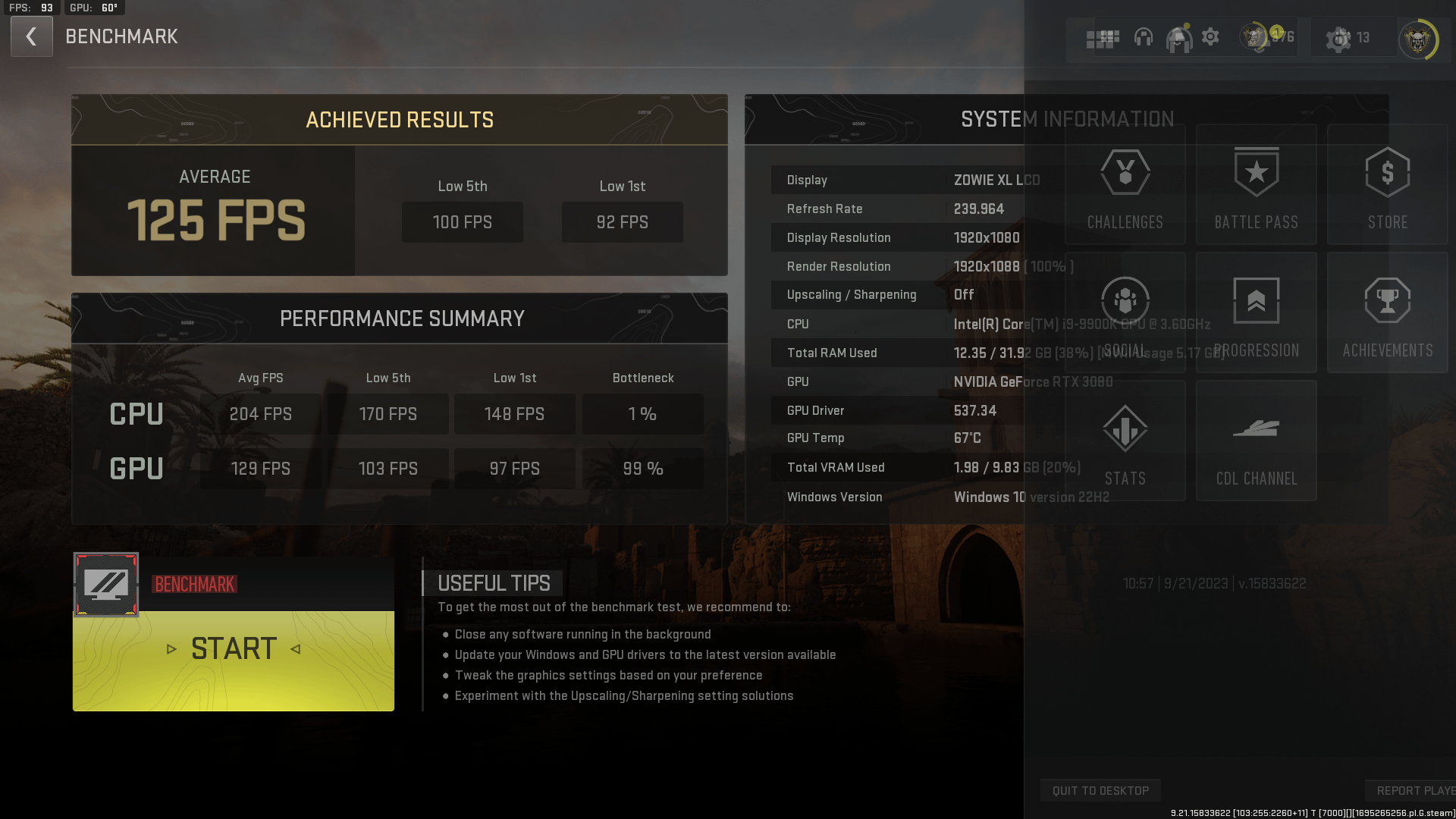
switched to a 240hz 1080p monitor and FPS is the same as If I was playing on a 4k screen. This doesn’t add up to me. Anyone have any solutions?
fcpl
Something is not right. CPU should be bottleneck on that system not GPU. Unless you play on all high settings.
Double check driver settings. DDU drivers and install fresh version. Or dig deeper
Illustrious-Slice-91
Try turning on DLSS. I had a 9700k and my benchmark said the same thing but my CPU was 100% bottlenecking GPU
Ndrade
i had the same issue. update BIOS
Born_Fish_2419
Looks normal to me, this game is just so badly optimized nowadays. My avg fps has dropped from 190 to 130 since the release and i have done every possible optimization out there. This is even worse on warzone ranked. ( I have tried this with few different pc setups and the results are about the same )
Roughly the fps drop is about 10-20% on gpu side since the release and 30-40% from cpu side
Edit: I first looked that this was cpu bottleneck
baliza1991
Just a heads up: this benchmark is useless for warzone. Also u need to check what’s going on with your 3080. I get better frames on a 3060ti on 1440p
EntrepreneurOk6166
What was it like before the new monitor?
I’m guessing you have an fps limiter enabled someplace – game, 3rd party programs, windows itself.
Try setting to Recommended from the graphics settings dropdown menu, then benchmark. Obviously clean game / driver reinstall is an option.
This result is WAY off. You should be getting 150 fps even on 1080p Ultra settings.
distinguisheditch
Try DLSS 100%. Is eco mode turned on? Did you leave an fps limiter on anywhere?
[deleted]
[deleted]
PRSMesa182
That’s very normal for a 9900k. I have old screenshots of my 9900k/3080ti and mine were a bit higher as my cpu was at 5ghz all core. The 9900k was smack in the middle of intel not giving a shit era.
Dis_Joint
Seems about right. I’ve got a 9900k at 5.1ghz and those figures (for the CPU) look pretty similar.
What’s the GPU? Edit: you’ve got a 3080, and looks like you’ve got settings on low with such minimal VRAM usage..
Is the 3080 in the right PCI-e slot on the mobo? You haven’t accidentally plugged it into a PCI-e 1 slot?
raides
DDR4 or DDR5? What’s the gpu? The 9900K, though the best of the i9 series for over clocking is still 5 generations behind.
125 fps is pretty decent for this game. I get roughly that in 4K. The game is a resource hog, anyone denying that, count in seconds how long it takes to exit to desktop.
Plentiful1
What is your RAM speed
SadFaxDaTruth
I don’t touch above 125 myself either. High settings or low.
lilsasuke4
I mean you are using low settings at 1080p. We’re you expecting higher fps? Woops I saw that you had a 3080
Careless_Frosting559
They have been deliberately making it worse every season. Season 1 was perfect, though.
Manakuski
Something is horribly wrong for the gpu. Horribly wrong. Optimize your system and make sure your gpu is in the top slot….
reasimoes
I know I will be downvoted as hell but my problem was with Win10.
I changed to Win11 and I went from 120FPS avg on benchmark to 160ish avg on benchmark, same settings!
I think Windows 11 is better optimized for most recent games.
Idk I might be saying shit. Nonetheless, give it a try!
LabTechRazkiL
Hahaha
We have the same benchmarks!
Ryzen 7 5800x
Rtx 3070
32GB ram
GTOman758
What’s effd up about this is sometimes using low settings stirs the usage to the cpu being a slight bottleneck but it states that the 3080 was at 99% at 1080p daayum. Scratching my head here
GTOman758
Hows ur ram speed? sith that juicy 32gig
Flight-2012
It’s okay I run this with a 13700kf and a 4080 and I still see high bottleneck % I don’t think this game is even close to being properly optimized
compaholic83
!STOP! – As others have asked. What is your RAM speed? Have you confirmed its running its advertised XMP speed and timings? COD fucking LOVES fast RAM and will punish FPS pretty bad if the RAM is too slow. Also you should use Fidelity CAS, don’t use DLSS on the 3080 as it isn’t as good for COD.

23 Comments
switched to a 240hz 1080p monitor and FPS is the same as If I was playing on a 4k screen. This doesn’t add up to me. Anyone have any solutions?
Something is not right. CPU should be bottleneck on that system not GPU. Unless you play on all high settings.
Double check driver settings. DDU drivers and install fresh version. Or dig deeper
Try turning on DLSS. I had a 9700k and my benchmark said the same thing but my CPU was 100% bottlenecking GPU
i had the same issue. update BIOS
Looks normal to me, this game is just so badly optimized nowadays. My avg fps has dropped from 190 to 130 since the release and i have done every possible optimization out there. This is even worse on warzone ranked. ( I have tried this with few different pc setups and the results are about the same )
Roughly the fps drop is about 10-20% on gpu side since the release and 30-40% from cpu side
Edit: I first looked that this was cpu bottleneck
Just a heads up: this benchmark is useless for warzone. Also u need to check what’s going on with your 3080. I get better frames on a 3060ti on 1440p
What was it like before the new monitor?
I’m guessing you have an fps limiter enabled someplace – game, 3rd party programs, windows itself.
Try setting to Recommended from the graphics settings dropdown menu, then benchmark. Obviously clean game / driver reinstall is an option.
This result is WAY off. You should be getting 150 fps even on 1080p Ultra settings.
Try DLSS 100%. Is eco mode turned on? Did you leave an fps limiter on anywhere?
[deleted]
That’s very normal for a 9900k. I have old screenshots of my 9900k/3080ti and mine were a bit higher as my cpu was at 5ghz all core. The 9900k was smack in the middle of intel not giving a shit era.
Seems about right. I’ve got a 9900k at 5.1ghz and those figures (for the CPU) look pretty similar.
What’s the GPU? Edit: you’ve got a 3080, and looks like you’ve got settings on low with such minimal VRAM usage..
Is the 3080 in the right PCI-e slot on the mobo? You haven’t accidentally plugged it into a PCI-e 1 slot?
DDR4 or DDR5? What’s the gpu? The 9900K, though the best of the i9 series for over clocking is still 5 generations behind.
125 fps is pretty decent for this game. I get roughly that in 4K. The game is a resource hog, anyone denying that, count in seconds how long it takes to exit to desktop.
What is your RAM speed
I don’t touch above 125 myself either. High settings or low.
I mean you are using low settings at 1080p. We’re you expecting higher fps? Woops I saw that you had a 3080
They have been deliberately making it worse every season. Season 1 was perfect, though.
Something is horribly wrong for the gpu. Horribly wrong. Optimize your system and make sure your gpu is in the top slot….
I know I will be downvoted as hell but my problem was with Win10.
I changed to Win11 and I went from 120FPS avg on benchmark to 160ish avg on benchmark, same settings!
I think Windows 11 is better optimized for most recent games.
Idk I might be saying shit. Nonetheless, give it a try!
Hahaha
We have the same benchmarks!
Ryzen 7 5800x
Rtx 3070
32GB ram
What’s effd up about this is sometimes using low settings stirs the usage to the cpu being a slight bottleneck but it states that the 3080 was at 99% at 1080p daayum. Scratching my head here
Hows ur ram speed? sith that juicy 32gig
It’s okay I run this with a 13700kf and a 4080 and I still see high bottleneck % I don’t think this game is even close to being properly optimized
!STOP! – As others have asked. What is your RAM speed? Have you confirmed its running its advertised XMP speed and timings? COD fucking LOVES fast RAM and will punish FPS pretty bad if the RAM is too slow. Also you should use Fidelity CAS, don’t use DLSS on the 3080 as it isn’t as good for COD.