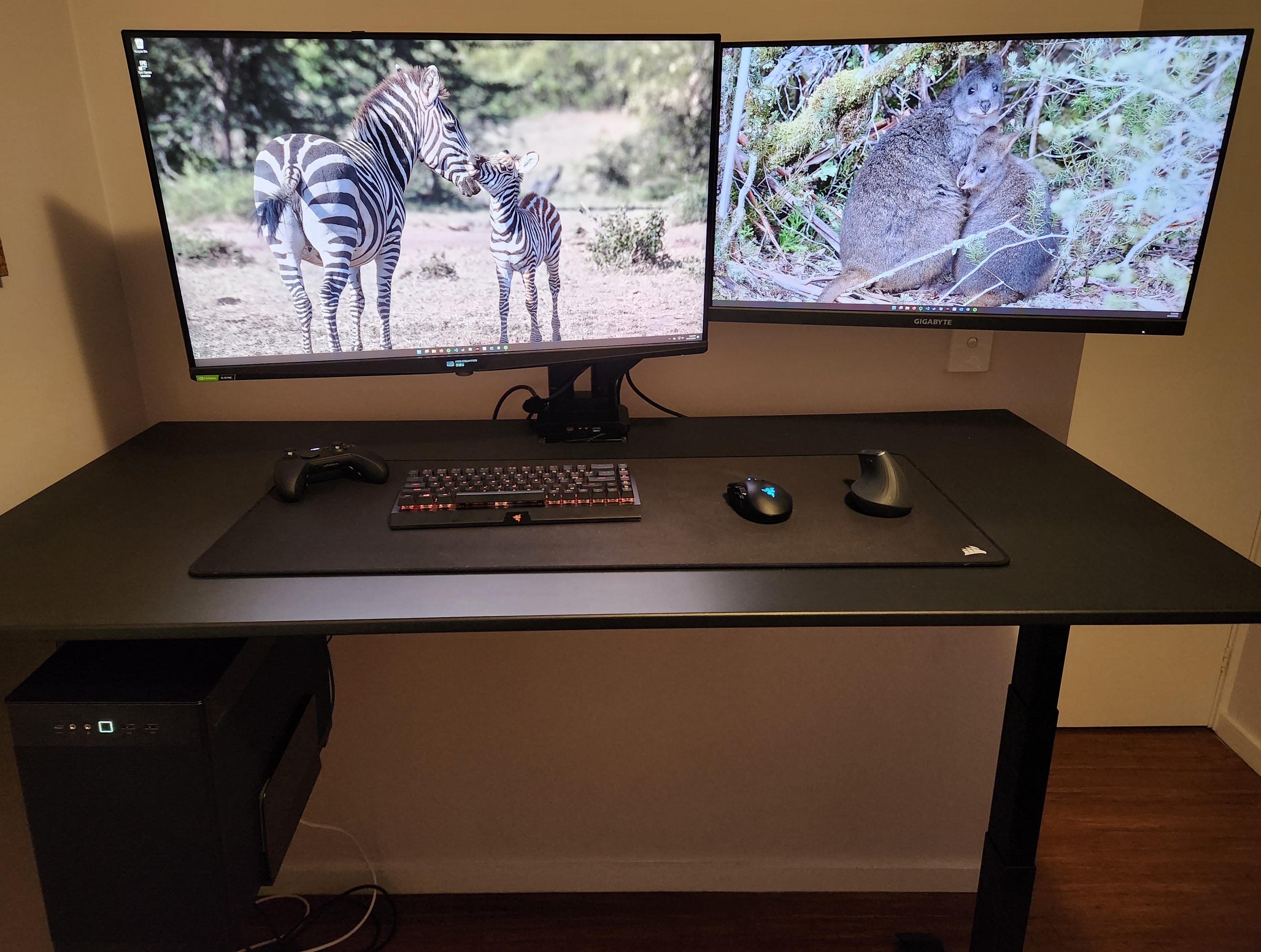
Not the flashiest of battlestations, but I would argue the usability of this setup is obscene. A charging cable for all the wireless devices can be pulled out of the hole next to the monitor arm. I also love using two mice, one for work where ergonomics is key and one for gaming.
No RGB so enjoy some animal photos instead!
**Monitor (left):** Asus PG32UQX
This monitor is amazing and also amazingly expensive. 32″ 4k 144hz, Gsync Ultimate, Proper HDR1400 through local dimming of 1152 mini-leds. Use a flamthrower in Deep Rock Galactic and your eyes will burn as much as the creepy crawlies. But my favourite feature of all? If you look closely you’ll see it has a FPS counter screen below the monitor that works on everything at all times. Extremely
handy!
**Monitor (right):** Gigabyte M28U
Great monitor for the price. My wife thinks photos look better on this one than the extremely expensive one, funny how that works.
**Table:** Omnidesk sit/stand with monitor arms.
**Mouse (right):** Logitech MX ergonomic mouse
Great mouse to use for work. I have noticed that my wrist strains less using this one for 8 hours than the proper gaming mouse.
**Mouse (left):** Razer Naga
**Keyboard:** Razer Blackwidow V3 Mini Hyperspeed
Amazing to use for typing (yellow switches), and I love that I can pair both the Naga and this keyboard on the one 2.5ghz dongle. I love the look of the 65% keyboards, but next time I might move back to TKL as it can be annoying to use a 65% for programming in Stata and anything that uses F keys alot.
**Controller:** Xbox Elite Wireless
No complaints
**PC Case:** Asus Prime AP201
I love mATX cases, anything larger and I would need to sit it on the table or floor as the case mounts have weight limits.
**Inside the PC:**
CPU – AMD 7950X3D
GPU – Holdover PNY 3090
Mobo – Asus X670E Gene mATX (fantastic motherboard in most ways but very expensive. Thought PCIE 5 will help futureproof me while waiting for the 5090 to come out, and this is the only X670E mATX board.)
Boot SSD – 4tb Seagate Firecuda 530
If anyone is interested in more details let me know, but might save it for another subreddit when I end up with a new gpu.
WongJeremy
What are you using for the case mount under the desk?

2 Comments
Not the flashiest of battlestations, but I would argue the usability of this setup is obscene. A charging cable for all the wireless devices can be pulled out of the hole next to the monitor arm. I also love using two mice, one for work where ergonomics is key and one for gaming.
No RGB so enjoy some animal photos instead!
**Monitor (left):** Asus PG32UQX
This monitor is amazing and also amazingly expensive. 32″ 4k 144hz, Gsync Ultimate, Proper HDR1400 through local dimming of 1152 mini-leds. Use a flamthrower in Deep Rock Galactic and your eyes will burn as much as the creepy crawlies. But my favourite feature of all? If you look closely you’ll see it has a FPS counter screen below the monitor that works on everything at all times. Extremely
handy!
**Monitor (right):** Gigabyte M28U
Great monitor for the price. My wife thinks photos look better on this one than the extremely expensive one, funny how that works.
**Table:** Omnidesk sit/stand with monitor arms.
**Mouse (right):** Logitech MX ergonomic mouse
Great mouse to use for work. I have noticed that my wrist strains less using this one for 8 hours than the proper gaming mouse.
**Mouse (left):** Razer Naga
**Keyboard:** Razer Blackwidow V3 Mini Hyperspeed
Amazing to use for typing (yellow switches), and I love that I can pair both the Naga and this keyboard on the one 2.5ghz dongle. I love the look of the 65% keyboards, but next time I might move back to TKL as it can be annoying to use a 65% for programming in Stata and anything that uses F keys alot.
**Controller:** Xbox Elite Wireless
No complaints
**PC Case:** Asus Prime AP201
I love mATX cases, anything larger and I would need to sit it on the table or floor as the case mounts have weight limits.
**Inside the PC:**
CPU – AMD 7950X3D
GPU – Holdover PNY 3090
Mobo – Asus X670E Gene mATX (fantastic motherboard in most ways but very expensive. Thought PCIE 5 will help futureproof me while waiting for the 5090 to come out, and this is the only X670E mATX board.)
Boot SSD – 4tb Seagate Firecuda 530
If anyone is interested in more details let me know, but might save it for another subreddit when I end up with a new gpu.
What are you using for the case mount under the desk?