Hello Ninasaur44, and thank you for your submission to Gaming PC! If you are new please check out our rules over at the wiki [here](https://www.reddit.com/r/gamingpc/wiki/rules)!
We have recently added the useful feature of Title Flair! You can set this manually by clicking Flair under your post once you have submitted your post, but if you missed it in the rules there is a much better way that will automatically flair your post!
To do this simply add what your post is about in brackets before your title. For example for a Build Log you can type [Build Log] before your post so that it looks like this; [Build Log]My new awesome build!, and the bot will automatically set your flair to Build Log! This works for Build Log, Build Showcase, News, Hardware News, Hardware Release, Discussion, and Miscellaneous!
Also remember that this is a place for discussing and sharing our love of Gaming Computers! This is NOT the place for help building or determining what parts you should buy, that is better suited for /r/buildapc. Troubleshooting questions should be directed to /r/techsupport. Thank you again!
*I am a bot, and this action was performed automatically. Please [contact the moderators of this subreddit](/message/compose/?to=/r/gamingpc) if you have any questions or concerns.*
obiedge
Awesome work. Building a PC for the first time can be intimidating, and we should all be thankful for Plug n Play. I remember back in the 90s we had to configure dip switches for processor clocks and multiplier, as well as IRQ and DMA settings for every card we plug into ISA slots.
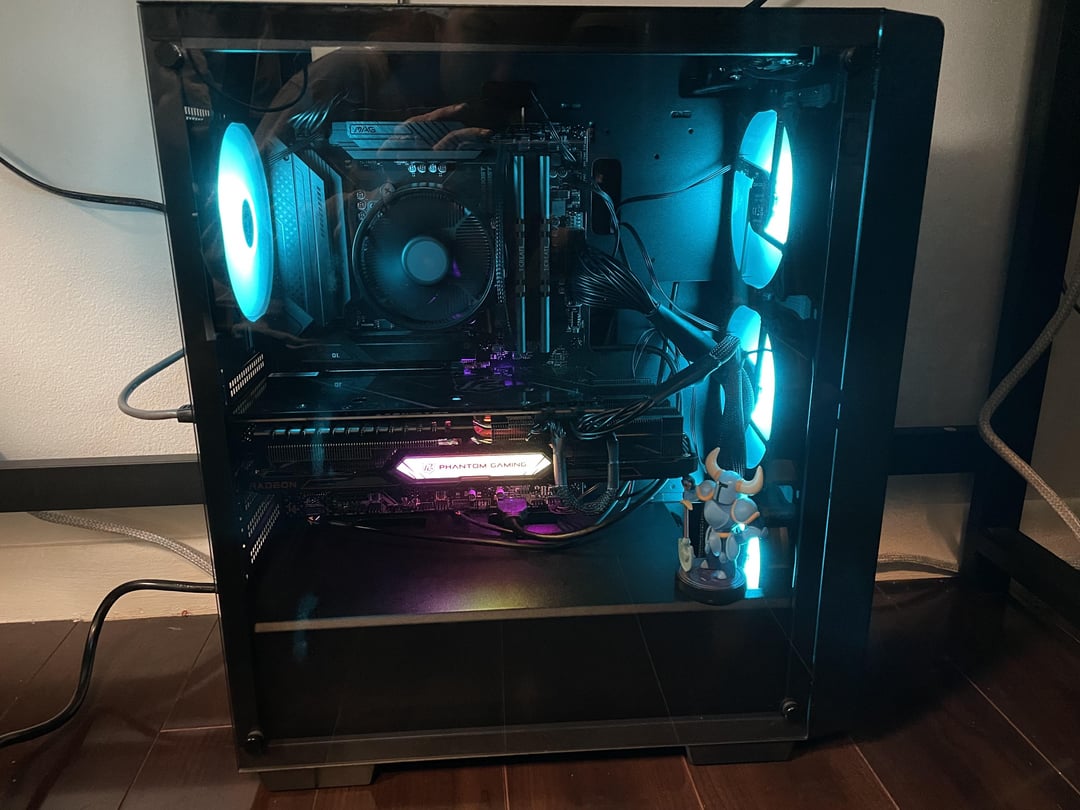
Now that you’ve confirmed all connections are working, it’s time to move on to dressing your cables to create an unobstructed flow from your front fans to your cpu cooler. Start with the 24-pin cable to make it come out from the case opening to the right of the corresponding header on the motherboard.
HappyBengal
Well done! Enjoy the system. 🙂 As alsready mentioned, for the eye and better airflow you can redirect the big cables into the holes of case backplate just beside the mainboard on the right side. The little cables at the bottom you can also reroute into the nearby holes for a cleaner look if you want (and if there is enough space to not bend them too much).
justapcguy
Looking at your bios, everything is running fine.
MoneyLambo
Asrock phantom gang!
robplumm
Ahh yeah…the little “Please work…” as you press the power button is always a bit of an anxiety moment.
_kurip
Specs?
titanrig
Nothing like that moment when it comes to life, is there? 🙂

9 Comments
Hello Ninasaur44, and thank you for your submission to Gaming PC! If you are new please check out our rules over at the wiki [here](https://www.reddit.com/r/gamingpc/wiki/rules)!
We have recently added the useful feature of Title Flair! You can set this manually by clicking Flair under your post once you have submitted your post, but if you missed it in the rules there is a much better way that will automatically flair your post!
To do this simply add what your post is about in brackets before your title. For example for a Build Log you can type [Build Log] before your post so that it looks like this; [Build Log]My new awesome build!, and the bot will automatically set your flair to Build Log! This works for Build Log, Build Showcase, News, Hardware News, Hardware Release, Discussion, and Miscellaneous!
Also remember that this is a place for discussing and sharing our love of Gaming Computers! This is NOT the place for help building or determining what parts you should buy, that is better suited for /r/buildapc. Troubleshooting questions should be directed to /r/techsupport. Thank you again!
*I am a bot, and this action was performed automatically. Please [contact the moderators of this subreddit](/message/compose/?to=/r/gamingpc) if you have any questions or concerns.*
Awesome work. Building a PC for the first time can be intimidating, and we should all be thankful for Plug n Play. I remember back in the 90s we had to configure dip switches for processor clocks and multiplier, as well as IRQ and DMA settings for every card we plug into ISA slots.
Now that you’ve confirmed all connections are working, it’s time to move on to dressing your cables to create an unobstructed flow from your front fans to your cpu cooler. Start with the 24-pin cable to make it come out from the case opening to the right of the corresponding header on the motherboard.
Well done! Enjoy the system. 🙂 As alsready mentioned, for the eye and better airflow you can redirect the big cables into the holes of case backplate just beside the mainboard on the right side. The little cables at the bottom you can also reroute into the nearby holes for a cleaner look if you want (and if there is enough space to not bend them too much).
Looking at your bios, everything is running fine.
Asrock phantom gang!
Ahh yeah…the little “Please work…” as you press the power button is always a bit of an anxiety moment.
Specs?
Nothing like that moment when it comes to life, is there? 🙂
the cable management work needs some improvement