Hello Accurate-Composer470, and thank you for your submission to Gaming PC! If you are new please check out our rules over at the wiki [here](https://www.reddit.com/r/gamingpc/wiki/rules)!
We have recently added the useful feature of Title Flair! You can set this manually by clicking Flair under your post once you have submitted your post, but if you missed it in the rules there is a much better way that will automatically flair your post!
To do this simply add what your post is about in brackets before your title. For example for a Build Log you can type [Build Log] before your post so that it looks like this; [Build Log]My new awesome build!, and the bot will automatically set your flair to Build Log! This works for Build Log, Build Showcase, News, Hardware News, Hardware Release, Discussion, and Miscellaneous!
Also remember that this is a place for discussing and sharing our love of Gaming Computers! This is NOT the place for help building or determining what parts you should buy, that is better suited for /r/buildapc. Troubleshooting questions should be directed to /r/techsupport. Thank you again!
*I am a bot, and this action was performed automatically. Please [contact the moderators of this subreddit](/message/compose/?to=/r/gamingpc) if you have any questions or concerns.*
Accurate-Composer470
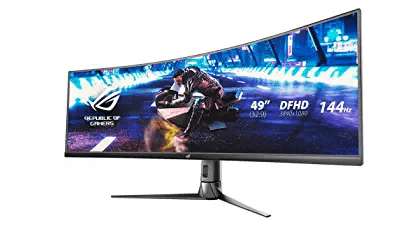
Im not against curved moniters and i have a mid curve one myself, but THIS THING IS LIKE 5 TIMES WIDER THAN IT SHOULD BE
Inner-Cloud162
Designed more for simulation games where the extra FoV makes a massive difference
Dudi4PoLFr
You don’t need to use the whole screen depending on the size those are equal to 2x 24-28″ 16:9 displays side by side. So with software, you can make it work like two separate displays, with a super clean look.
But if a game supports the Super Ultrawide aspect radio the immersion is outstanding, in some FPS it’s even OP AF to use them as you can cover way more ground without needing to move the mouse.
thatguy_905
I just picked up one last weekend. I absolutely love it. I got the AOC Agon. Takes a minute to get used to but I’m never going back to normal sized monitors. I am picking up a desk mount to remove the massive base and push the monitor back about 5”.
Aggravating-Boat5530
It’s time strech!
Yraid
Gaming on a super ultra wide is amazing. You can turn up your FOV to the max, when you look down your scope in a FPS the area in your sight is huge, Great for sniping. It does take getting some use to.
MontazumasRevenge
I use 3 27-in monitors side by side for work. They take up a lot of space and require three separate cords going to a dock. I used those same monitors for my desktop and have three additional cords going to that. No one makes a two source KVM switch for three monitors, at least not at a reasonable cost from what I’ve seen. One monitor like this would free up a ton of desk space as well as chords. Many of them have a built-in KVM switch as well. Eventually I’ll get around to spending the 800 plus dollars on one.
BlakeBruhh
Not everyone plays FPS games. I’m sure for racing, flight sim, stuff like that it is badass. I personally could not use one for what I do, though
belhambone
Do you not have peripheral vision?
bussybustr
I have a samsung odyssey g9 and love it. if a game doesnt run extra wide, i typically just turn on the picture by picture mode and windows recognizes it as if i had two 27 inch monitors and its a really smooth experience. honestly aside from the challenging experience of finding a suitable mount that didnt cost me $300+, it’s been a awesome and I wouldnt go back to two standard monitors (cost permitting).
​
besides playing LoL on the whole screen has done wonders for me, I can see so much of the map it’s like impossible to get ganked…and then games like Witcher 3 look so so good, really easy to get lost in the immersion these monitors offer gamers.
DKugly
I just got an odyssey g9 and it fucking slaps. Primarily play fps.
IdiotSysadmin
BY LAUNCHING THE GAME AND PLAYING IT. NOW STOP YELLING AT ME.
landenone
The wider sides fall into your peripheral vision, which increases the immersion factor. You can glance at the sides as well to see more than you would usually be able to.
Personally I’ve always been of the thought process that getting a larger TV would essentially be the same thing but with added space vertically, but I also would hate the feeling of using a TV close to my face. 🤷♂️
KalTheo
I just picked up a 34″ widescreen (3440×1440), and I love it, but it certainly strains my eyes more during long gaming sessions.
The problem is that Red Dead Redemption and Cyberpunk 2077 have never been more engrossing, so I deal with a bit of eye strain!
West_Contribution355
With mouse and keyboard
Lonewolfblack
They look awesome tbh
BadBwoiYardy
I switched to a wide unit recently. I can’t imagine going back.
KC-Admin
I have a 34″ UWHD and absolutely love it … #3440x1440pGang
marcisphoenix
not sure what you are asking, you can always adjust the screen size if its too big for your needs. but they are helpful in letting you see more.
WavingPick
I have the Samsung 49″ and I don’t think I would ever go back. I wish it was a little taller like the new LG that’s coming out but for the games I play, rocket league mostly, I love it.
redditforgot
My solitaire game as never been the same.
astrongineer
With their fuckin eyes maybe?
ventiewentie
With a computer usually.
Arkwel
When you go wide you don’t go back… Joke aside. It’s depending the games. I play world of warships and it’s really great to see those huge ships on a 49″ 🙂
Neeeeedles
Actually its amazing, much more immersive
jacob22656
The fact you’re asking means you’ve never tried it haha

27 Comments
Hello Accurate-Composer470, and thank you for your submission to Gaming PC! If you are new please check out our rules over at the wiki [here](https://www.reddit.com/r/gamingpc/wiki/rules)!
We have recently added the useful feature of Title Flair! You can set this manually by clicking Flair under your post once you have submitted your post, but if you missed it in the rules there is a much better way that will automatically flair your post!
To do this simply add what your post is about in brackets before your title. For example for a Build Log you can type [Build Log] before your post so that it looks like this; [Build Log]My new awesome build!, and the bot will automatically set your flair to Build Log! This works for Build Log, Build Showcase, News, Hardware News, Hardware Release, Discussion, and Miscellaneous!
Also remember that this is a place for discussing and sharing our love of Gaming Computers! This is NOT the place for help building or determining what parts you should buy, that is better suited for /r/buildapc. Troubleshooting questions should be directed to /r/techsupport. Thank you again!
*I am a bot, and this action was performed automatically. Please [contact the moderators of this subreddit](/message/compose/?to=/r/gamingpc) if you have any questions or concerns.*
Im not against curved moniters and i have a mid curve one myself, but THIS THING IS LIKE 5 TIMES WIDER THAN IT SHOULD BE
Designed more for simulation games where the extra FoV makes a massive difference
You don’t need to use the whole screen depending on the size those are equal to 2x 24-28″ 16:9 displays side by side. So with software, you can make it work like two separate displays, with a super clean look.
But if a game supports the Super Ultrawide aspect radio the immersion is outstanding, in some FPS it’s even OP AF to use them as you can cover way more ground without needing to move the mouse.
I just picked up one last weekend. I absolutely love it. I got the AOC Agon. Takes a minute to get used to but I’m never going back to normal sized monitors. I am picking up a desk mount to remove the massive base and push the monitor back about 5”.
It’s time strech!
Gaming on a super ultra wide is amazing. You can turn up your FOV to the max, when you look down your scope in a FPS the area in your sight is huge, Great for sniping. It does take getting some use to.
I use 3 27-in monitors side by side for work. They take up a lot of space and require three separate cords going to a dock. I used those same monitors for my desktop and have three additional cords going to that. No one makes a two source KVM switch for three monitors, at least not at a reasonable cost from what I’ve seen. One monitor like this would free up a ton of desk space as well as chords. Many of them have a built-in KVM switch as well. Eventually I’ll get around to spending the 800 plus dollars on one.
Not everyone plays FPS games. I’m sure for racing, flight sim, stuff like that it is badass. I personally could not use one for what I do, though
Do you not have peripheral vision?
I have a samsung odyssey g9 and love it. if a game doesnt run extra wide, i typically just turn on the picture by picture mode and windows recognizes it as if i had two 27 inch monitors and its a really smooth experience. honestly aside from the challenging experience of finding a suitable mount that didnt cost me $300+, it’s been a awesome and I wouldnt go back to two standard monitors (cost permitting).
​
besides playing LoL on the whole screen has done wonders for me, I can see so much of the map it’s like impossible to get ganked…and then games like Witcher 3 look so so good, really easy to get lost in the immersion these monitors offer gamers.
I just got an odyssey g9 and it fucking slaps. Primarily play fps.
BY LAUNCHING THE GAME AND PLAYING IT. NOW STOP YELLING AT ME.
The wider sides fall into your peripheral vision, which increases the immersion factor. You can glance at the sides as well to see more than you would usually be able to.
Personally I’ve always been of the thought process that getting a larger TV would essentially be the same thing but with added space vertically, but I also would hate the feeling of using a TV close to my face. 🤷♂️
I just picked up a 34″ widescreen (3440×1440), and I love it, but it certainly strains my eyes more during long gaming sessions.
The problem is that Red Dead Redemption and Cyberpunk 2077 have never been more engrossing, so I deal with a bit of eye strain!
With mouse and keyboard
They look awesome tbh
I switched to a wide unit recently. I can’t imagine going back.
I have a 34″ UWHD and absolutely love it … #3440x1440pGang
not sure what you are asking, you can always adjust the screen size if its too big for your needs. but they are helpful in letting you see more.
I have the Samsung 49″ and I don’t think I would ever go back. I wish it was a little taller like the new LG that’s coming out but for the games I play, rocket league mostly, I love it.
My solitaire game as never been the same.
With their fuckin eyes maybe?
With a computer usually.
When you go wide you don’t go back… Joke aside. It’s depending the games. I play world of warships and it’s really great to see those huge ships on a 49″ 🙂
Actually its amazing, much more immersive
The fact you’re asking means you’ve never tried it haha