To add on to this, I have a medium size pc that can fit most anywhere if need be!
Philster07
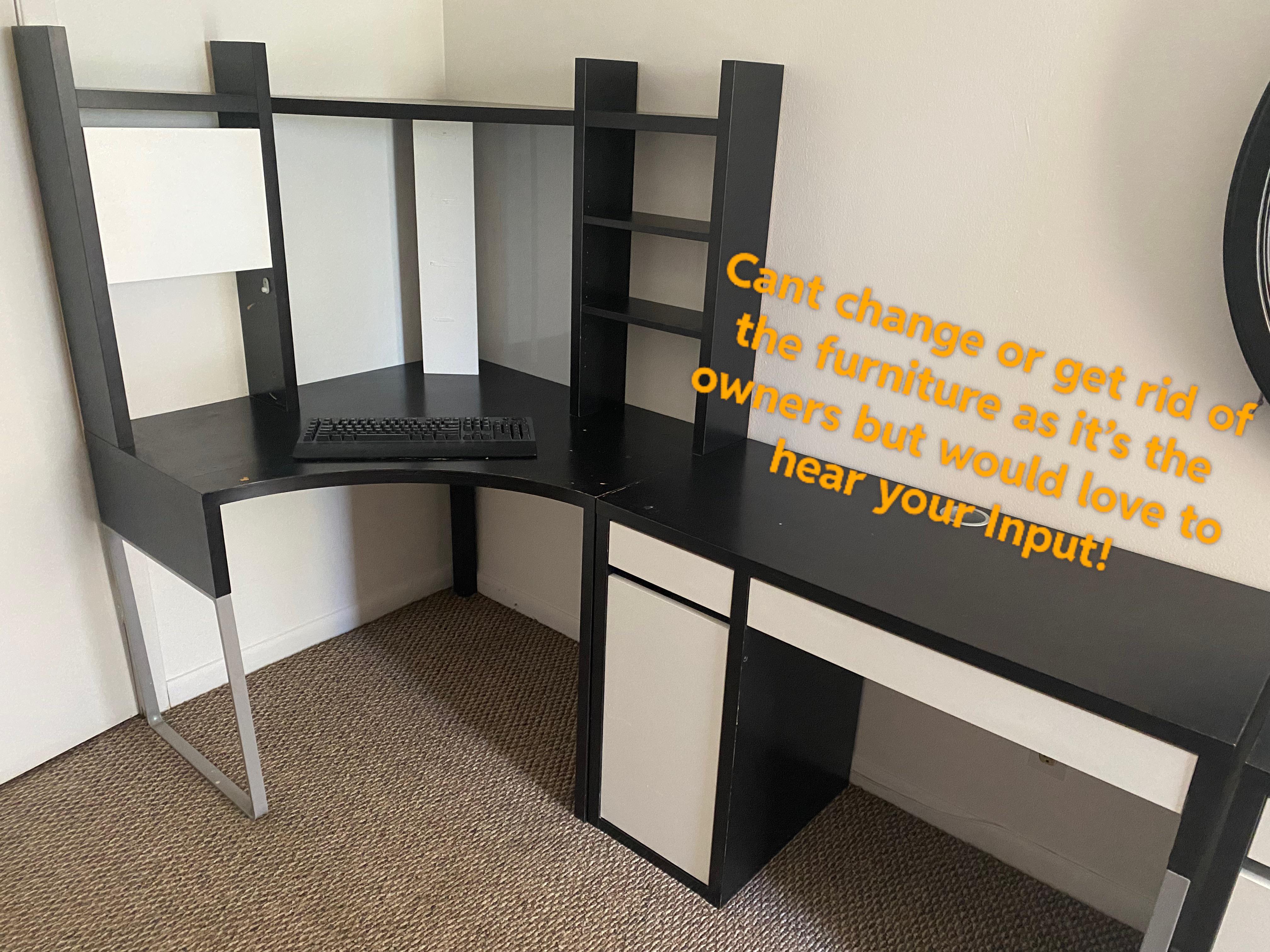
I’d put the second monitor on top, might give you neckache but can’t see any other way.
VanDuck0205
Verticality!
ProLegendHunter
would put pc under desk on the right and use the rectangular side for the monitors because of space and you can manage your cables thru that hole so it doesn’t get too messy
CuboRoto
Personally, I wouldn’t use the corner space. I would use the right side of the desk for more space and a less cramped feeling. Could use the other side for a small TV and console gaming or something.
SciFiGunslinger
u could do a sideways monitor depending on the size or stack them ontop of each other like u could have a sideways monitor on one side and a regular one in the corner
dekianman
I’d say sit at the right side of the desk. Place your main monitor directly in front of you and place your second monitor diagonally on your left touching the bezel of your other monitor.
That’s how my monitors are positioned at least and looks possible for you
IntelligentCamp2480
I think that you would have to stack the monitors vertically and the rest would be self explanatory
prncssbbygrl
I used to have this exact Ikea set and I used it as a vanity. Not a helpful comment, just a comment.
Candid-Patient-6841
Honestly I would see how the shelves are connected and just remove them. Unless the people you rent from also live there they won’t know. Just save the hardware. It’s a shame that is a nice desk if it didn’t have those shelves. It limits the size of the screen in the first place unless you put it on the right side.
Also side note. I wouldn’t put your Pc on the carpet.
You could try this way
🖥️
🖥️
SilverSp0rk
maybe a dual monitor mount that you can clamp to the desk. you could get it setup in a way potentially that could bring it down to more of an eye level that less straining on the neck.
[https://www.amazon.com/Heavy-Duty-Adjustable-Computer-Monitors-EGCM1/dp/B082MLVXRR](https://www.amazon.com/Heavy-Duty-Adjustable-Computer-Monitors-EGCM1/dp/B082MLVXRR)
as an example.
OhSizzles
I’ve started to prefer stacking recently, so that’s the route I’d go.
Words_Are_Hrad
Can you not non destructively remove the top portion of the corner desk?
PcNewbieee
My knees hurt just looking at this. Look at those tight spaces lol
Practical-Cup9537
Usually those top halves of desks are easily removable. You could take it off and store it/use it in a closest or something
Paulenski
Table mounted stand? If not, you may want to use a different corner
wild454
Two vertical monitors
Redacted_Explative
Get a swivel monitor arm that you can clamp onto it. Suggest also looking into the Occulus Quest 2 for this as well! Don’t have much space myself, but thanks to my vr headset, and desktop mode, can move the screens to be a bit more convient!
That’s hilarious looks like it’s 30 years old . It’s got a place for your CRT.
TrollOnFire
Dual Ergotron arm thru the port hole on the desk is what I have done in the past with a setup like this.
GL Cheers
timotheusd313
Other option i see is a smaller, vertically oriented display left of the main.
Does anyone ever need two and only two matched monitors for gaming? The sweet spot would be the bezels.
ShredGuru
Get a dual arm desk clamp monitor mount and stick it on the right side, then stick your PC tower on the left so you aren’t banging into that crap on the left side when you want to adjust them.
Every-Ambassador9783
one in the middle and one there on the left as a vertical monitor then have the whole right side of the desk for extrea stuff or alternitavely use the whole right side of the desk for your set up then the left side for spare stuff
5DollarRevenantOF
I would put a monitor in the corner and in the the open and get a second keyboard and roll between the 2 and pretend I’m a ‘guy in the chair’
smudger510
If there is space to do so and the desks are not fixed together, switch the side of the right desk to the left. This will allow you to sit more centrally for a duel monitor set up and gives more options for monitor placement. The cupboard part of the desk also won’t be between the two desks making it more accessible when a chair is being used.
MysteryHisyory
Echoing others but I wouldn’t use the corner. Use the right side for your duel monitors, and you could use the corner for your PC and any gaming systems you might have, shelves in the same area could be used for games and any sort of knick knacks or books you might want to display. I think that could make it quite cozy actually.
Skullzi_TV
If you want double monitors, you can’t use that corner space, it is what it is. IMO double monitors are overrated.
stranger2107
Main monitor where your keyboard is and second monitor to the left, my desk is similar to the one you have. Jelly of the shelves
jepal357
Depends how big your monitors are and if they’re curved or not
mre16
Clamping style monitor arms would work well here!
super_nova_135
use the corner for something else, have a desk lamp and papers or something over there, dual monitors should go on a monitor arm on the long portion
Fit_Substance7067
I would use the longer space for my gaming monitor and put the second monitor where your keyboard is angled…I’d use a bigger monitor/T.V. for your second one as well…
I use a t.v. and a monitor for my setup l…YouTube, social media and movies go on the t.v. and games on the monitor…I see little reason for dual otherwise
Too bad you can’t take those shelves off
ComprehensivePay2215
UPDATE: After LOTS of comments (Thanks everyone!) The biggest and best two ideas were to either unscrew the top setup and put it in the corner or don’t put it in the corner and use the rectangular table on the left. After talking with some friends and my landlord it’s probably smarter not to try and mess around with something like the furniture as something may go wrong and I wouldn’t want to deal with that. For now I’m gonna try and use the rectangle side to set up my two monitors horizontally as to try it out and see if it works otherwise we’ll switch to horizontal with a arm. Thanks everyone and feel free to keep suggesting things! I’ll be updating when things move forward as well!
rioniscoool
Dual monitor on the right, left side would be for models or work stuff
Bonelessgummybear
I use to have that corner desk. Unscrew the top shelves and 2 monitors can fit
Woirol
I have both of these desks as well. We used to have the top part on the desk, but it didn’t work well with a dual monitor setup. We ended up removing the top and calling it a day.

38 Comments
To add on to this, I have a medium size pc that can fit most anywhere if need be!
I’d put the second monitor on top, might give you neckache but can’t see any other way.
Verticality!
would put pc under desk on the right and use the rectangular side for the monitors because of space and you can manage your cables thru that hole so it doesn’t get too messy
Personally, I wouldn’t use the corner space. I would use the right side of the desk for more space and a less cramped feeling. Could use the other side for a small TV and console gaming or something.
u could do a sideways monitor depending on the size or stack them ontop of each other like u could have a sideways monitor on one side and a regular one in the corner
I’d say sit at the right side of the desk. Place your main monitor directly in front of you and place your second monitor diagonally on your left touching the bezel of your other monitor.
That’s how my monitors are positioned at least and looks possible for you
I think that you would have to stack the monitors vertically and the rest would be self explanatory
I used to have this exact Ikea set and I used it as a vanity. Not a helpful comment, just a comment.
Honestly I would see how the shelves are connected and just remove them. Unless the people you rent from also live there they won’t know. Just save the hardware. It’s a shame that is a nice desk if it didn’t have those shelves. It limits the size of the screen in the first place unless you put it on the right side.
Also side note. I wouldn’t put your Pc on the carpet.
You could try this way
🖥️
🖥️
maybe a dual monitor mount that you can clamp to the desk. you could get it setup in a way potentially that could bring it down to more of an eye level that less straining on the neck.
[https://www.amazon.com/Heavy-Duty-Adjustable-Computer-Monitors-EGCM1/dp/B082MLVXRR](https://www.amazon.com/Heavy-Duty-Adjustable-Computer-Monitors-EGCM1/dp/B082MLVXRR)
as an example.
I’ve started to prefer stacking recently, so that’s the route I’d go.
Can you not non destructively remove the top portion of the corner desk?
My knees hurt just looking at this. Look at those tight spaces lol
Usually those top halves of desks are easily removable. You could take it off and store it/use it in a closest or something
Table mounted stand? If not, you may want to use a different corner
Two vertical monitors
Get a swivel monitor arm that you can clamp onto it. Suggest also looking into the Occulus Quest 2 for this as well! Don’t have much space myself, but thanks to my vr headset, and desktop mode, can move the screens to be a bit more convient!
Link below is for something like what I was suggesting:
https://www.amazon.com/Dual-Monitor-Stand-Articulating-Adjustable/dp/B07JKWH97B/ref=sr_1_16?crid=2XUE1WPZSWVOA&keywords=multi+monitor+mount&qid=1674153669&s=electronics&sprefix=multi+monitor+moun%2Celectronics%2C178&sr=1-16
apartment/extra storage space for landlord
That’s hilarious looks like it’s 30 years old . It’s got a place for your CRT.
Dual Ergotron arm thru the port hole on the desk is what I have done in the past with a setup like this.
GL Cheers
Other option i see is a smaller, vertically oriented display left of the main.
Does anyone ever need two and only two matched monitors for gaming? The sweet spot would be the bezels.
Get a dual arm desk clamp monitor mount and stick it on the right side, then stick your PC tower on the left so you aren’t banging into that crap on the left side when you want to adjust them.
one in the middle and one there on the left as a vertical monitor then have the whole right side of the desk for extrea stuff or alternitavely use the whole right side of the desk for your set up then the left side for spare stuff
I would put a monitor in the corner and in the the open and get a second keyboard and roll between the 2 and pretend I’m a ‘guy in the chair’
If there is space to do so and the desks are not fixed together, switch the side of the right desk to the left. This will allow you to sit more centrally for a duel monitor set up and gives more options for monitor placement. The cupboard part of the desk also won’t be between the two desks making it more accessible when a chair is being used.
Echoing others but I wouldn’t use the corner. Use the right side for your duel monitors, and you could use the corner for your PC and any gaming systems you might have, shelves in the same area could be used for games and any sort of knick knacks or books you might want to display. I think that could make it quite cozy actually.
If you want double monitors, you can’t use that corner space, it is what it is. IMO double monitors are overrated.
Main monitor where your keyboard is and second monitor to the left, my desk is similar to the one you have. Jelly of the shelves
Depends how big your monitors are and if they’re curved or not
Clamping style monitor arms would work well here!
use the corner for something else, have a desk lamp and papers or something over there, dual monitors should go on a monitor arm on the long portion
I would use the longer space for my gaming monitor and put the second monitor where your keyboard is angled…I’d use a bigger monitor/T.V. for your second one as well…
I use a t.v. and a monitor for my setup l…YouTube, social media and movies go on the t.v. and games on the monitor…I see little reason for dual otherwise
Too bad you can’t take those shelves off
UPDATE: After LOTS of comments (Thanks everyone!) The biggest and best two ideas were to either unscrew the top setup and put it in the corner or don’t put it in the corner and use the rectangular table on the left. After talking with some friends and my landlord it’s probably smarter not to try and mess around with something like the furniture as something may go wrong and I wouldn’t want to deal with that. For now I’m gonna try and use the rectangle side to set up my two monitors horizontally as to try it out and see if it works otherwise we’ll switch to horizontal with a arm. Thanks everyone and feel free to keep suggesting things! I’ll be updating when things move forward as well!
Dual monitor on the right, left side would be for models or work stuff
I use to have that corner desk. Unscrew the top shelves and 2 monitors can fit
I have both of these desks as well. We used to have the top part on the desk, but it didn’t work well with a dual monitor setup. We ended up removing the top and calling it a day.
3 vertical monitors