This thing will not turn on. I don’t know what I’m missing. Please don’t comment unless it’s useful information.

This thing will not turn on. I don’t know what I’m missing. Please don’t comment unless it’s useful information.
18 Comments
Hello Material-Map-5733, and thank you for your submission to Gaming PC! If you are new please check out our rules over at the wiki [here](https://www.reddit.com/r/gamingpc/wiki/rules)!
We have recently added the useful feature of Title Flair! You can set this manually by clicking Flair under your post once you have submitted your post, but if you missed it in the rules there is a much better way that will automatically flair your post!
To do this simply add what your post is about in brackets before your title. For example for a Build Log you can type [Build Log] before your post so that it looks like this; [Build Log]My new awesome build!, and the bot will automatically set your flair to Build Log! This works for Build Log, Build Showcase, News, Hardware News, Hardware Release, Discussion, and Miscellaneous!
Also remember that this is a place for discussing and sharing our love of Gaming Computers! This is NOT the place for help building or determining what parts you should buy, that is better suited for /r/buildapc. Troubleshooting questions should be directed to /r/techsupport. Thank you again!
*I am a bot, and this action was performed automatically. Please [contact the moderators of this subreddit](/message/compose/?to=/r/gamingpc) if you have any questions or concerns.*
Can you give us some background? Has it ever worked? Did you just build this? What happened what it stopped working? Etc.
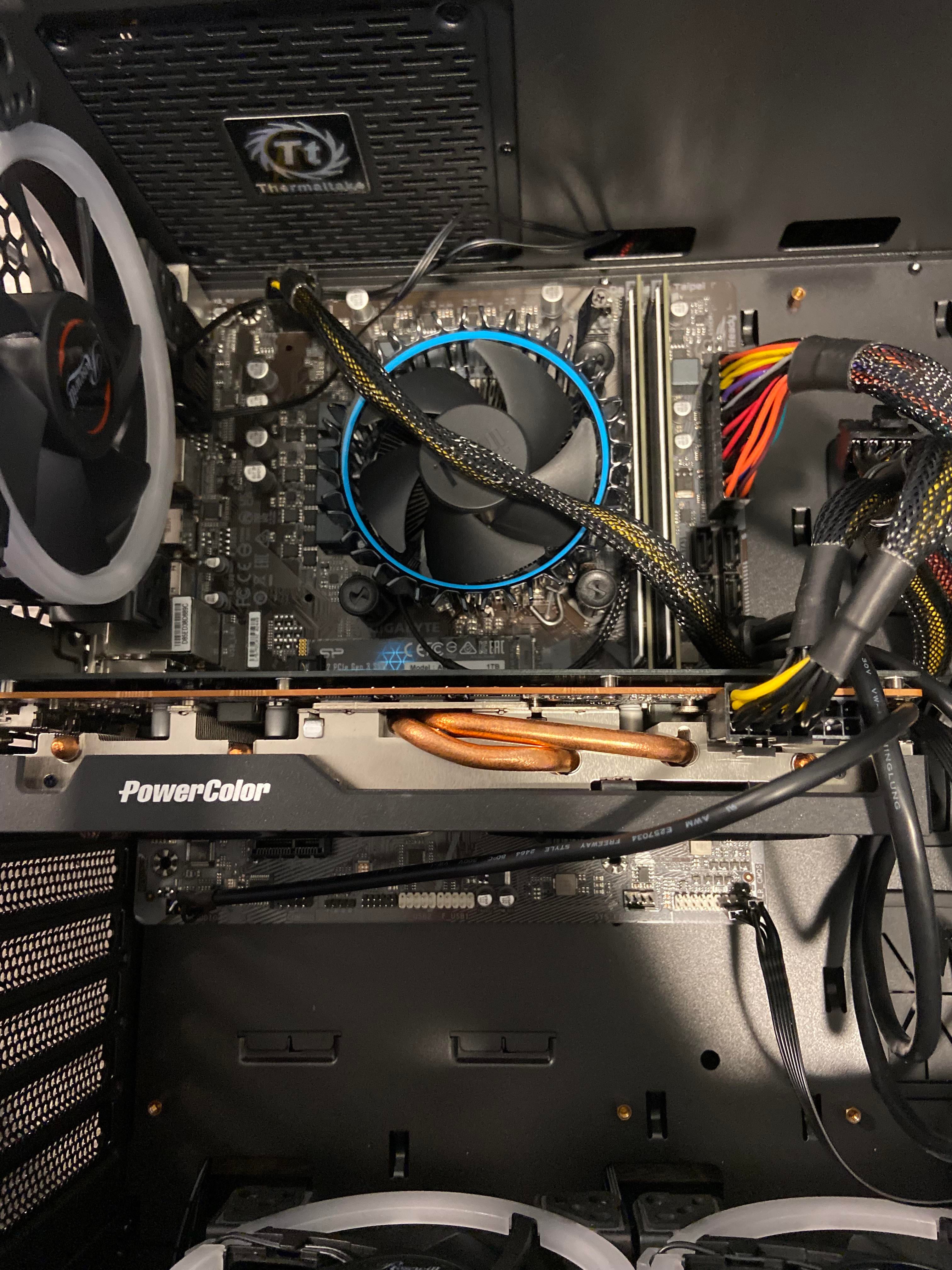
Looks like you are missing a connection on the GPU. Also, I can’t quite tell from the picture but you may have your case connections (power button) plugged into the wrong spot. Would need to know which motherboard to further inspect.
Your front panel IO pins are not properly connected to the mobo. Check mobo manual. Power switch should be the two top right pins but pls double check.
useful information.
Your front panel IO is improperly connected to the motherboard headers, see the motherboard book for the pin layout, also you won’t get a video out from that GPU, you haven’t connected the second power cable, at this angle I can’t tell if it’s a 6pin or a 6x2pin but that needs plugging in
Edit: you’ll also find diagnosing and plugging things in far easier if you route cables around back panels of the case and the provided channels
GPU 1x 8pin missing.
Btw, did you swap your CPU fan with case fan? lmao
Does it call for 8 or 16-pin connection?
So if you look at the bottom right part of the board, the flux capacitor isn’t wound up all the way. Ya can’t get no juice without the flux capacitor being set up properly son
When I hit power the fan moves for a second and then nothing happens
Maybe find the manual for that motherboard and check if you connected everything in the right spot.
When I have that issue I disconnect everything and reseat like start from the beginning take the ram out, GPU out and my board allows you to touch 2 pins with a screwdriver and it resets the mb read the manual thoroughly sometimes it’s the little corrections that makes a big difference
Yo I’m looking at ya mb and all u need to do is read the manual from beginning to end it’s not a race homie take ya time double check before you give it power… Troubleshooting is the fun part my guy
Don’t eat yellow snow
Not seeing full specs listed. That would help a lot, everything including models and numbers.
useless information
What specs
🤔 When u switch on does your fans spin at all?even for a split second? If not then there is a power issue… Most probably your front io pins are incorrectly put… And it looks like it is…can you take a closer Pic of your io pins and also provide your motherboard specs… And psu specs… Try taking out your gpu and see if it turns on… Even with new parts you can have a doa psu or motherboard… So you gona have to determine if either one is dead… With your psu use the paperclip trick to check…