

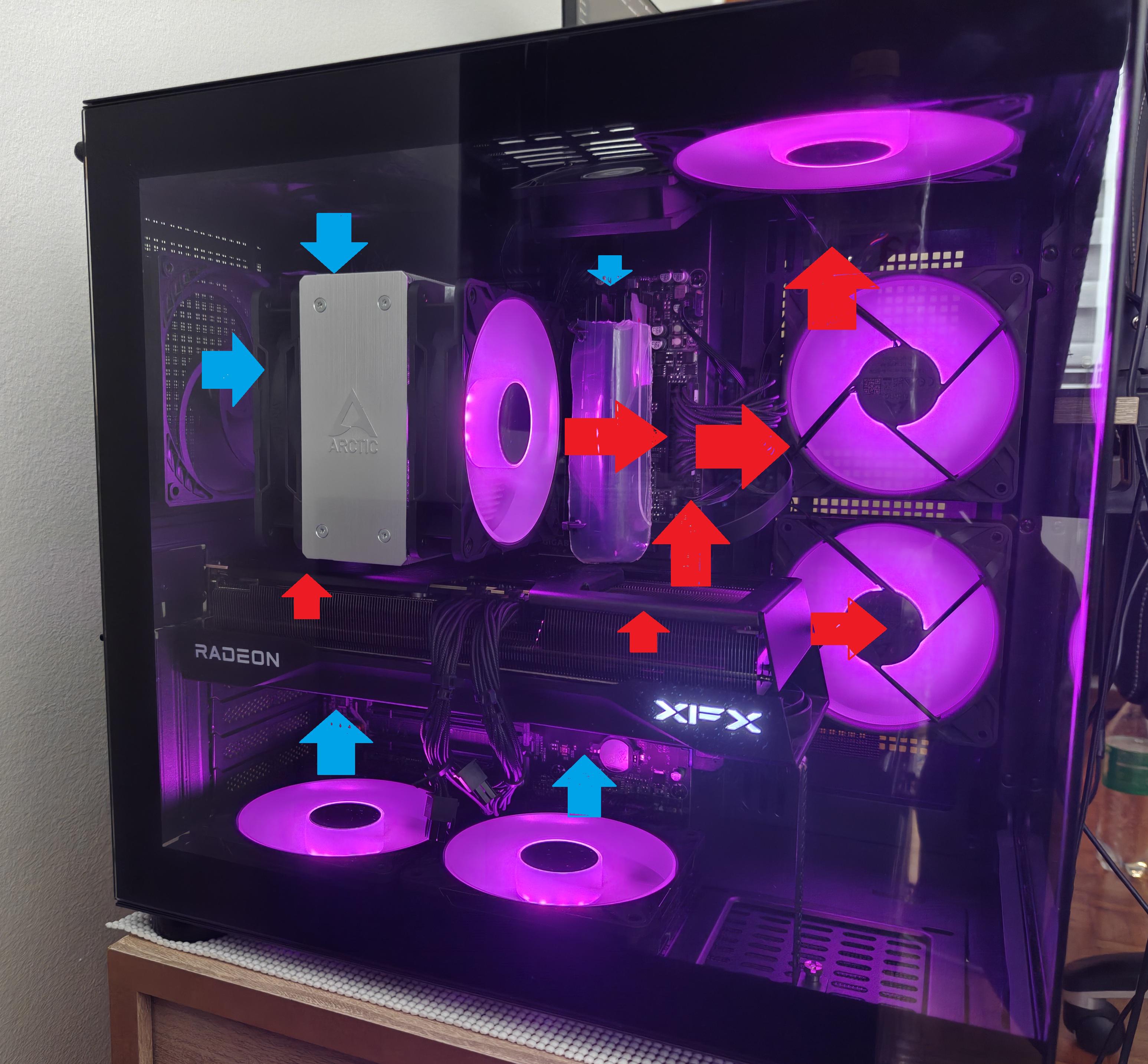
I recently switched to AM5 with a 7800X3D, RX 9070 XT, and 32GB of Viper Venom DDR5. The oldest part left from my previous PC was the case, which was about six years old.
I stumbled upon a pretty nice dual-chamber Cougar case and decided to give it a shot. I'm honestly really happy with it, but the airflow just wasn't there.
My old case was a standard tower with three Arctic P12 Pro fans at the front and two exhaust fans. I'd also removed pretty much every unnecessary metal panel at the back, so it was basically blowing fresh air over everything. It was about as much airflow as you could get.
The stock fans in the new case were pretty weak, and everything was running hotter, so I replaced them with six Arctic P12 ARGB reverse fans and one P14 ARGB. Initially, I went with a conventional airflow setup: intake from the side and bottom, exhaust out the back.
However, when I ran FurMark and Cinebench simultaneously, my CPU would almost immediately hit its 89°C thermal limit, and the RAM was getting pretty hot too.
So I experimented with reversing the airflow. Now the CPU gets fresh air directly, as does the GPU, while the hot air exhausts out the front. Even after running FurMark for 10–20 minutes before starting Cinebench, the CPU doesn't go above 84°C.
Anyway, I love overclocking, so I've been experimenting quite a bit over the past few days. Since DDR5 benefits from lower temperatures when pushing tREFI and tRFC, I've been trying to improve RAM cooling as much as possible.
Unfortunately, this case just doesn't seem to match my old one in that regard, even with a dedicated RAM fan. In the old case, RAM temperatures wouldn't exceed 50°C with active cooling. In the new one, they can reach 63°C or more when FurMark is running alongside a memory stress test, regardless of how I configure the fans.
I even made a temporary heat shield out of a plastic food container rated for over 100°C, hoping to protect the RAM from hot air coming off the CPU and GPU. It helped keeping it around 60C, but nothing dramatic.
At this point, I'm starting to think I'd have to remove the RAM heatspreaders to make a meaningful difference, since the Viper Venom modules use foam-like thermal material rather than proper thermal pads. But I'm hesitant to do that, given how expensive RAM is and the risk of damaging the modules.
Still, I think the reversed airflow setup performs better overall, and I actually like how it looks.
What do you guys think? Any suggestions for improving it further?