
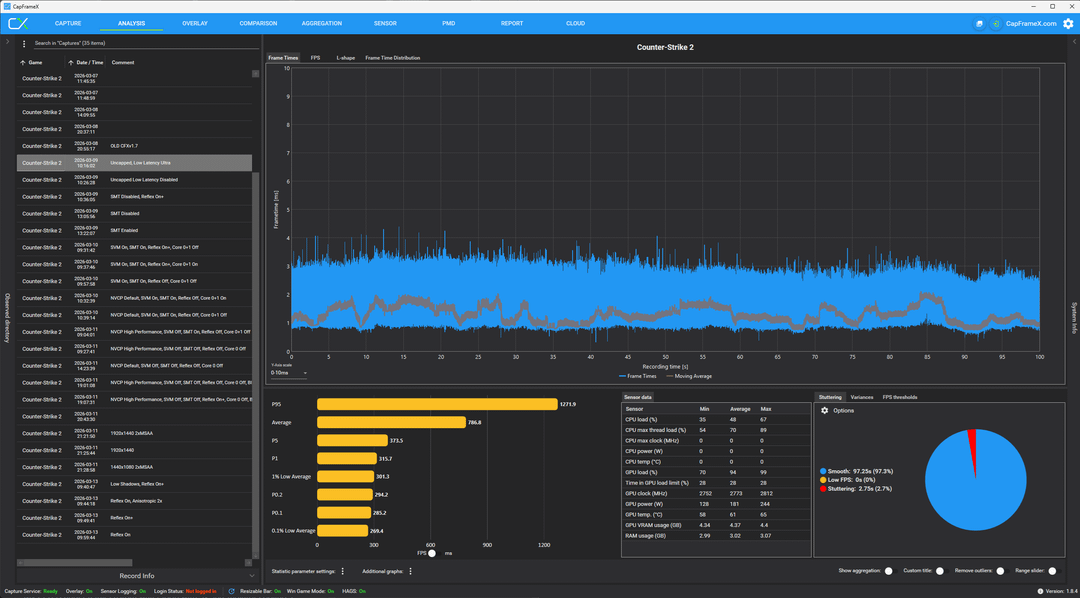
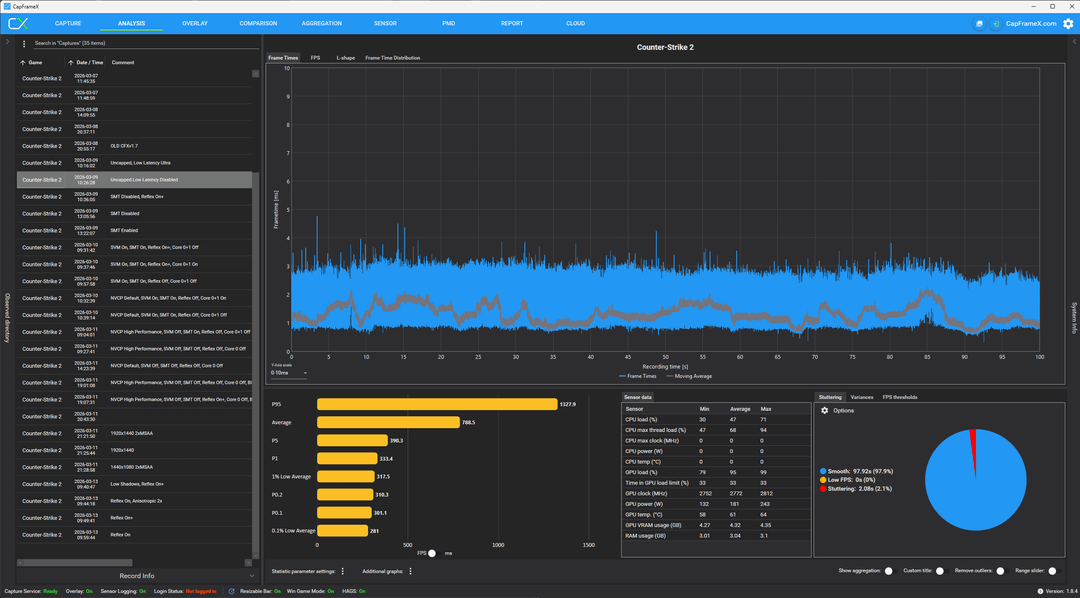
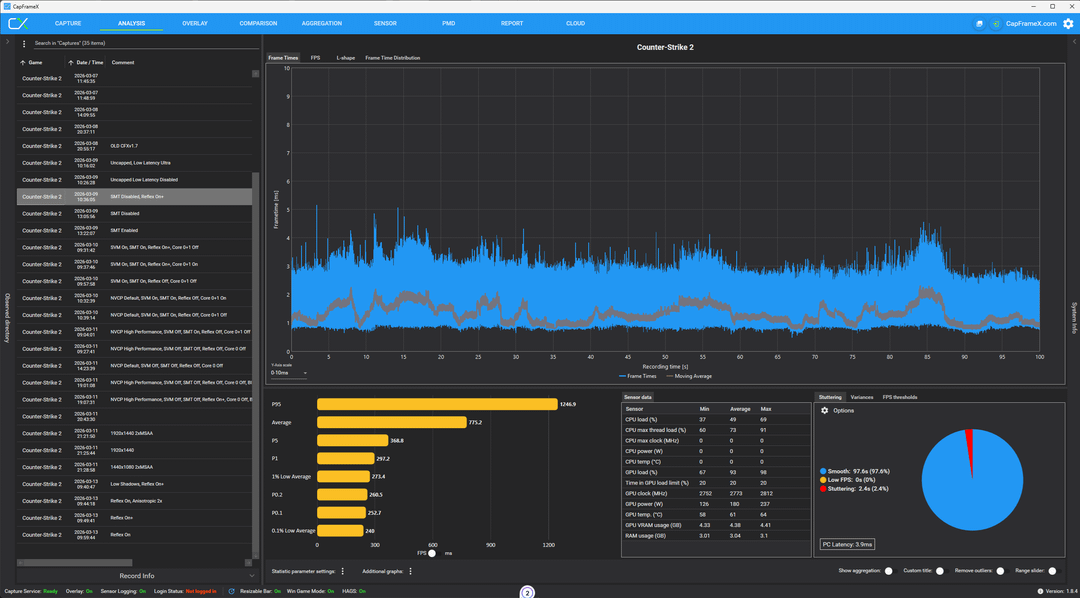
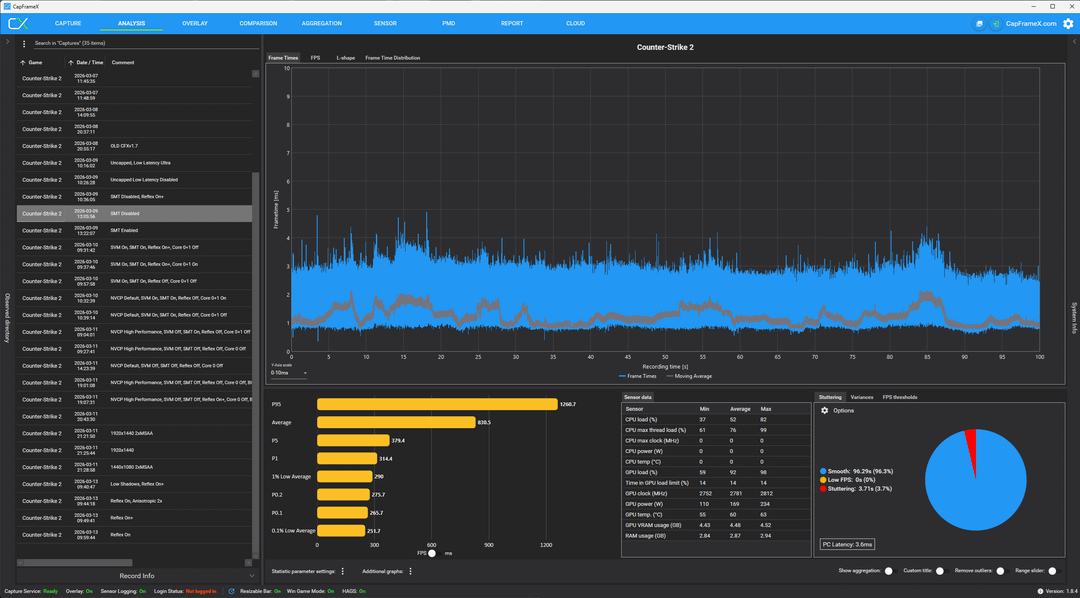
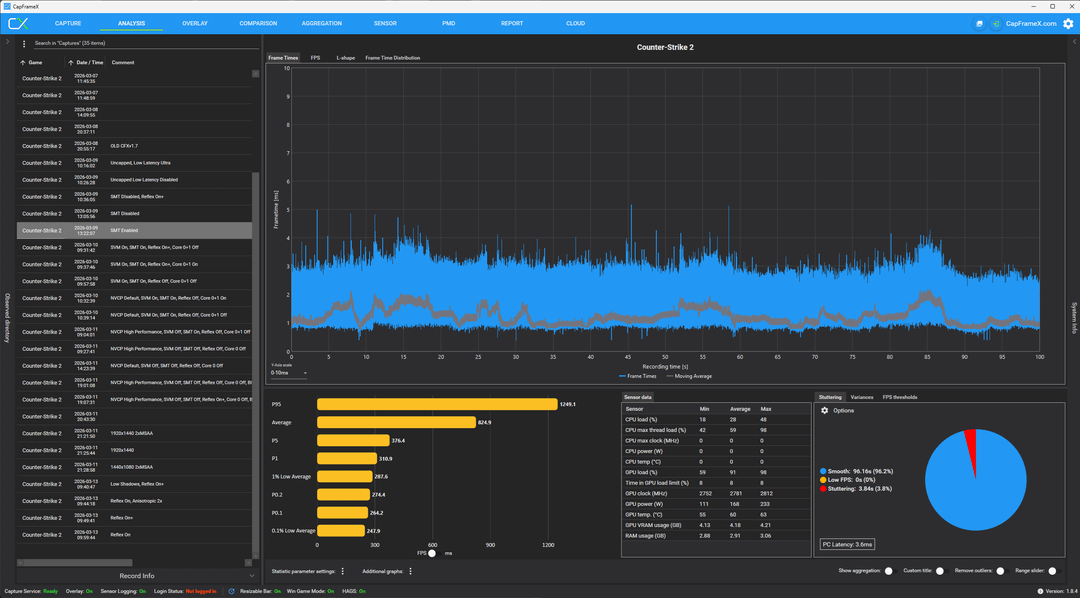
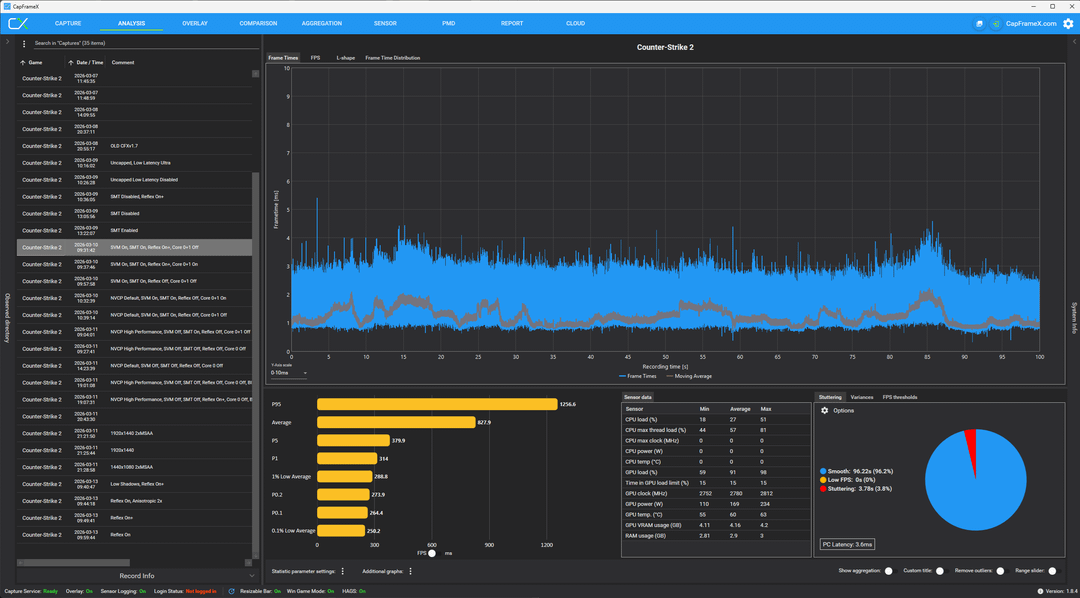
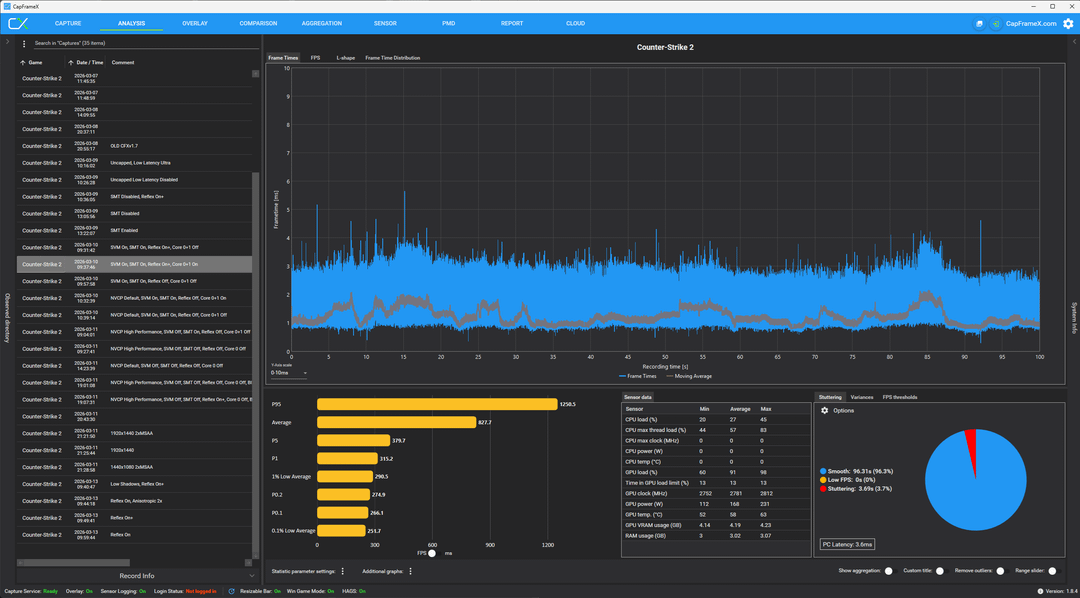
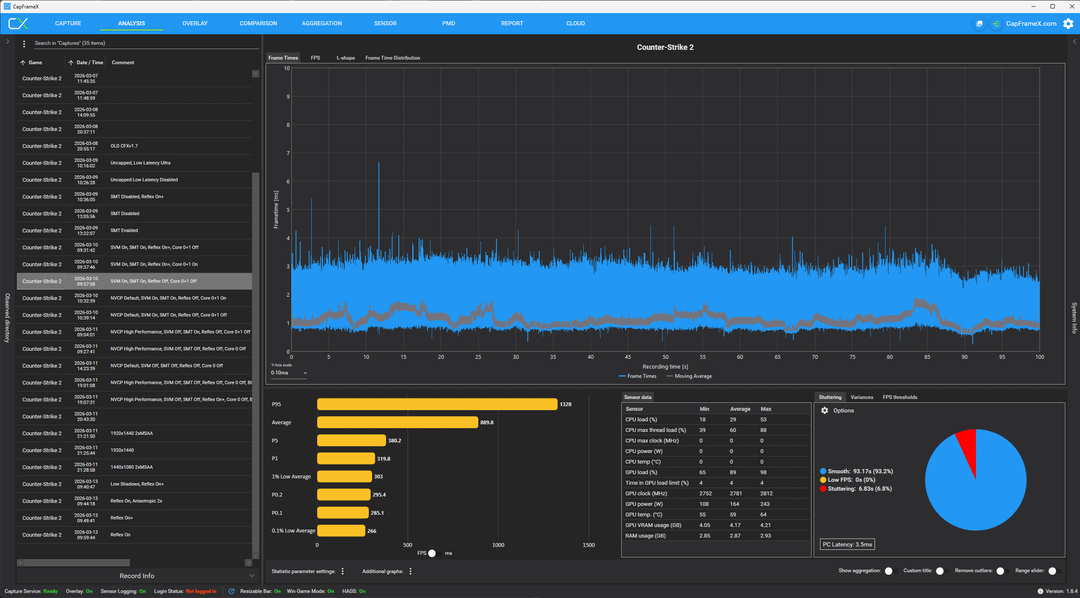
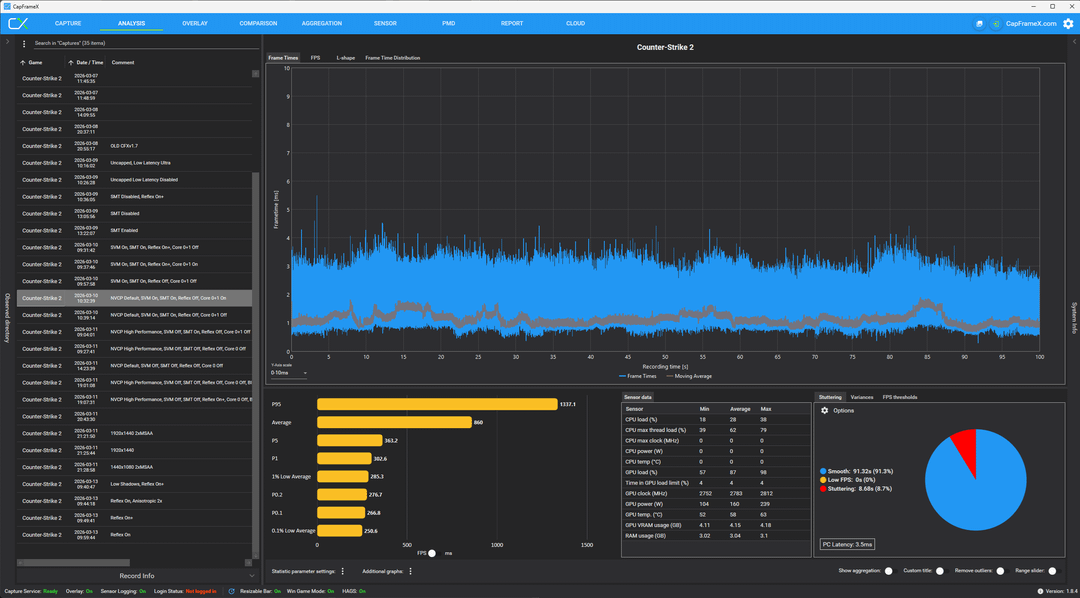
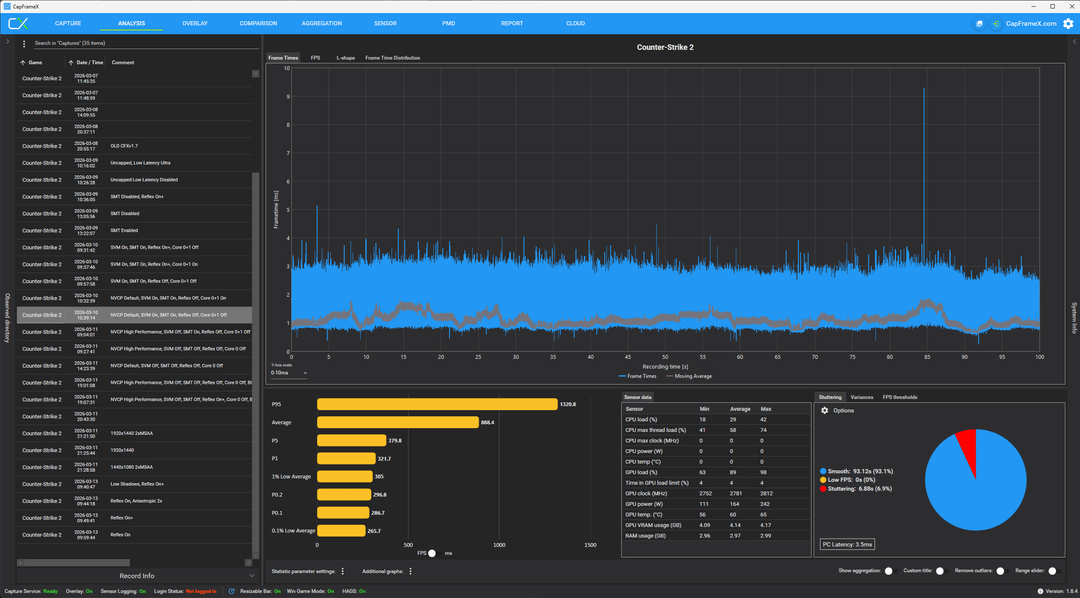
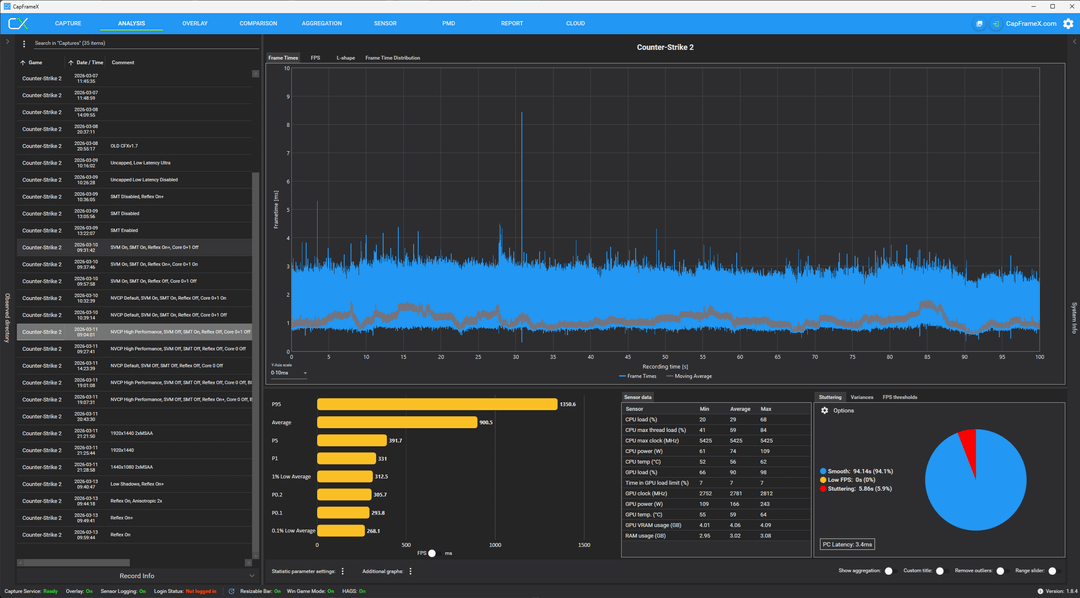
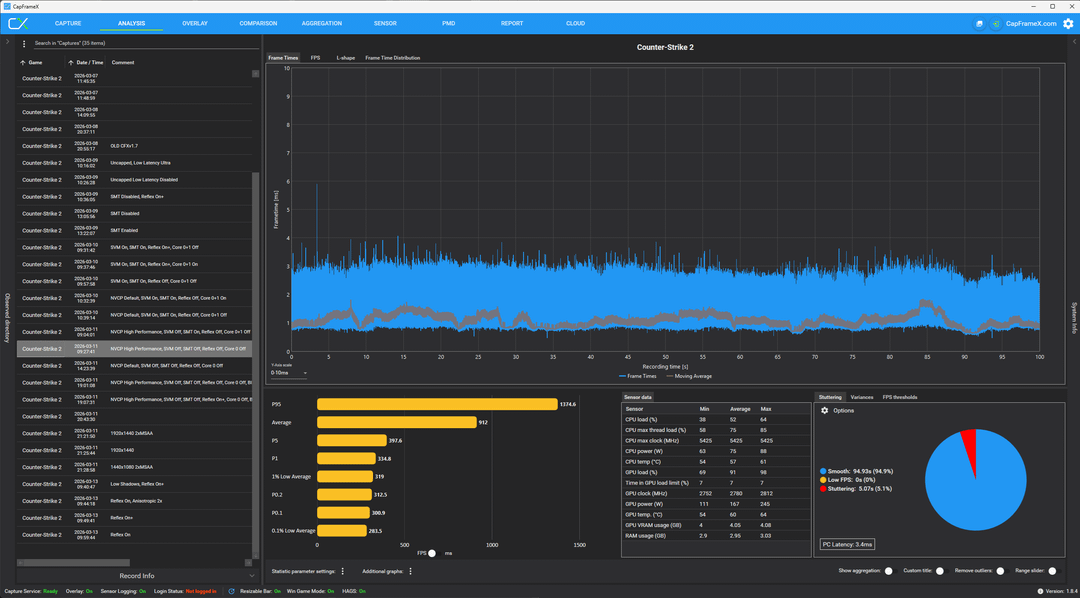
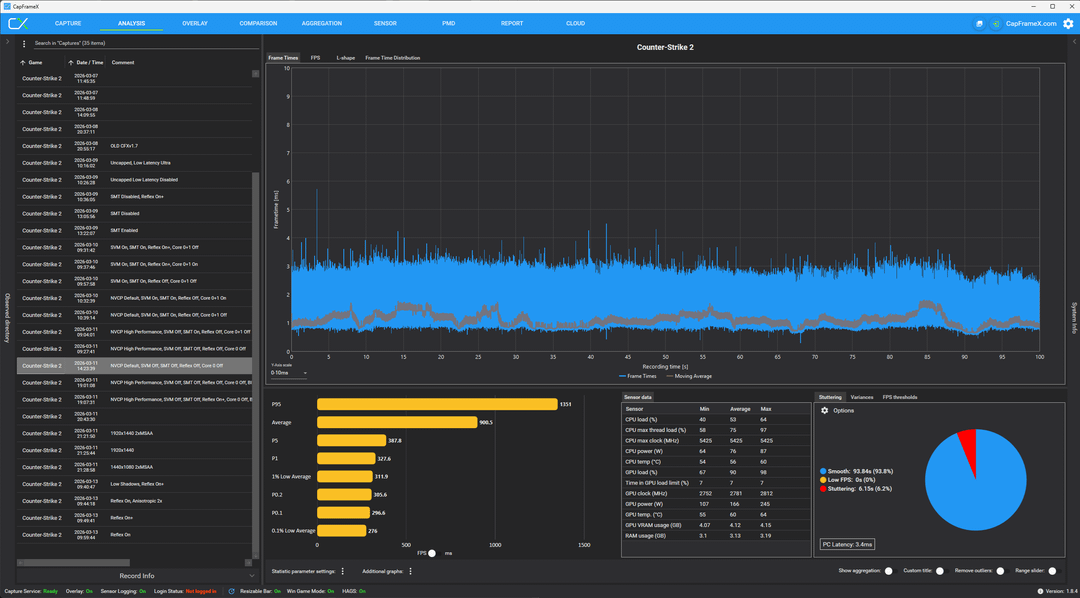
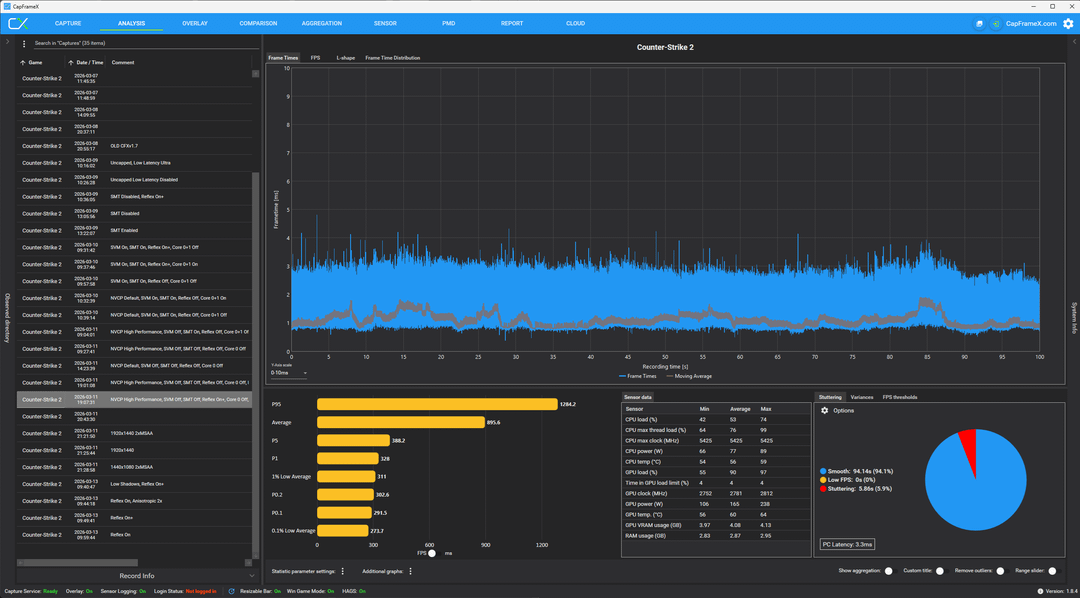
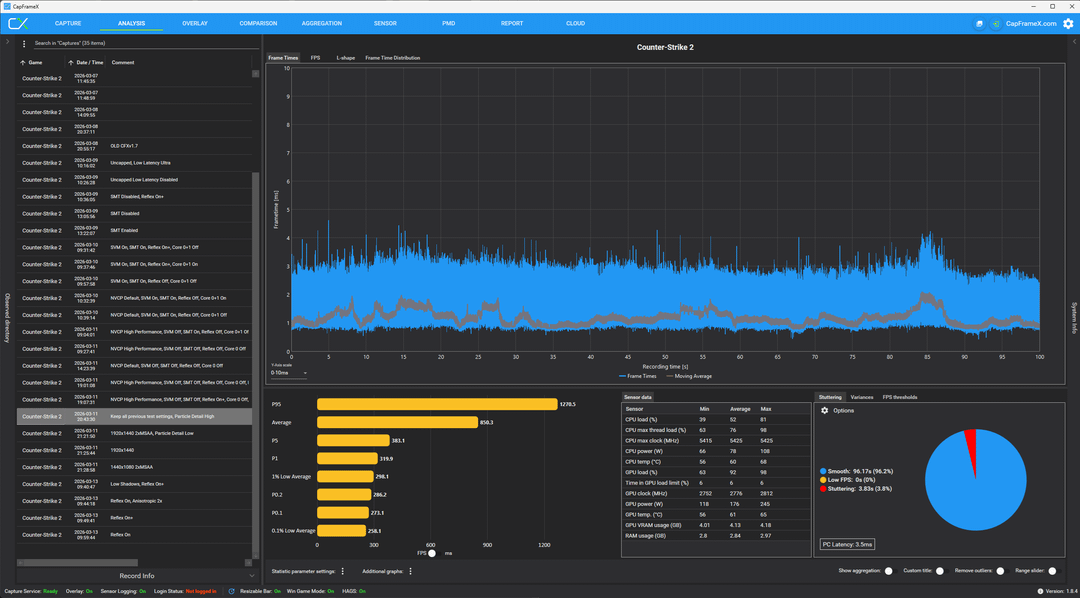
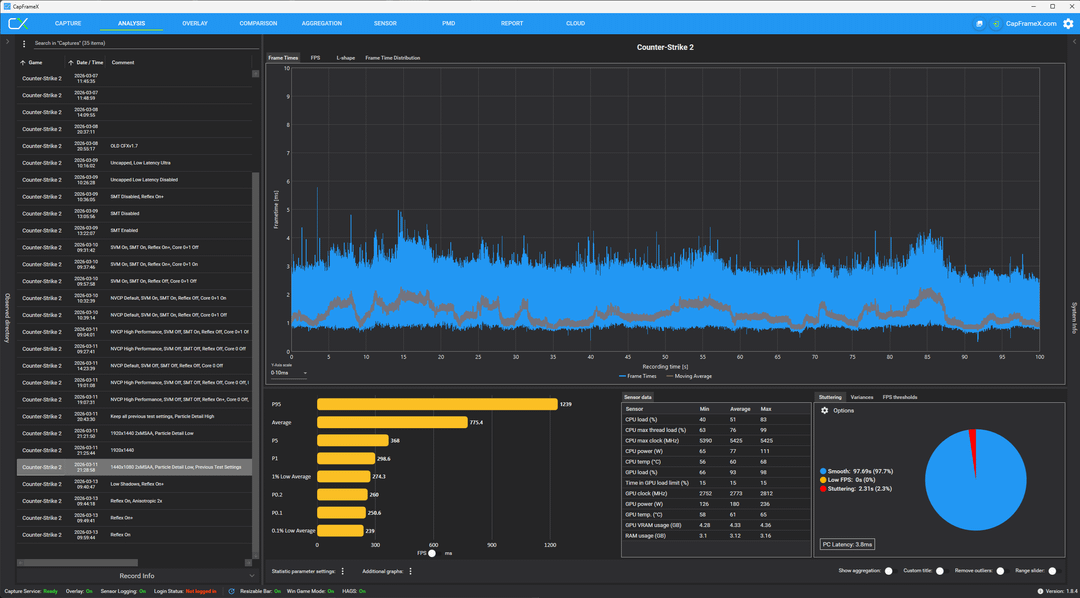
Firstly, I want to thank the users here who pointed out that my CapFrameX (CFX) software was bugged because it was calculating frame times incorrectly. I'm not technically savvy enough to know exactly what was happening under the hood, but since SOMETHING was being measured much faster with some of these settings than others, I wanted to retest them with the updated software. Using those considerations, I set out to run the tests again.
TL;DR: The in-game settings will do FAR more for your FPS than any optimization guide. If you need low-latency performance, turn everything down to minimum, uncap the FPS, and use Reflex. If you need FPS, don't use Reflex. The effort to squeeze another 5% of performance will be great, and these settings do not work for everyone or every system; some actually REDUCE performance for those with medium- or low-end systems. ***If you are going through the trouble of optimizing your Game/Windows/NVCP, go through the effort of running a benchmark test for each setting to confirm it's actually giving you a performance boost***
**Some settings that were used and not tested:**
Windows Visual Effects: Adjust for Best Performance (+Smooth Edges of Screen Fonts)
BIOS iGPU: Disabled
Win32PrioritySeparation – 32 Decimal
MouseDataQueueSize – Mine is set to 20
KeyboardDataQueueSize – Mine is set to 20
Windows Power Plan – I use High Performance
I found these settings might offer minor benefits with the old CFX, but I did not retest with the new one. Most of these tests were in the margin of error anyway.
**Hardware used in my system:**
CPU: 9800X3D – OC'd +200MHz, Core Optimizer set per core between -10 and -15 (I have it set +5 higher than needed, ensuring stability at the cost of heat). Infinity fabric at 2200MHz.
GPU: 5080 – No OC, as it doesn't help CS2 much.
RAM: 16GBx2 6000MHz CL 26 – timings have been slightly tightened in the BIOS for lower latency, probably only helps increase the 1% Lows by <1%.
**In-Game Test Settings (unless otherwise specified in the data):**
Fullscreen, 1280×960 (stretched), 2xMSAA, 480Hz
Boost Player Contrast: Enabled
VSYNC: Disabled
Reflex: Variable with data
Global Shadows: High
Dynamic Shadows: All
Model/Texture Detail: Low
Texture Filtering: Anisotropic 16x
Shader Detail: Low
Particle Detail: Low
Ambient Occlusion: Low
High Dynamic Range: Quality
Fidelity FX Super Resolution: Disabled
The images are ordered chronologically. As I made changes, I would run another test. Once a setting was enabled for one test, it remained enabled for all subsequent tests unless otherwise specified. This reduced the number of notes I had to take. I do want to apologize in advance for some images having multiple settings being changed between images. I can only post 20 images and cut out some tests that seemed to offer no performance difference. I ran several tests and posted the best results for each setting. Posting the best results rather than the average makes very minor performance differences stand out more clearly. If you use an average, and the difference is only 2-3FPS when pushing 300+FPS, then it would fall in the margin of error. However, running a test 3 times and using the highest result, which is 2-3FPS higher than the highest result of the previous setting, might imply something very small has improved. Especially if you ran a test 10 or more times for each setting, and one setting never reached the best test result of another setting. I did not run that many tests, but when looking for these extremely minor performance differences, it would be beneficial for the data. So if you are looking to run these tests yourself, that's something you could improve on.
**Explanation of data:**
Image 1-5: I found that uncapping the FPS yielded better 1% lows than capping it with the new version of CapFrameX (CFX), so I left it uncapped. I used the Low Latency setting in NVCP set to Ultra for this test. Once I turned on Reflex, I tested SMT On and Off. SMT Off yielded the best performance.
Image 6-7: Disabling Core 0+1 (with SMT) or Core 0 (without SMT) didn't seem to change the performance with Reflex On +Boost. However, if you have a less powerful CPU with fewer than 8 physical cores, disabling the first core might reduce your performance. You should test your own system.
Image 8-10: With Reflex disabled, also disabling Core 0 (no SMT) or Core 0+1 (yes SMT) seemed to improve performance. You can ignore the NVCP default change; I will test it specifically later. If anything, it worsened performance, which means the cores being disabled helped even more than it looks. Disable your first physical core (if you can spare it) in CS2 for best performance.
Image 11: NVCP Power setting set to High Performance and SVM Disabled. Good performance gains. SVM might not be as big a deal as it seems, since the NVCP High Performance setting slightly improved performance.
Image 12: Disabled SMT. This seemed to reduce stutters slightly and helped 0.1% lows the most. As observed in the first few tests, disabling SMT improves performance on high-end systems.
Image 13: Turning off NVCP High Performance Power Management reduced the performance. Leave Power Management Mode at Prefer Maximum Performance. If you compare to image 11, you can see better performance, confirming that disabling SVM also helps performance for high-end machines.
Image 14: Now, turning Reflex back on doesn't seem to affect FPS as much. However, it still improves system latency by 0.1ms. There is a significant performance degradation at the point in the test where the Frag Grenade and Shotguns shoot through a Smoke Grenade around 85s.
Image 15: I read that setting Particle Detail to High makes it easier to see through Molotovs. I personally don't notice it being much easier, and as you can see from this test, there is a clear performance cost for the change. I would still recommend leaving it off.
Image 16: I play at 1440×1080 with 2x MSAA. I wanted to see what performance I was sacrificing for the better resolution.
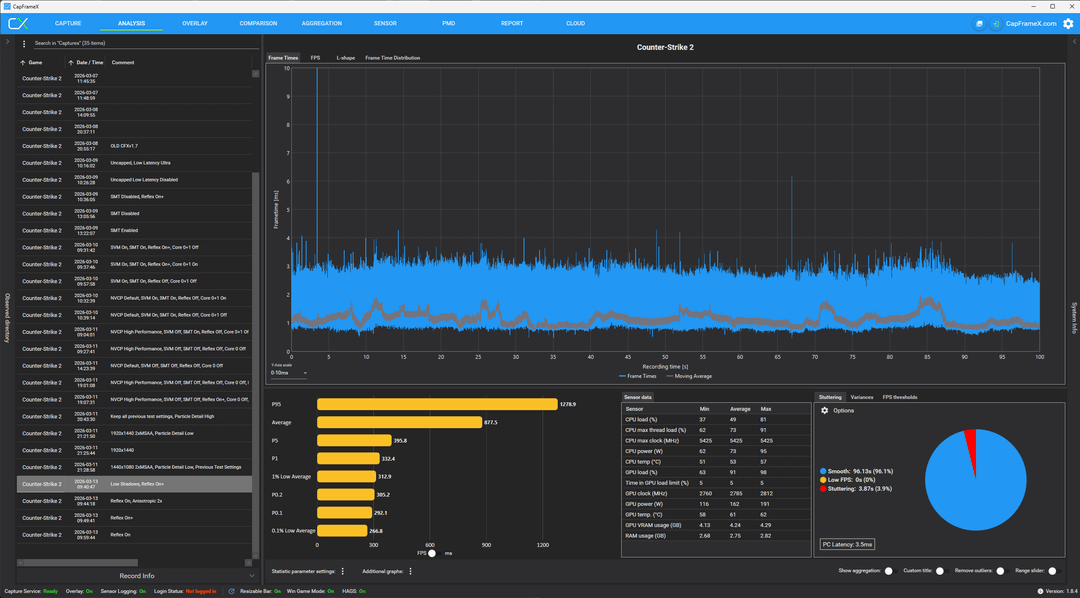
Image 17: During my testing and research these last few days, I found that the game had been updated so that you no longer needed High Global Shadows for the dynamic shadows to show up, and it no longer affects the shadow render distance. So I turned Global Shadows to Low to see the performance gains.
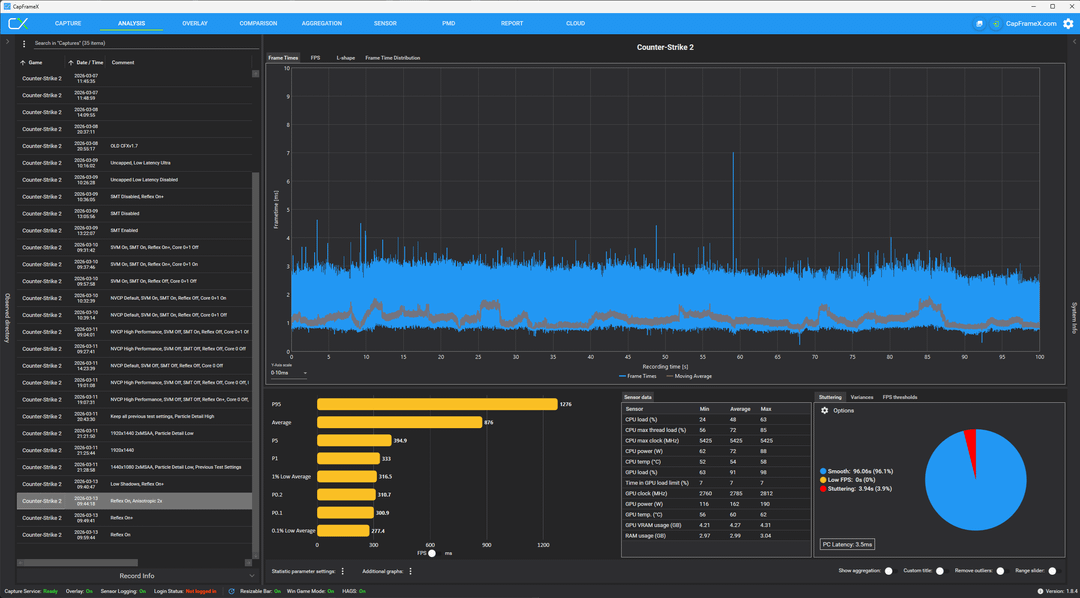
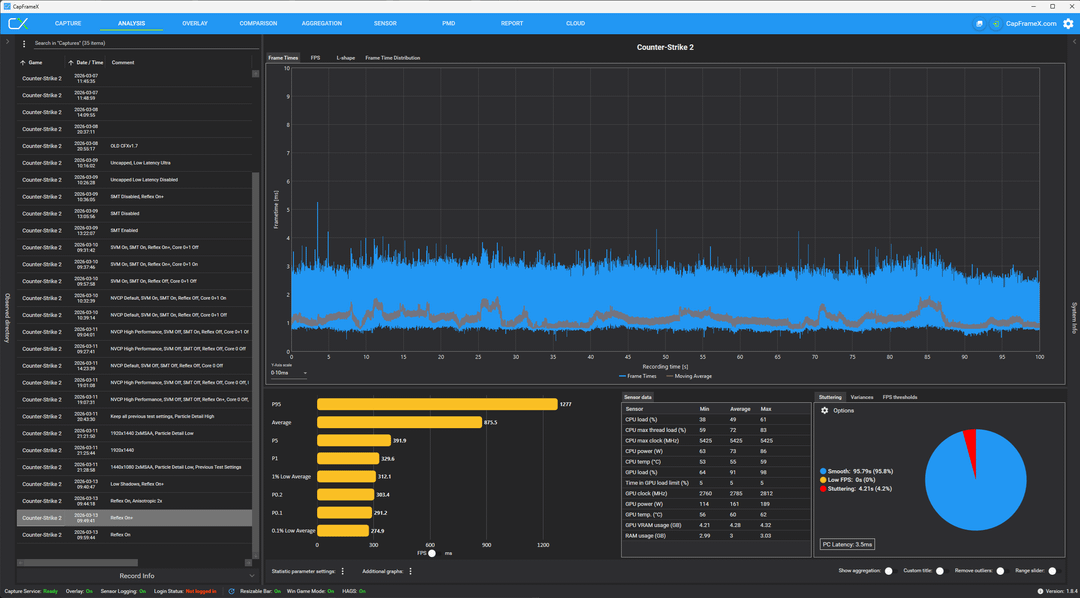
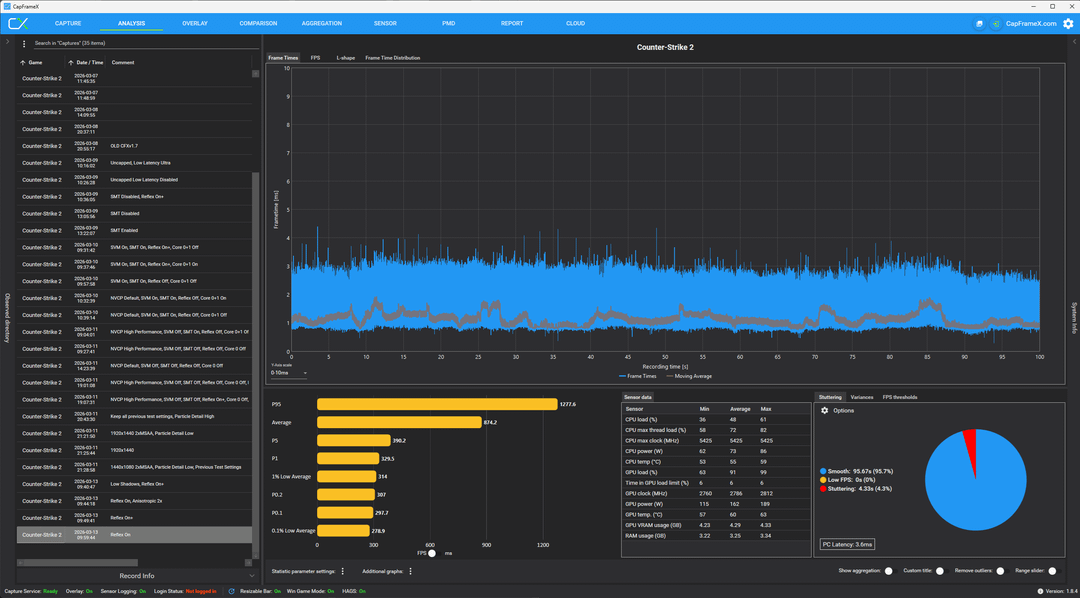
Image 18-20: With optimized settings, I wanted to test the difference between Reflex Enabled and Enabled +Boost. The bar graphs seem to favor Reflex Enabled. However, if you look at the frame-time data, there does seem to be some situations that favor one setting or the other. Overall, since situations in which one setting is definitely better than the other are rare, it is best to leave Enabled WITHOUT Boost, given the general improvement in 1% and 0.1% Lows. At worst, you are sacrificing <0.05ms of PC Latency, as I believe the 3.6ms of measured system latency in Image 20 is most likely due to rounding values ranging from ~3.44ms to ~3.46ms. In exchange, you get slightly better 1% and 0.1% lows. Additionally, it seems that switching from Anisotropic Filtering x16 to x2 might yield better performance in the 0.1% Lows, even on high-end systems. I don't have testing data for that specific setting. The visual acuity is minor, so if you're unsure, just set it to x2 and forget about it.
Finally, we are at the end.
**My Optimized BIOS and Windows Settings:**
Overclocked CPU and RAM (if possible)
SMT: Disabled
SVM: Disabled
iGPU: Disabled (no tests, but can reduce CPU heat)
Core 0(+1): Disabled for CS2 with Process Lasso
Windows Visual Effects: Adjust for Best Performance (+Smooth Edges of Screen Fonts)
Win32PrioritySeparation – 32 Decimal (Untested, might be no improvement at all or even performance degradation for mid- or low-end systems)
MouseDataQueueSize – Mine is set to 20 (Untested, might be no improvement at all or even performance degradation for mid- or low-end systems)
KeyboardDataQueueSize – Mine is set to 20 (Untested, might be no improvement at all or even performance degradation for mid- or low-end systems)
Windows Power Plan – I use High Performance
NVCP – Power Management Mode: Prefer Maximum Performance
**CS2 Optimized Settings:**
Fullscreen, 1440×1080(stretched), 2xMSAA, 480Hz
Boost Player Contrast: Enabled
VSYNC: Disabled
Reflex: Enabled
Global Shadows: Low
Dynamic Shadows: All
Model/Texture Detail: Low
Texture Filtering: Anisotropic 2x
Shader Detail: Low
Particle Detail: Low
Ambient Occlusion: Low
High Dynamic Range: Quality
Fidelity FX Super Resolution: Disabled