
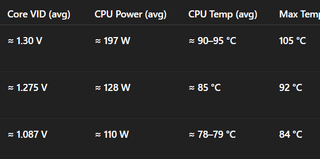
I thought to myself – 95°C average in Battlefield 6? Nope, that’s not okay.
So I started tweaking, step by step, trying to find out what still works with the new 2025 MSI BIOS (E7D25IMS.1M0).
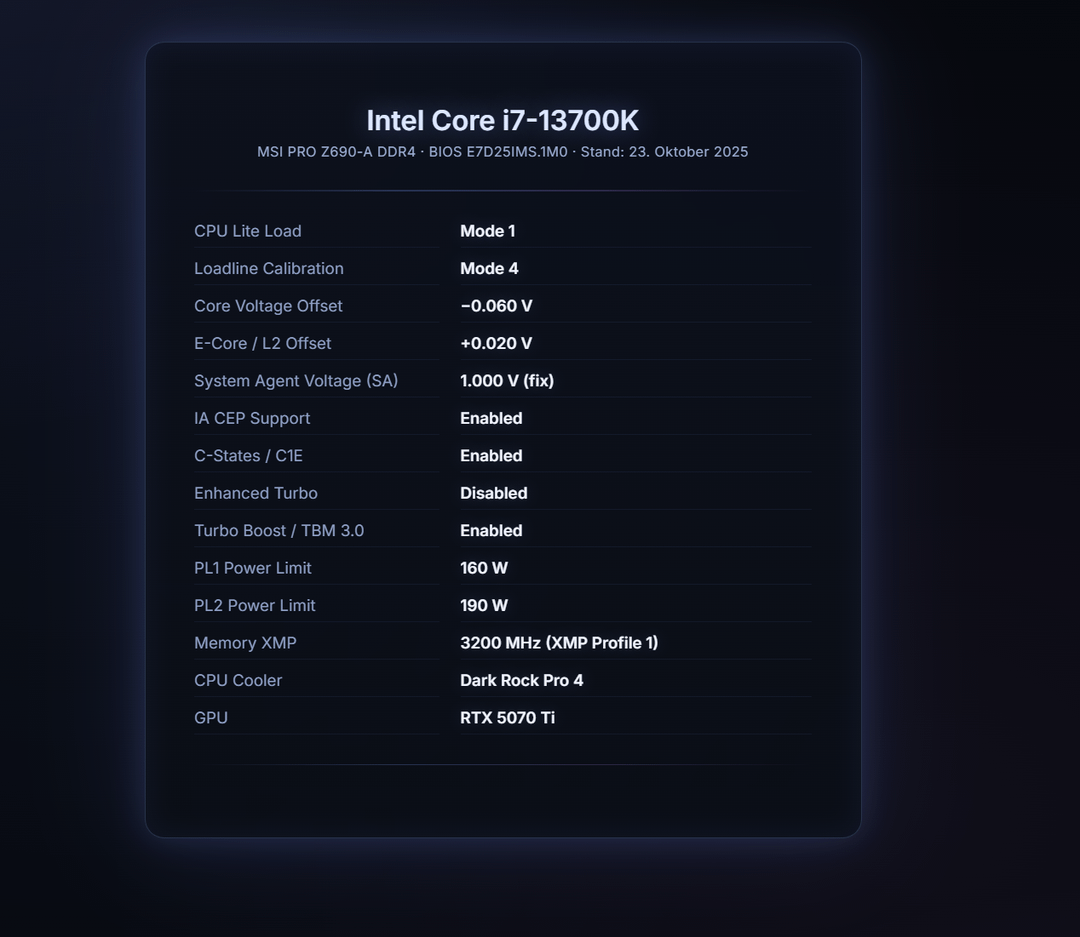
After a few rounds of testing, adjusting Lite Load modes and fine-tuning my Core Voltage Offset and L2 Offset for stability… I honestly didn’t expect this result.
From 105°C peak (I quit after 2 minutes 😅) down to an average of 78°C — and that’s with air cooling!
I’m genuinely impressed with how much difference these small voltage adjustments made.
Most guides I found were for older BIOS versions, and none of them worked anymore. Lots of outdated or cryptic info out there. So I figured I’d share this clean result and my setup for anyone still struggling to cool their 13700K.
Maybe I got lucky with the silicon lottery — but it’s absolutely stable, and I couldn’t be happier.
Would love to hear if anyone else with a **13th Gen Intel CPU** (or similar MSI board)
has managed to achieve comparable results with Lite Load + Offset tuning.
What’s your best stable combination?
System Specs
- CPU: Intel Core i7-13700K
- Motherboard: MSI PRO Z690-A DDR4 (BIOS E7D25IMS.1M0 – 08/2025)
- RAM: Kingston Fury Beast RGB 32 GB DDR4-3200 CL16
- GPU: MSI RTX 5070 Ti
- Cooling: be quiet! Dark Rock Pro 4 (air)
- Monitor: 1440p @ 165 Hz
- OS: Windows 11 Pro 23H2
- BIOS Version: E7D25IMS.1M0 (August 2025)
🧩 Summary
✅ Fully stable after multiple Battlefield 6 rounds
✅ ~20 °C cooler under load
✅ ~60 W lower power draw
✅ No FPS loss (0–1 % difference at most)
🧊 Idle temps around 38–42 °C with C-States enabled
💬 Notes
- Fan curve: 30° = 25 %, 45° = 40 %, 60° = 60 %, 75° = 80 %, 85° = 100 %
- Tested with HWiNFO v8.32 – no WHEA errors or throttling flags