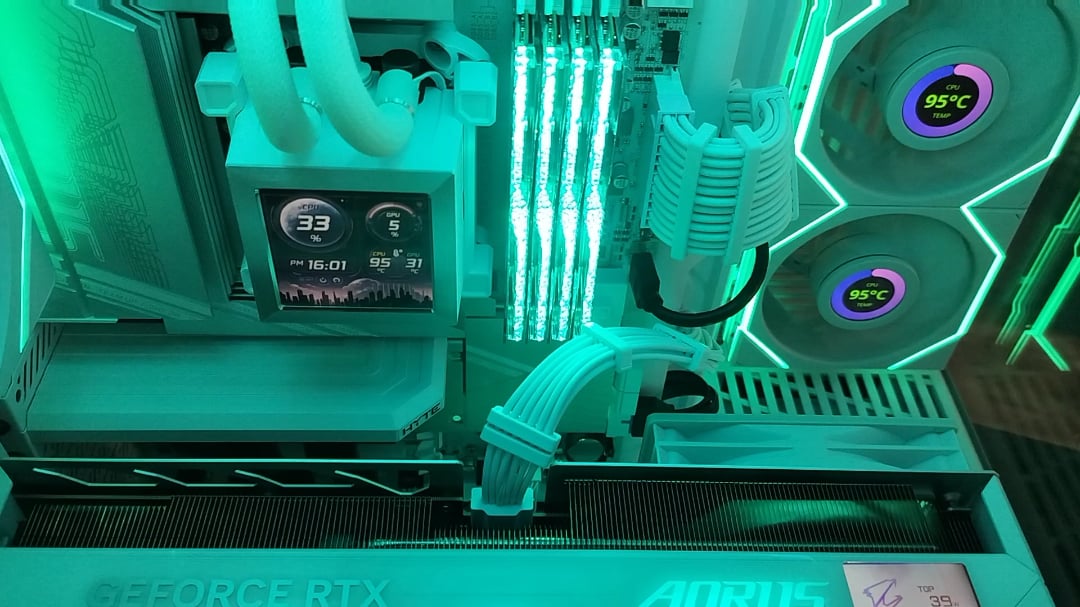
this happen when i turn on the computer i didn't Overclock i have check Airflow is good 10 fan totally i have put it new thermal paste and checked the Cooler working perfectly

this happen when i turn on the computer i didn't Overclock i have check Airflow is good 10 fan totally i have put it new thermal paste and checked the Cooler working perfectly
40 Comments
https://preview.redd.it/bz4tftvlnlgf1.png?width=640&format=png&auto=webp&s=183b52e52dc94c9f86c6cc85593036e17aca62c3
and this is on idle? are you sure there isnt a protective layer or something on top of the cpu? idle 99C is almost impossible
Did you peel the plastic? Plug in the pump?
Have you checked the cooler and took the little plastic off?
maybe you (or someone who built the pc) didnt take off the “remove before use” sticker on the AIO pump (the part that contacts the CPU directly) and thus it’s not reaching the required levels of thermal conductivity
Check if the aio is mounted properly, try to screw it in with an x shape tightening each screw slowly
Probably there is a problem in the contact beetwen cpu and cooler, make sure that there is no space at all
Not enough mounting pressure or the plastic that everyone mentioned are the only two things I can think of.
I see you’ve ensured the contact plate plastic sheet has been removed. I think you’ve got an issue with your water cooling – is this an AIO or not? Might check that the pump is properly powered and if non-aio make sure you’re not dealing with an air bubble in the system. Wouldn’t hurt to see how the CPU functions with a standard air cooler too – that would further indicate wither the CPU or the water cooling system is the culprit.
Send a photo of the contact plate of the heatsink.
What model is your pump/AIO?
What RPM is it reporting? DC or PWM controlled?
Is your pump running?
I don’t see anything plastic I clean thermal paste o am gonna try it to use another this kryosheet thermal pads
the cooler is likely not screwed in all the way.
I had this problem with the cooler.
I had put the springs and mounting brackets on in the incorrect order. Took off the cooler and behold – untouched thermal paste lol
I assumed and I wondered why my temps in BIOS were so high.
https://preview.redd.it/4y9rap3bslgf1.jpeg?width=2160&format=pjpg&auto=webp&s=8606b8072f2626bc9159ba62f8d5371b8358cfc2
Either pump is dead or there is no contact between CPU and aio pump
system specs?
edit:nvm saw it, did u update the bios? its not an x870e so you prob have to update for that chip.
also you made sure to use the amd plate for your pump right?
do you hear the pump?
do you have rpm reports from the pump or fans?
liquid slushing or bubble noises?
Yeah always check thermal paste
Plug the pump cable into pump pins also on some motherboards fan header is used as both water pump and for regular fan go into bios and see the fan header on which pump is connected is set to water pump or fan
Can you share the voltage values in bios and windows? There are various tools available from within windows, I can recommend HwInfo.
Another thing;
I have never used the cooler and we did not put it in the systems I collected, it is an expensive product here.
I saw the cpu_fan1 connection in the video but there is no pump connection next to it, is there a pump connection in the cooler?
Are u sure u can hear the pump working? Every now and again they tend to die pretty fast
Any RPM being reported in the CPU header? if not, the pump is dead
Si funcionan todos los ventiladores y tiene pasta térmica, lo que se me ocurre es que este mal lo que mide la temperatura.
What about speeds of pump and radiator fans?
Is the pump power cable plugged in the right spot on the motherboard?
Is your black Heat spreader correctly seated?
It might be too high and your pump can’t make direct contact with your CPU?
Are you sure you used the correct mounting brackets for the aio? I would take the manuals and go all over them again if you did something wrong or used wrong screws or wrong parts.
Maybe re-oriente the CPU block so the pipes are at the bottom or on the side, gravity will help the flow.
I gained ~10degres C by doing this, my cooler is way shittier than yours though
This happened to me and it was because I had plugged the pump into the CPU fan on the motherboard (which the guide said to do) instead of the Pump AIO.
Once I switched to Pump AIO the cooler worked just fine
Must watch with audio 😆 gave me a good laugh.
Check if there are bubbles inside aio?
Tilt it or something.
Air lock or something.
I looked at the picture you sent someone of the cooler and processor after you cleaned. It looks like your contact frame is sitting higher than your cpu. That will absolutely cause overheating
When you said you checked airflow what does that mean exactly, did you try running with the covers off?
I have 10 fans and had the same problem, turned out I had three venting that should have been intaking, swapped them around and my temperatures dropped by ~30 degrees.
even without paste…this seems very odd.
The only thing that makes sense here is…the contact is just really really bad.
Is the aio pump and cpu fan plugged in properly?
Does the computer feel hot? Because I would say it’s more likely a faulty sensor over the cpu idling at 99.
What, you can’t hit triple digits? Pathetic.
Is the pump working?