
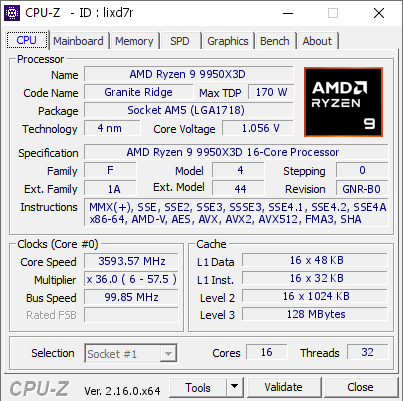
I wasnt aware that signalRGB used so much cpu resources that it would affect performance in measurable ways. I started using it because of how bad I was told Corsair Icue was as far as slowing down my system.
(For the record I didnt expect one piece of software to really mess with a Ryzen9 9950x3d, 64gb of ddr5 6000mhz cl26 ram, and a Asus TUF OC RTX5090)
Yesterday, I disabled it and I finally broke 41k in Port Royal.
Before that I had 40,350, after my score yesterday was 41268!
I know lots of people dont use cpuz as a benchmarking program but I use it to quickly see if any settings I've changed made a difference and to compare it to other people who are running the same hardware.
I noticed alot of "youtubers" all had single core scores of over 900pts and usually somewhere in the 17,000's for multicore.
My multicore always did ok, but i never could get my single core to break 900pts. Usually it was around 885-890pts.
With signalRGB turned off from my taskbar , first run i scored 929pts on my single core, and 17,757pts on my multicore!
Its been the same results with all the benchmarks I've ran today. Lol
Can anyone recommend a better program then signalRGB? Or is there something SignalRGB is blocking or a setting that is hurting the performance of my cpu? Is it just X3D cpu's or have any of you guys had the same issues with a different cpu?
Thanks for your help, I know its not a huge leap forward but if you knew how many hours I spent tweaking settings etc just to try and break 900pts on my cpu you would understand why scoring 929 and then 927 right after is awesome to me. Lol
4 Comments
I always benchmark with everything closed, only nvidia control panel and windows defender on basically.
If it has to be a really exact bench safemode is the best.
Well, every generation learns it again: low level tools, especially those communicating with embedded controllers (ECs), are very prone to causing system latencies that yield micro freezes, stutter , audio glitches, high DPC times etc.
Has always been the case, since decades.
Candidates: Mainboard OEM software, fan control software, RGB light control software, …
I benchmark 2 well 3 different ways depending on my mood.
Everyday use where everything runs on normal daily usage. So I do not disable my daily stuff.
Bench where I am pushing my scores where I will disable everything sometimes but rare boot into safe mode.
Third when I want to check a specific program/task where I will only disable it. So can then determine if that specific program is worth the overhead in my daily usage. If not than I test with different solutions for that “needed” program.
In my many many years I have arrived at the conclusion I no longer need to flex my big epeen to anyone else, so hardly bother even posting them anymore. For example I messing around with a Linux mod that can be carried over to windows that carries lots of dangers but my 9070xt on air scores 8450 to 8500 in Steel Nomad.
My epeen these days is getting the most out of my own system for my daily use. Not what others are getting other than to know if I underperforming, over performing, or just average. I take any over performing by anyone as I don’t know if they are stable so not to be trusted
Underperforming tells me my system needs adjustments.
Average is good.
When I am over performing I know what is or is not stable through much testing. Once I have tested than I know my own system is truly over performing stable.
It is not an easy process as you have to test, test, test chasing numbers unless you are gonna settle for just benchmark stable. (Which is fine too)
It is a live rendering program that keeps open polling to every single rgb (EC) system in your machine. That would be like running a small game and benchmarking, because processing, rendering, polling, and output is happening right then. You always close background programs when you benchmark, and if you think there is an all-in-one rgb control software that takes up no resources, there is not.
Signal has a couple different rendering profiles, and two major systems. One is QT-Webengine (doesn’t work super efficiently on some x3d systems), and then Ultralight. Try Ultralight, I average about 1-3% CPU use with it on my x3d, but that is STILL enough to knock 1-2k off of CBr23 or 3dMark. It is what it is.
The only other piece of software that can do anything close to what signalRGB can do is OpenRGB, and it takes quite a bit of learning and setup in comparison.