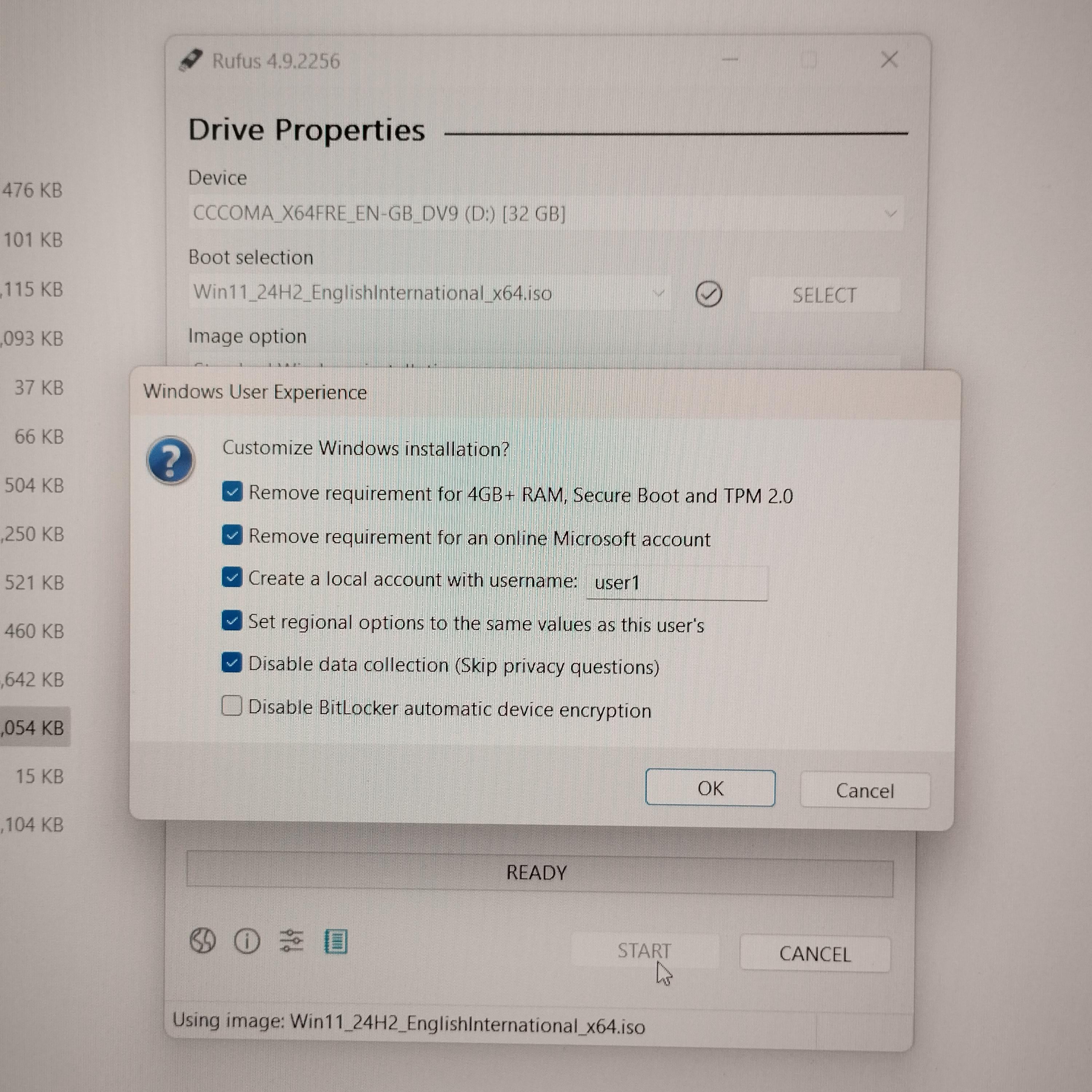
Decided to update my windows 11 iso for installs. Wasn’t aware of these options before. No ms account needed

Decided to update my windows 11 iso for installs. Wasn’t aware of these options before. No ms account needed
32 Comments
Its been like that for a long time when you create it with Rufus
I highly recommend checking the Disable BitLocker option as well. You can do it manually after Windows installs and that way you will be able to store the key somewhere.
Are there settings to change these post install?
Rufus is awesome😉
incoming “Määäh that new Windows update fucked my system, Microsoft is so incompetent”
I prefer not to butcher the system at its core, it only calls for trouble.
[Generate autounattend.xml files for Windows 10/11](https://schneegans.de/windows/unattend-generator/) – use this to general an xml. create an image using rufus, but not clicking any of those options. copy the xml to the flash drive. win prizes.
Goddamnit, I should have used Rufus with my Windows 11 install.
Surprisingly, the latest Windows 11 ISO I have downloaded off the Microsoft’s page straight gives me an option to choose an offline account. Maybe they had to change it due to some regional regulations.
Check out this tool -> [https://schneegans.de/windows/unattend-generator/](https://schneegans.de/windows/unattend-generator/)
Website gives you ability to create your own `autounattend.xml` file.
What `autounattend.xml` is exactly? It’s file contains predefined settings Windows will follow during installation. In short; adjust the settings just how you want it, generate the file, copy it to the bootable USB and Windows will install automatically with the settings you chose. Basically, the OS will install itself without you touching anything.
Rufus is really doing some work these days to make windows less shit
You better disable bitlocker to 🤣
I’ve been creating my own autounattend.xml files ever since I learnt they were a thing. Can recommend.
From someone with Windows 10, about to upgrade to windows 11, with a USB stick and no knowledge of rufus. How do I use it? ELI5 please!
Or press shift F10 during the config screen and type
start ms-cxh:localonly
Question: Would removing the 4GB RAM requirement, specifically, make the device actually usable? I just upgraded a work PC from 10 to 11 and noticed that my idle RAM usage went from ~2GB to ~4GB. If you bypassed that requirement and ran it on a system with <4GB RAM, would it run like shit or not at all?
I realize that you’re most likely checking that box to bypass TPM 2.0, but I’m curious.
Can I do this and still keep my files?
Chris Titus Tech has a utility on GitHub that can remove telemetry and hundreds of customizable options and create a iso image from that. He has videos on TY about it, been using it for a while now and very solid. Can do everything Rufus does and much more.
Check out [Ventoy](https://ventoy.net/). You don’t need to reformat your USB every time you need to flash a iso. You just install this once and just copy the .iso file inside the USB drive. You can even have multiple isos and choose which you want to install.
I’m not sure the no MS account option in Rufus actually works anymore.
Now get Explorer patcher + open shell. Do all settings you liked from previous windows versions and never look back.
You should update from windows 11 iso to a Linux iso. Unless you play Fortnite and riot titles. (Or just dual boot for them)
Pro tip, when windows asks for your preferred language set it to english (world). This makes it somehow such that windows will not show any ads or install any shitty third party apps. You may later switch any other language without the ads.
Big thanks to theojoe for showing this.
You can also open a command prompt at the “enter or create your MS account” page byt hitting SHIFT + F10 and in the CMD windows type “bypassNRO” without the quotes. Reboots and let’s you create a local account.
Rufus, the goat
Last time I tried to do this the install had a ton of issues with games and programs. I ended up wiping it and doing a new install.
Can I build an ISO in Rufus then import it to Ventoy? I should check this weekend.
add the last checkmark too.
saves you time later.
the automatic encryption thing should be one of the things windows asks you during setup. It’s quite dangerous to have it automatically enabled without informing the users
I’d also recommend AtlasOS on top after install. Works wonders for me.
Im staying on win10 and going down with the ship to the very last
Just be aware that some programs require TPM
I thought I read that when win11 updates it will turn all that stuff on again. I am going to give up gaming and just move to mint Linux when win 10 sunsets. None of the modern games keep me engaged and they keep altering older stuff till they take the fun out of it.