
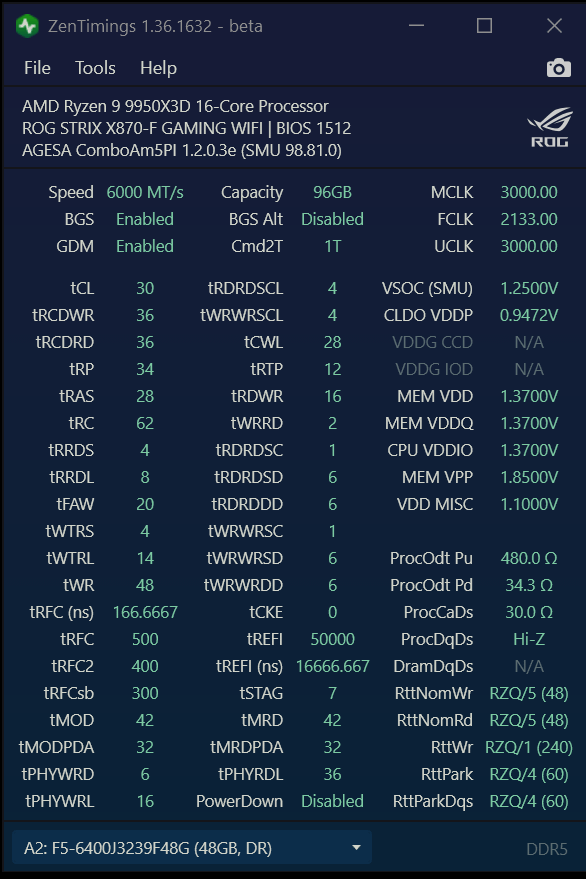
Hi all, I have a 2x48GB DDR5 kit with 9950X3D that I have been trying to fine tune for a while. The kit is supposedly rated for 6400mhz/CL32, but it wasn't stable at stock. After a lot of tweaking, I got it stable at 6000mhz/CL30, but I just installed a RAM cooler and would like to try to push it a little more. Can anyone take a look at the timings and give me any suggestions on what would be the next lowest hanging fruit that I might be able to try now that I have a bit more cooling?
RAM link: https://www.amazon.com/G-SKILL-Trident-CL32-39-39-102-Desktop-Computer/dp/B0D7QZ7NWF
Current ZenTimings: https://i.imgur.com/yUdVLTU.png
Current AIDA64 Ram Benchmark: https://i.imgur.com/FKoPD1z.png
2 Comments
Set your tREFI to 65535.
Set your tRCD to auto then go into the AMD overclocking menu under DDR Options, DDR Timings, and enable tRCD control then set tRCDRD to 36 and tRCDWR to 12. then check boot. If not boot set tRCDWR to 16.
tFAW to 32 and both tRRDs to 8.
Then since you are active cooling you can try tCL 28 with 1.45-1.50 VDD. 26 may work with 1.6 but you’ll have to keep an eye on your temps and frankly that’s approaching a long term health limit for VDD.
24GB dual rank MDie is tough to get stable at higher clocks and tighter tCL. There’s a lot of memory banks that have to be up to the task and if even one isn’t, your best case is no boot and worst case is booting but not stable with no way to get stable.
VSOC does not need to be 1.25 with UCLK equal to 3000. Lower it to 1.1 and see if it will work, 1.085 works for me at that clock but it depends on your cpu. 1.15 would still be a significant improvement over 1.25.
Finally, you can see if FCLK 2200 will boot with VDDG CCD and IOD set to 0.95V. you can go up to 0.98V with VDD_Misc at 1.1. You want to have a 0.100V difference between your CCD/IOD voltages and VDD_Misc. I wouldn’t run higher than 1V on CCD/IOD for longevity reasons, and obviously lower is better. But do FCLK pushing LAST because it is tough to measure stability and you need to make sure everything else is 100% stable first.
You can set your TX and RX burst lengths to x8 each and then try seeing how low you can get your Nitro timings. 1/2/0 is the golden nitro timings but it may or may not work depending on your CPU. 1/2/1 is a good alternative,but you won’t get 1/1/x to work ever, I don’t think. That should help lower latency a little bit. Nitro settings can be found in AMD Overclocking/DDR Options.
Check both RAM sticks in zen timings and see if tPHYRDL is matched between them. If not, try the RDpointer initial value setting (DDR PMU Training options) at 1 or 0 until it matches up.
Otherwise things look good.
I have a post about 2×24 gb kit, should be the same minus the dual rank specific timings. Though they will likely get a bit hotter than a single rank. You can get cheap ram fans off amazon or aliexpress that would hel
Edit: disregard. You’ve actually gotten it damn near maxed out. Try getting nitro 1/2/0