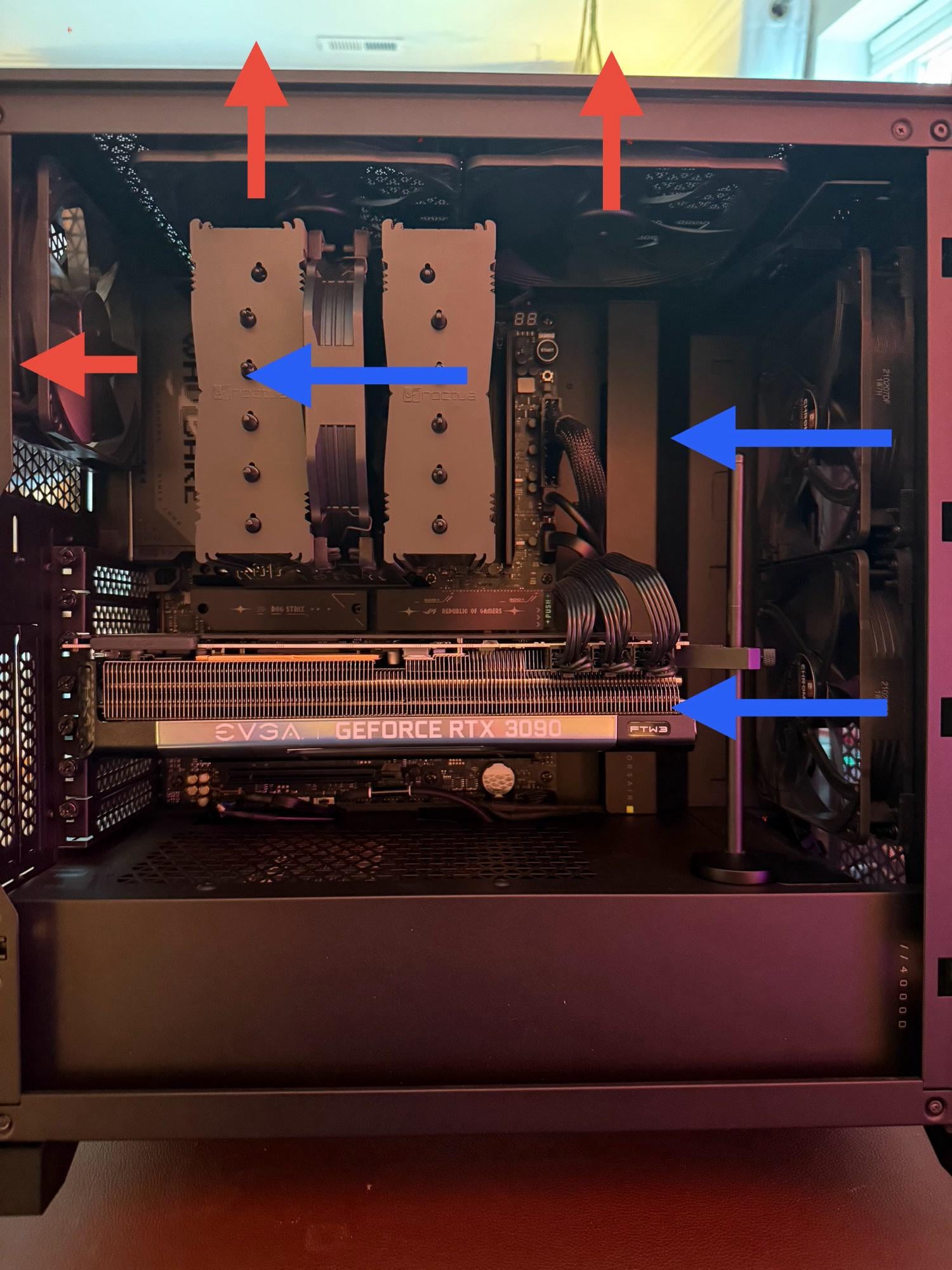
Should I change anything on the flow? Haven’t tuned anything fan wise and it idles around 36-42
AlextheGoose
If you care about dust I’d get rid of the top 2 fans so you have more intake than out
assortedUsername
I think one less exhaust, the rightmost one. They did research and found too many exhausts in a certain order can increase temps
TheHamsterMage
I suggest turning the front top fan into an intake, since it will rob air from the tower air cooler if its an exhaust.
Flashy-Ad8008
Flip the right fan on the top panel and you’re good
AnxiousJedi
I would lose the top fans. If you really want you can leave the top left one in, but the top right is just spitting out fresh air brought in from the front fans.
KanataSD
personally I’d switch the top front top to intake. I Always go for more positive pressure.
Competitive_Ad6989
front top as intake, even noctua recommend it like that
acelaya35
What’s your side panel like? Mesh or glass?
Sadik
If you have a cat, it is purrfect.
DietQuark
Airflow is good like this.
Check temps see if it’s ok.
Otherwise play around with the rpm. For example have the lowest intake fan at the front do the most rpm.
notthatguypal6900
I’ve got the same case, same cooler, same fan setup and i have zero temp issues.
Difficult-Report5702
Everything looks nice, just bring the back fan a bit down, align i with the cpu fan. Just for ascetics
TakeyaSaito
Flip top right to intake.
Play_outStation_5
I wish there was a way to get a fan directly on both sides of the gpu
My setup is like this with the 5000D airflow. How simple is it to flip the top front exhaust fan to intake? I didn’t build my PC (pls no crucify, I don’t trust myself with such expensive parts). Mine are both exhaust at the moment.
As others have mentioned, top right fan should be changed to intake rather than exhaust. From your setup, the cold air will just be exiting the system even before the cpu cooler can pull air from it.
Brendawgy_420
No tips, but we have a very similar build, looks good!
Mysterious-End-441
surprised that nobody has mentioned you only have one fan on your dual tower cooler. if i were you i’d take the top right fan and move it to push air through the right tower of your cpu heat sync toward the back of the case
DayneTreader
I’d get a third front fan and put the second fan on your cooler
my5cworth
It depends. Look at your temperatures while running your favourite titles.
If your GPU runs hotter than your CPU, keep it as it is.
If your CPU runs hotter than your GPU, turn the top-right to an intake.
PreviousAssistant367
Top right fan should be intake.
bamronn
Switch top right to pull instead of push.
Sanga884
I have this cooler, i regret not getting the model with 2 fans on my my amd 9800
Evil_Cronos
My set up is basically the same as this, except I only have one fan up top. It has always been exhaust, but after reading so r.of the comments and the reasoning, I will be switching it to intake. Thanks for making this post!
cs37er
Put the top right fan on the front of your CPU cooler instead.
CommercialShame5961
Can you turn CPU cooler clockwise? I think it will be good for convection…

30 Comments
Should I change anything on the flow? Haven’t tuned anything fan wise and it idles around 36-42
If you care about dust I’d get rid of the top 2 fans so you have more intake than out
I think one less exhaust, the rightmost one. They did research and found too many exhausts in a certain order can increase temps
I suggest turning the front top fan into an intake, since it will rob air from the tower air cooler if its an exhaust.
Flip the right fan on the top panel and you’re good
I would lose the top fans. If you really want you can leave the top left one in, but the top right is just spitting out fresh air brought in from the front fans.
personally I’d switch the top front top to intake. I Always go for more positive pressure.
front top as intake, even noctua recommend it like that
What’s your side panel like? Mesh or glass?
If you have a cat, it is purrfect.
Airflow is good like this.
Check temps see if it’s ok.
Otherwise play around with the rpm. For example have the lowest intake fan at the front do the most rpm.
I’ve got the same case, same cooler, same fan setup and i have zero temp issues.
Everything looks nice, just bring the back fan a bit down, align i with the cpu fan. Just for ascetics
Flip top right to intake.
I wish there was a way to get a fan directly on both sides of the gpu
https://preview.redd.it/7cmv96qf6wff1.jpeg?width=1500&format=pjpg&auto=webp&s=864f86fd94c66acf32a3b6c2ae42c6191719fdb8
You probably don’t need the top fans
My setup is like this with the 5000D airflow. How simple is it to flip the top front exhaust fan to intake? I didn’t build my PC (pls no crucify, I don’t trust myself with such expensive parts). Mine are both exhaust at the moment.
https://preview.redd.it/04e6k3pnbwff1.png?width=757&format=png&auto=webp&s=e86b7fe5d89377fdf4ff7bd1aaabf490c1f2683c
As others have mentioned, top right fan should be changed to intake rather than exhaust. From your setup, the cold air will just be exiting the system even before the cpu cooler can pull air from it.
No tips, but we have a very similar build, looks good!
surprised that nobody has mentioned you only have one fan on your dual tower cooler. if i were you i’d take the top right fan and move it to push air through the right tower of your cpu heat sync toward the back of the case
I’d get a third front fan and put the second fan on your cooler
It depends. Look at your temperatures while running your favourite titles.
If your GPU runs hotter than your CPU, keep it as it is.
If your CPU runs hotter than your GPU, turn the top-right to an intake.
Top right fan should be intake.
Switch top right to pull instead of push.
I have this cooler, i regret not getting the model with 2 fans on my my amd 9800
My set up is basically the same as this, except I only have one fan up top. It has always been exhaust, but after reading so r.of the comments and the reasoning, I will be switching it to intake. Thanks for making this post!
Put the top right fan on the front of your CPU cooler instead.
Can you turn CPU cooler clockwise? I think it will be good for convection…
https://preview.redd.it/5jdcql1zxyff1.png?width=2400&format=png&auto=webp&s=64933ce7dc41b051bdc3dbecce280c1297ef20d9