I don’t know how to fix it, but I’ll give emotional support while putting it out of its misery.
Awkward-Talk2453
It matches the keyboard now.
InfernoTrees
RMA
Notchrider32
Cyberpunk looks nice
Vivid-Tooth-5318
You’re just color blind bro
noob-from-ind
This guy is accessing the 4th dimension 🫨
Indie--Dev
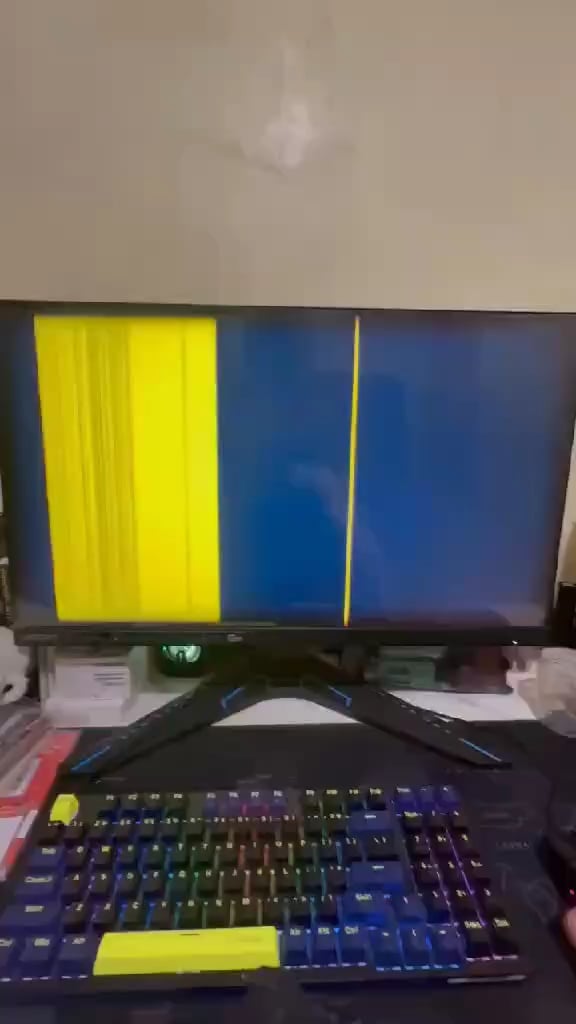
Accidently set resolution to 1920×1, or 1×1080.
Maybe can boot in safe mode and get it back to normal if that is it.
Jealous-Layer5742
BE SERIEUS, guys!
1. Take a look on connectors between graphics card and monitor. They must seated firmly, otherwise replug it.
2. Check your monitor, take out and replacement it with a second display, look what it happen.
3. Otherwise put pc case open and check if graphics card sagging, it happen at some models that are heavy that card sagged out if there no support installed. Reseat the gfx card again.
More steps? No idea…
DayneTreader
I don’t think that’s the monitor’s fault
iPe6eHoK
try heating it with a hair dryer, it helps me on a curved monitor
InterestLeather2095
Welcome to night city choom
Edit: seriously how did the same people who made Witcher 3 make this game. Worst writing I’ve ever heard
Icookeggsongpu
sorry for the off topic question but what keyboard is that? looks really good
Zealousideal_Side987
Bro sell it !! It’s the cyberpunk edition !!? 20k+ must
Tanawat_Jukmonkol
I reckon you should take it to the doctor 💀💀💀
Lazy-Tea-4212
no monitor should be ever repaired if its broken its broken
Alternative_Exit_333
Needs new gpu
Ghost_Riff
Test pc on another monitor just to make doubly sure it’s the monitor’s fault, not the pc. Also swap the hdmi cable to make sure it isn’t the cable’s fault. Take it step by step to see if you can for sure narrow down the issue. If it does end up being the monitor… it’s not really worth repairing it honestly, I’d just get a new one.
Xenon-Hacks
White sounds stupid, but have you tried
Windows Key + Ctrl + Shift + B
Incorect_Speling
1- Flip the monitor 90° counter clockwise.
2- Slava Ukraini
3- Profit?
TIGER_SUS
Take what to the repair shop?
madefrom0
Monitor made by Netflix
SiggiHD
Looks nice. Sell it to Ryanair 🙂
LordBacon69_69
Ikea monitors be like
DomSchraa
Barcode simulator looking fire
Selfpropelledm
Game name?
StinkyPingus
Seems fine to me
CrwlngSloog
Looks like a GPU with knackered memory; seen many older cards suffer this fate, sometimes they boot ok and quickly end up like this. Thats assuming its a dedicated graphics card?
DexterHeck
you should try hitting it really hard!
submawho
Reseat your video cable, maybe broken pin not making contact
Mineplayerminer
The monitor seems to be doomed after looking closer at the screen.
gundamseed
Monitor: Slava ukraine.
aman_kumar_0017
at first glance it looks like netflix has released a new intro

32 Comments
Give me a screwdriver and a few minutes.
I don’t know how to fix it, but I’ll give emotional support while putting it out of its misery.
It matches the keyboard now.
RMA
Cyberpunk looks nice
You’re just color blind bro
This guy is accessing the 4th dimension 🫨
Accidently set resolution to 1920×1, or 1×1080.
Maybe can boot in safe mode and get it back to normal if that is it.
BE SERIEUS, guys!
1. Take a look on connectors between graphics card and monitor. They must seated firmly, otherwise replug it.
2. Check your monitor, take out and replacement it with a second display, look what it happen.
3. Otherwise put pc case open and check if graphics card sagging, it happen at some models that are heavy that card sagged out if there no support installed. Reseat the gfx card again.
More steps? No idea…
I don’t think that’s the monitor’s fault
try heating it with a hair dryer, it helps me on a curved monitor
Welcome to night city choom
Edit: seriously how did the same people who made Witcher 3 make this game. Worst writing I’ve ever heard
sorry for the off topic question but what keyboard is that? looks really good
Bro sell it !! It’s the cyberpunk edition !!? 20k+ must
I reckon you should take it to the doctor 💀💀💀
no monitor should be ever repaired if its broken its broken
Needs new gpu
Test pc on another monitor just to make doubly sure it’s the monitor’s fault, not the pc. Also swap the hdmi cable to make sure it isn’t the cable’s fault. Take it step by step to see if you can for sure narrow down the issue. If it does end up being the monitor… it’s not really worth repairing it honestly, I’d just get a new one.
White sounds stupid, but have you tried
Windows Key + Ctrl + Shift + B
1- Flip the monitor 90° counter clockwise.
2- Slava Ukraini
3- Profit?
Take what to the repair shop?
Monitor made by Netflix
Looks nice. Sell it to Ryanair 🙂
Ikea monitors be like
Barcode simulator looking fire
Game name?
Seems fine to me
Looks like a GPU with knackered memory; seen many older cards suffer this fate, sometimes they boot ok and quickly end up like this. Thats assuming its a dedicated graphics card?
you should try hitting it really hard!
Reseat your video cable, maybe broken pin not making contact
The monitor seems to be doomed after looking closer at the screen.
Monitor: Slava ukraine.
at first glance it looks like netflix has released a new intro