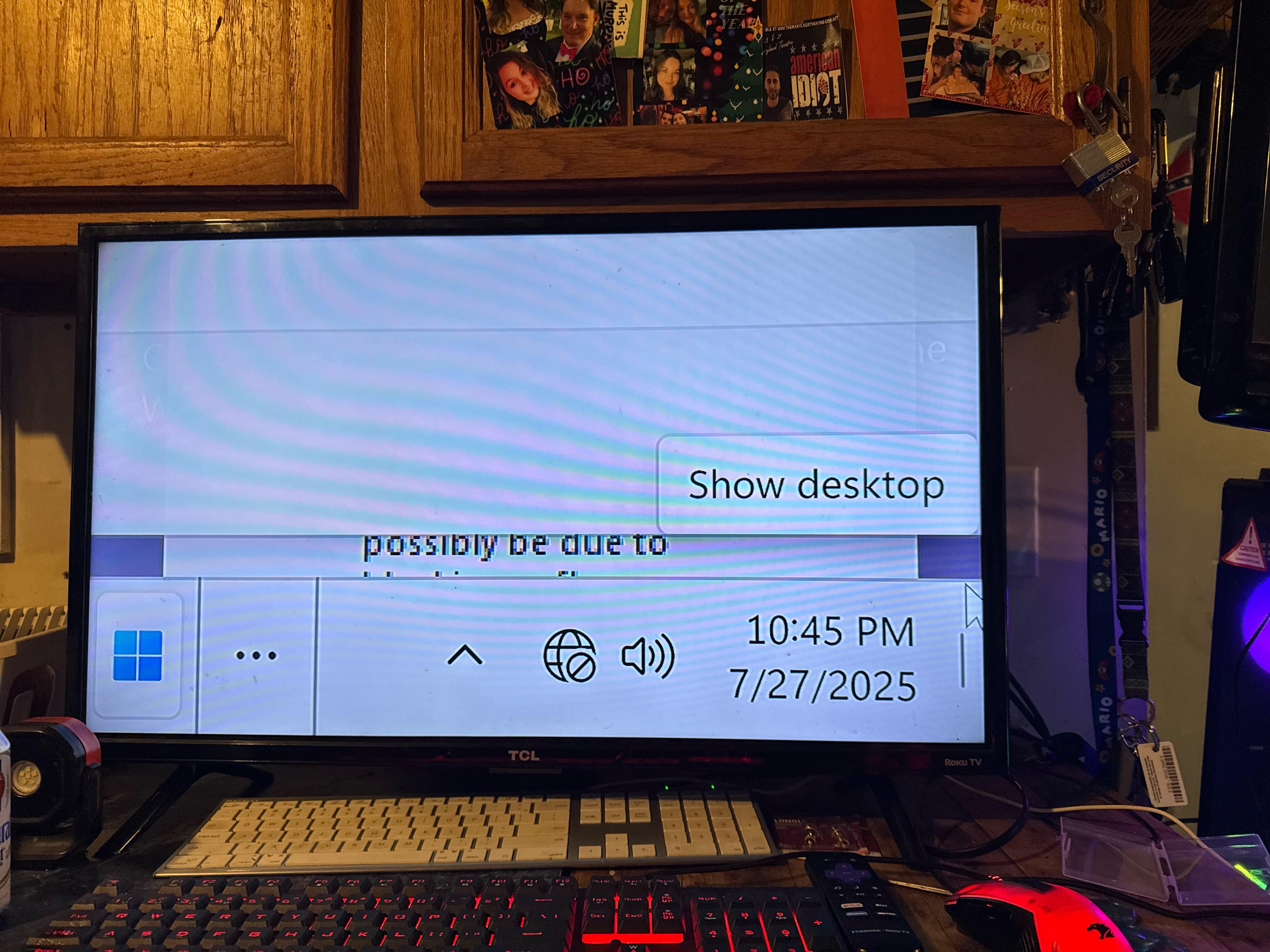
I cant get my sisters pc out of this stupid resolution bs. Look at the pics. Ive googled and reddit search just nothing works. I cant even reinstall windows on this intel pc.

I cant get my sisters pc out of this stupid resolution bs. Look at the pics. Ive googled and reddit search just nothing works. I cant even reinstall windows on this intel pc.
33 Comments
It kinda looks like they turned the magnifying glass on
More than resolution, seems like a magnifying problem. Have you tried changing the zoom or magnification in the windows settings?
So basically you would have to just fix it as if you dont have a display. Basically memorize, or follow the keyboard hits you do on a separate computer.
For example, Hit the Windows key. Type display Settings, hit enter. Tap down until you get to where you need to go… I dont have any other good ideas. But good luck
Hold windows button and click the ” – ” a few times. It will use the magnify and reduce its effect
Start the PC in safe mode(press f8 when pc is starting), and there adjust or reset the screen resolution settings.
You can probably fix that with one of these [shortcuts ](https://support.microsoft.com/en-us/windows/magnifier-keyboard-shortcuts-and-touch-gestures-6d7c3095-75ec-258f-6f5b-3b0bc19a18e7)
you turned on the scaling in display settings to like 500% you can get out of it but it’s difficult, if you have a higher resolution display or tv you can temporarily hook up to fix it then use that to make it easier and then revert back to the old monitors
Lol
Windows + Esc should do the trick
Window key + esc
Go sitting ,display and make scalling lower
My parents: I can finally read the pixels
I’ve got a learn how to do this and undo this in windows to mess with my boss.
Simply go crazier
Is it zoomed? Or is it your display scale? Safe Mode, Holmes!
boot up in safe mode
My dads pc:
Will I be criticized hard if I express my curiosity about how exactly your sister’s PC got effed up like that?
https://preview.redd.it/387gok7ejjff1.jpeg?width=800&format=pjpg&auto=webp&s=e9eeecd0fc9a52ffce1225a52f6a592af77d1ed8
Lmfao 🤣
Lmao

Update op.
That’s the biggest task bar I’ve ever seen
Enhance. Enhance.
Can you get better screen shot? I can’t seem to make out what’s on the screen.
CTL(hold) + mouse scroll down
I’m not sure it’s possible to set the resolution to something this low. This looks like an accessibility feature maxed out which means there is probably a keyboard shortcut to undo it.
confederate flag
On another machine download the gpu driver uninstaller. https://www.guru3d.com/download/display-driver-uninstaller-download/
On your sisters machine completely power off wait 30seconds boot into safe mode F8 when the safe mode comes up select safe mode with command prompt.
Uninstall the graphics driver using the previously downloaded file reboot into windows and see if that works. It looks like scaling or accessibility is enabled some how.
crtl+0(zero)
It looks similar to another issue a few days ago, the fix was
Press Win+R
enter the following: explorer ms-settings:display
Press TAB 7 times
Press the up-arrow on your keyboard until the scaling is correct
Might help here as well
First the left control key and scroll the mouse wheel and it will zoom out.