Its possible your audio jacks are shorting or something, make sure they are physically clean or okay.
Skoziik
If you have multiple audio devices plugged in, maybe try unplugging one audio device after another until it stops. Otherwise it might be software related.
Ssyynnxx
Somethings prob shorting unplug ur shit 1 by 1, this isnt a software thing
AnalogueBoy1992

Typhon-042
They want to show you that Disco is not dead.
Demonic_Monster
Just incase anyone else comes here and needs some information
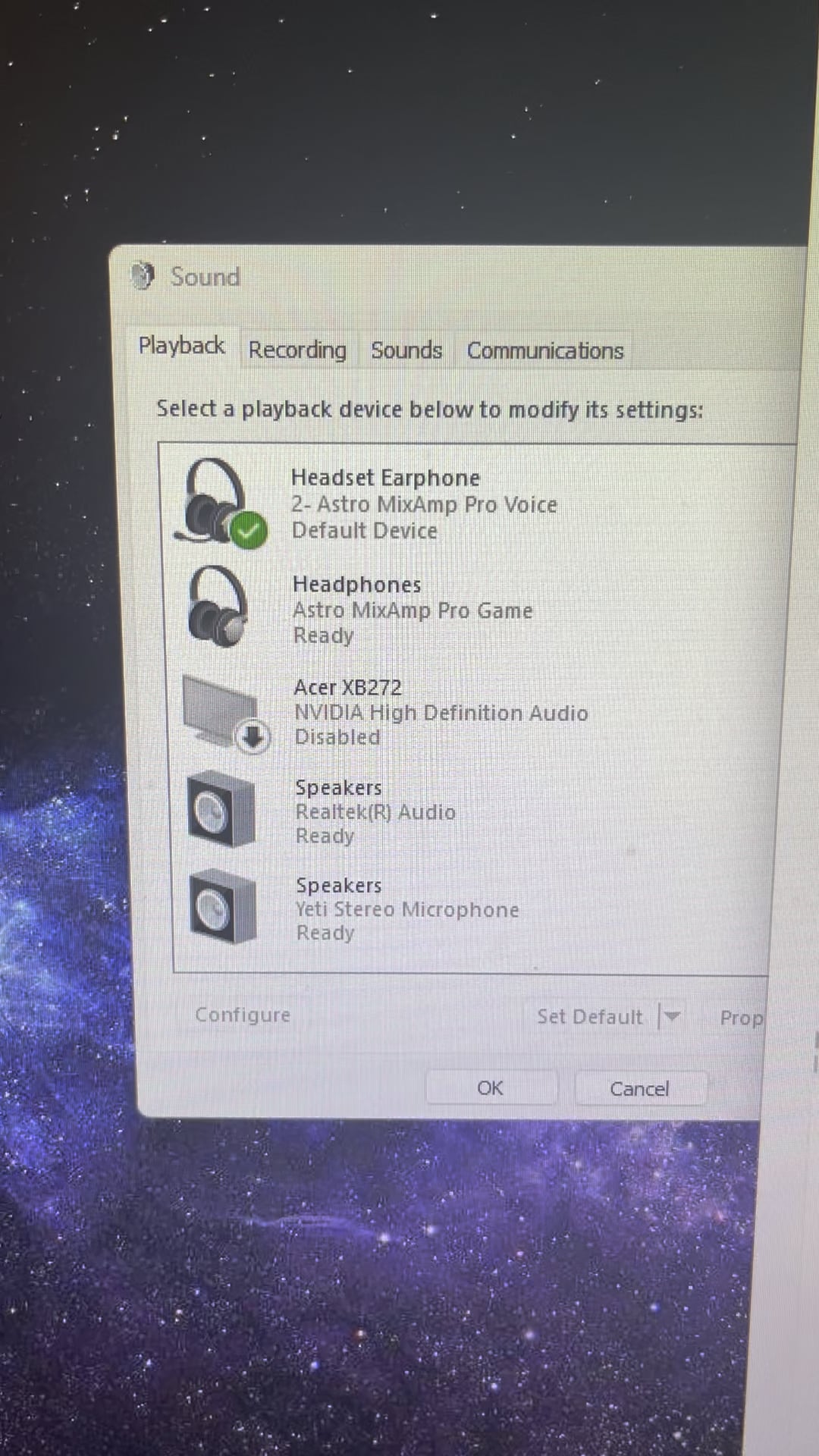
my audio devices are rapidly changing between eachother
i’ve unplugged all of them and replugged them in one by one and this is the consensus
when my speakers are plugged in by themselves, everything is fine
when i plug in my speakers and yeti microphone, it rapidly changes between the two of them
when i plug in my speakers and headphones, it rapidly changes between the two of them
when i plug my headphones and yeti microphone it also rapidly changes better the two of them
when all three are connected it rapidly changes between all of them
simply_dini
I have the same issue, can only use one at a time.
On windows 10, using either device seemed to work perfectly fine.
FuriousMonkey375
It’s a windows issue, happened to me after one of their many, many updates on W11.
Nothing wrong with hardware as per device manager.
Like others said – plugging or connecting one device at a time was the only solution for me.
Ok_Geologist7533
i’d start with disabling all the sound adapters through device management and then go from there. If not, see if you have a system restore point.
gamerdadreno
I have noticed my pc does this when it has a software update that I don’t see. It bothers me to no end because I keep thinking my mobo is going bad then I remember to look at software updates.
Jijonbreaker
My brain started playing the Mario kart item jingle on the first window
HugoHughes
Mine did this. Had something to do with which port I used on the GPU. Somehow it’s fine now so I dont touch any friggin thing haha. Damaged port maybe on GPU?
GigaSoup
If there’s any option for automatic jack detection turn it off.
NighthawK1911
This also happens to me sometimes.
Are you using a bluetooth headphone, speaker or earbuds?
You just need to power cycle it. This usually goes away.
theonewiththesea123
The jack, to where the headphones is connected, got damaged probably. Or your headphone’s cable is at fault. Connect another wired headphone to the jack, to see if the problem exists.
Educational_Rub_5885
Try to reinstall windows and drivers fresh from 11 and see if that works
OGPresidentDixon
This is what’s happening:
– Program: *has a channel it’s playing out of*
– Windows: The user said to change the channel, I will change it.
– Program: *has no idea, keeps trying to play out of the channel it knows it can.*
– Windows: Let’s change the channel, the user said to USE A NEW CHANNEL.
– Program: “I am playing out of THIS CHANNEL THAT I WAS TOLD TO PLAY OUT OF”
– Windows: “WHY IS THE CHANNEL NOT THE ONE I KEEP CHANGING IT TO”
salteazers
Unplug your mouse and keyboard
yeloooh
ah windows. decades of universal audio device standards and they still can’t make a functional audio interface.
OffAthens
I ran into a similar issue with some laptops at work. I would try updating your audio drivers, performing Windows updates, and check for any audio drivers in “optional updates” when you go to check for windows updates.
It’s kind of a long shot, but it could be worth a try.
NibbyGibby68
Uninstall the realtek audio drivers in device manager, then restart your PC.
Daedelous2k
PARTY HARD.
Update Drivers
maspann
well, reverting my audio driver and not updating it ever again fixed this
Orbital-Octopus
Because you are using Windows with Bluetooth devices.
Strylt
Had this issue with multiple Notebooks at work. Disable Driver updates in Windows Update and remove all audio devices in device manager with its drivers. Then reinstall your needed audio devices with drivers from manufacturer website.
SirChickin

real_junkcl
They’re partying!
kazuviking
Get sound switch from the microsoft store it will make your life way easier when unplugging and replugging audio devices.
Ssapt
they are having a party
Jeffrey-2107
I have this with my USB mic if i plug it into the wrong set of ports. The mic keeps dropping out and connecting back. Which lags the system like no tomorrow and causes exactly the same issues as shown.
So whats the potential issue? a bad device or a overloaded usb controller. In my case specifically i think its the power requirement more than the actual usb itself.
try plugging it in a different port thats likely to be on a different controller. or try plugging just this to the controller. if not possible just try to unplug as many devices as you can. if that doesnt help maybe drivers but then i would lean towards the device itself. if you can verify it being fine on another pc that would help loads.
Lucius_Sephir
Your pc has an stdeez
_Technical_Error_
Go into services and restart the Windows audio service. Fixes mine every time.
XenEcho
I get this problem if I try to use a headset through a slow Bluetooth adapter or Xbox Wireless adapter that doesn’t have enough bandwidth. My particular issue is trying to use one of the spatial audio settings like Dolby DTS, it will just flicker like this. The only way I found to get around the issue is to turn off spatial audio when I’m using one of these adapters.
cmx9771
I have an issue kind of like this but it’s my Bluetooth devices instead
paulerxx
Update the drivers
Ok_Worth4113
Disco
itismezed
Welcome to Microsoft Windows.
Demonic_Monster
UPDATE (No Change)
So i have tried updating my drivers, and going to the exact website or downloading whatever needed and that all hasn’t worked unfortunately, i had also plugged in my old headphones and it was also glitching and rapidly switching from ready to disabled. Not really sure what’s going on. I also tried power cycling the computer and also checking for any windows updates or anything of that sort. i don’t think it’s damage to the ports or usb and i don’t think it’s driver problems. I feel like windows is just fucking me for updating it to windows 11 naturally. Thanks for all the replies, will still try and offer info if anyone’s interesting in helping further.
Pizz001
I’ve been having a similar looking problem, first this may not be the same as your bug that you’ve got, i’m posting about it just in case it’s the same or related
as you didn’t add any extra info like if your using and programmes/app’s or on boot in you post
(unless i’ve missed it). when it happens if your using your mobile phone and phone link, when its connected using Bluetooth and you get a call then answer it on your phone
Suddenly all my sound devices turn on/off on my pc like shown in your video, when i answer my phone and even after the call ends, windows still goes insane with everything flashing on every sound device for 5-10 mins after i even end the call
I’ve reported my bug about 2 weeks via feedback hub as it was working great up until they did a phone link update about 2 weeks ago it doesn’t happen when the phones linked via WIFI (but you don’t get the dialling box unless on Bluetooth) as i use phone link a lot to read app updates and view/send my texts due to a eye problem, as i can see them better on my pc over my phone at the sec
chucnorris
I had something similar with my USB mic a year ago – turning on and off every second – out of the blue after working fine for years
It was a bad USB cable. It’s always a bad USB cable. Check that first always.
TheVoynich
Audio devices on acid trip, they are rare in the wild, but not uncommon. 😆

42 Comments
Are you currently playing techno music?
Its possible your audio jacks are shorting or something, make sure they are physically clean or okay.
If you have multiple audio devices plugged in, maybe try unplugging one audio device after another until it stops. Otherwise it might be software related.
Somethings prob shorting unplug ur shit 1 by 1, this isnt a software thing

They want to show you that Disco is not dead.
Just incase anyone else comes here and needs some information
my audio devices are rapidly changing between eachother
i’ve unplugged all of them and replugged them in one by one and this is the consensus
when my speakers are plugged in by themselves, everything is fine
when i plug in my speakers and yeti microphone, it rapidly changes between the two of them
when i plug in my speakers and headphones, it rapidly changes between the two of them
when i plug my headphones and yeti microphone it also rapidly changes better the two of them
when all three are connected it rapidly changes between all of them
I have the same issue, can only use one at a time.
On windows 10, using either device seemed to work perfectly fine.
It’s a windows issue, happened to me after one of their many, many updates on W11.
Nothing wrong with hardware as per device manager.
Like others said – plugging or connecting one device at a time was the only solution for me.
i’d start with disabling all the sound adapters through device management and then go from there. If not, see if you have a system restore point.
I have noticed my pc does this when it has a software update that I don’t see. It bothers me to no end because I keep thinking my mobo is going bad then I remember to look at software updates.
My brain started playing the Mario kart item jingle on the first window
Mine did this. Had something to do with which port I used on the GPU. Somehow it’s fine now so I dont touch any friggin thing haha. Damaged port maybe on GPU?
If there’s any option for automatic jack detection turn it off.
This also happens to me sometimes.
Are you using a bluetooth headphone, speaker or earbuds?
You just need to power cycle it. This usually goes away.
The jack, to where the headphones is connected, got damaged probably. Or your headphone’s cable is at fault. Connect another wired headphone to the jack, to see if the problem exists.
Try to reinstall windows and drivers fresh from 11 and see if that works
This is what’s happening:
– Program: *has a channel it’s playing out of*
– Windows: The user said to change the channel, I will change it.
– Program: *has no idea, keeps trying to play out of the channel it knows it can.*
– Windows: Let’s change the channel, the user said to USE A NEW CHANNEL.
– Program: “I am playing out of THIS CHANNEL THAT I WAS TOLD TO PLAY OUT OF”
– Windows: “WHY IS THE CHANNEL NOT THE ONE I KEEP CHANGING IT TO”
Unplug your mouse and keyboard
ah windows. decades of universal audio device standards and they still can’t make a functional audio interface.
I ran into a similar issue with some laptops at work. I would try updating your audio drivers, performing Windows updates, and check for any audio drivers in “optional updates” when you go to check for windows updates.
It’s kind of a long shot, but it could be worth a try.
Uninstall the realtek audio drivers in device manager, then restart your PC.
PARTY HARD.
Update Drivers
well, reverting my audio driver and not updating it ever again fixed this
Because you are using Windows with Bluetooth devices.
Had this issue with multiple Notebooks at work. Disable Driver updates in Windows Update and remove all audio devices in device manager with its drivers. Then reinstall your needed audio devices with drivers from manufacturer website.

They’re partying!
Get sound switch from the microsoft store it will make your life way easier when unplugging and replugging audio devices.
they are having a party
I have this with my USB mic if i plug it into the wrong set of ports. The mic keeps dropping out and connecting back. Which lags the system like no tomorrow and causes exactly the same issues as shown.
So whats the potential issue? a bad device or a overloaded usb controller. In my case specifically i think its the power requirement more than the actual usb itself.
try plugging it in a different port thats likely to be on a different controller. or try plugging just this to the controller. if not possible just try to unplug as many devices as you can. if that doesnt help maybe drivers but then i would lean towards the device itself. if you can verify it being fine on another pc that would help loads.
Your pc has an stdeez
Go into services and restart the Windows audio service. Fixes mine every time.
I get this problem if I try to use a headset through a slow Bluetooth adapter or Xbox Wireless adapter that doesn’t have enough bandwidth. My particular issue is trying to use one of the spatial audio settings like Dolby DTS, it will just flicker like this. The only way I found to get around the issue is to turn off spatial audio when I’m using one of these adapters.
I have an issue kind of like this but it’s my Bluetooth devices instead
Update the drivers
Disco
Welcome to Microsoft Windows.
UPDATE (No Change)
So i have tried updating my drivers, and going to the exact website or downloading whatever needed and that all hasn’t worked unfortunately, i had also plugged in my old headphones and it was also glitching and rapidly switching from ready to disabled. Not really sure what’s going on. I also tried power cycling the computer and also checking for any windows updates or anything of that sort. i don’t think it’s damage to the ports or usb and i don’t think it’s driver problems. I feel like windows is just fucking me for updating it to windows 11 naturally. Thanks for all the replies, will still try and offer info if anyone’s interesting in helping further.
I’ve been having a similar looking problem, first this may not be the same as your bug that you’ve got, i’m posting about it just in case it’s the same or related
as you didn’t add any extra info like if your using and programmes/app’s or on boot in you post
(unless i’ve missed it). when it happens if your using your mobile phone and phone link, when its connected using Bluetooth and you get a call then answer it on your phone
Suddenly all my sound devices turn on/off on my pc like shown in your video, when i answer my phone and even after the call ends, windows still goes insane with everything flashing on every sound device for 5-10 mins after i even end the call
I’ve reported my bug about 2 weeks via feedback hub as it was working great up until they did a phone link update about 2 weeks ago it doesn’t happen when the phones linked via WIFI (but you don’t get the dialling box unless on Bluetooth) as i use phone link a lot to read app updates and view/send my texts due to a eye problem, as i can see them better on my pc over my phone at the sec
I had something similar with my USB mic a year ago – turning on and off every second – out of the blue after working fine for years
It was a bad USB cable. It’s always a bad USB cable. Check that first always.
Audio devices on acid trip, they are rare in the wild, but not uncommon. 😆