Let’s not forget about 1080 PREMIUM on YouTube as well lol
USS_Barack_Obama
*I am the one who ~~cooks~~ renders
Away-Situation6093
Youtube when they make 3 types of an single resolution (1080 auto , 1080 manual and 1080 *Premium)*
Ahyao17
Usually by the time I manually click 1080p there is some time for the video to buffer so it looks better
believeinapathy
Why is this a thing? Didnt notice until a few weeks ago
Triplobasic
There is a chrome extension that automatically selects the highest available resolution when the youtube page loads.
Eagle_215
_I’m tired grandpaw!_
*clicks 1440p
_THAT’S TOO DAMN BAD_
SnowChickenFlake
Or *Higher picture quality* but it just sets it to 720p
It’s stuck in the 2008 mindset, it seems
User1875835
Meanwhile me using 360p still😥
Re7isT4nC3
You guys don’t have enhancer for youtube???
TheModWhoShaggedMe
I’M THE ONE WHO COOKS!
whowouldtry
You can have the superior 1080 automatically,by installing a userscript for it.
AzulZzz
click 4 times 1080 button manually to obtain 4K
Bebealex
Switch to Gray Jay if you’re on android. It’s really great.
snowsuit101
Well, with auto the quality fluctuates, if you ever see this, I’m pretty sure you see it saying 108öp because it started loading it but it’s still playing the already buffered seconds at a lower quality. It will also try saving bandwidth, not for you but its own servers, with auto, so it will prefer lower quality and switching to it frequently even if for a moment at a time. Also, 1080p even if only a few frames are interjected at lower quality regularly would make it look worse but for how many videos they serve, it would save a lot of bandwidth, and as a result resources for them, that can also be one reason to the apparent quality loss, because it is quality loss but not enough to trigger the quality indicator switching. At least that’s what I think, but I never watch videos on auto so I don’t actually see this ever happen.
gijoe50000
I use the Enhancer for YouTube extension.
You can set whatever resolution you want, and it has a shit-ton of other options too for all sorts of other stuff, like converting Shorts back into normal videos, etc..
eren-yeager12
just use browser extensions for pc
Chicken_Herder69LOL
I miss when you could let an entire video buffer if you had shit internet then watch it after like ten minutes
tnucffokcuf
I play on 1440 to get decent 1080p clarity
mavericksage11
Am I not the only one doing it? Damn.
humundo
There is a team working hard right now to get us to accept watching an ad when it switches over too.
De-Mattos
Enhancer for Youtube does the equivalent of clicking a resolution manually every time. That and many other add-ons.
It’s called adaptive bitrate streaming, it will try to get best quality on auto as it can given your network and computer resources. Starting off it is a lower quality to preserve playback for the video.
When you manually select auto, there is a slight delay to load but then because you waited you get the higher quality content you wanted.
I know this is PCMR, but is there a way to have my videos on my phone default to 1080p? I’m constantly having to manually change it for every video I watch.
I have the setting on Higher Pocture Quality already, but.. it doesn’t work. Sometimes my videos will be on 360, 480, or 720. It feels like YouTube is just throwing a dart
phonsely
why the hell is the first comment on this subreddit a 5 page bot post
Capital-Watch-828
Relatable so annoying about this
beardingmesoftly
Hate feels like a strong reaction
realnzall
I got an extension installed that automatically sets all YouTube videos to 1080p or 1440p if available. Really useful.
PresentationThink966
I’m fcking looking at you, Youtube!
SirPomf
I bet it’s to save on data throughput, some people will probably not notice. I don’t think it’s okay to do that though, they should just name it “auto” and don’t display a specific resolution beside it
SynthRogue
Youtube has reduced the quality of their videos again. There is no difference now between 1080p and 720p. Try it out on a few videos for yourself. They have reduced the bitrate of 1080p videos so much, that it is now identical to a 720p resolution. I bet they are also doing the same thing with their subscriptions.
In a few years time we will be watching 480p videos crammed into a 1080p label. All this to save costs, cheat the customer and increase profits every year.
Netflix, disney plus and other movie streaming services have also been doing the same. They’ve been progressively increasing the cost of subscriptions, while offering less and less.
MostAstronomer7058
it eases server load.
Milton_McGee
It takes me about 20 extensions to browse the web and use youtube anymore.
There’s a few extensions that will let you lock the quality. Google lowers it automatically to save money on bandwidth.

40 Comments
Let’s not forget about 1080 PREMIUM on YouTube as well lol
*I am the one who ~~cooks~~ renders
Youtube when they make 3 types of an single resolution (1080 auto , 1080 manual and 1080 *Premium)*
Usually by the time I manually click 1080p there is some time for the video to buffer so it looks better
Why is this a thing? Didnt notice until a few weeks ago
There is a chrome extension that automatically selects the highest available resolution when the youtube page loads.
_I’m tired grandpaw!_
*clicks 1440p
_THAT’S TOO DAMN BAD_
Or *Higher picture quality* but it just sets it to 720p
It’s stuck in the 2008 mindset, it seems
Meanwhile me using 360p still😥
You guys don’t have enhancer for youtube???
I’M THE ONE WHO COOKS!
You can have the superior 1080 automatically,by installing a userscript for it.
click 4 times 1080 button manually to obtain 4K
Switch to Gray Jay if you’re on android. It’s really great.
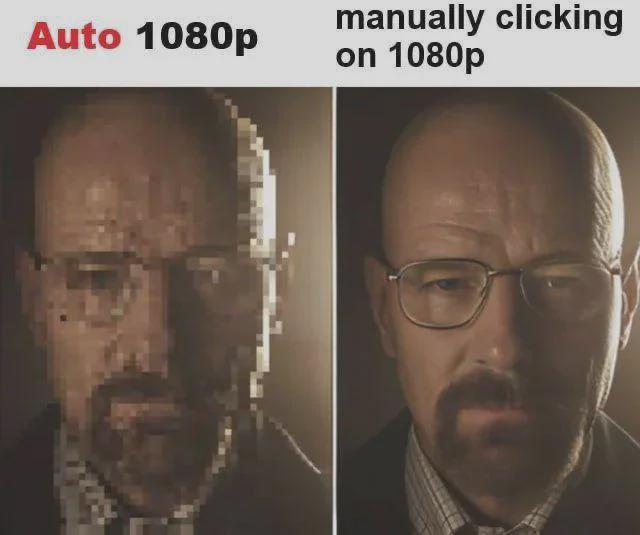
Well, with auto the quality fluctuates, if you ever see this, I’m pretty sure you see it saying 108öp because it started loading it but it’s still playing the already buffered seconds at a lower quality. It will also try saving bandwidth, not for you but its own servers, with auto, so it will prefer lower quality and switching to it frequently even if for a moment at a time. Also, 1080p even if only a few frames are interjected at lower quality regularly would make it look worse but for how many videos they serve, it would save a lot of bandwidth, and as a result resources for them, that can also be one reason to the apparent quality loss, because it is quality loss but not enough to trigger the quality indicator switching. At least that’s what I think, but I never watch videos on auto so I don’t actually see this ever happen.
I use the Enhancer for YouTube extension.
You can set whatever resolution you want, and it has a shit-ton of other options too for all sorts of other stuff, like converting Shorts back into normal videos, etc..
just use browser extensions for pc
I miss when you could let an entire video buffer if you had shit internet then watch it after like ten minutes
I play on 1440 to get decent 1080p clarity
Am I not the only one doing it? Damn.
There is a team working hard right now to get us to accept watching an ad when it switches over too.
Enhancer for Youtube does the equivalent of clicking a resolution manually every time. That and many other add-ons.
https://tenor.com/view/i-hate-this-i-hate-this-fucking-shit-sopranos-tony-soprano-gif-27638088
It’s called adaptive bitrate streaming, it will try to get best quality on auto as it can given your network and computer resources. Starting off it is a lower quality to preserve playback for the video.
When you manually select auto, there is a slight delay to load but then because you waited you get the higher quality content you wanted.
YouTube Auto HD plugin for chromium browsers.
[https://github.com/avi12/youtube-auto-hd](https://github.com/avi12/youtube-auto-hd)
left is the video, right is the ads
360p + RTX Video Super Resolution because my network is ass
there’s extensions for this on firefox. install one and you can stop worrying abou tthis hehe
https://i.redd.it/7a43pj4098ff1.gif
I’m glad this is a universal experience.
I know this is PCMR, but is there a way to have my videos on my phone default to 1080p? I’m constantly having to manually change it for every video I watch.
I have the setting on Higher Pocture Quality already, but.. it doesn’t work. Sometimes my videos will be on 360, 480, or 720. It feels like YouTube is just throwing a dart
why the hell is the first comment on this subreddit a 5 page bot post
Relatable so annoying about this
Hate feels like a strong reaction
I got an extension installed that automatically sets all YouTube videos to 1080p or 1440p if available. Really useful.
I’m fcking looking at you, Youtube!
I bet it’s to save on data throughput, some people will probably not notice. I don’t think it’s okay to do that though, they should just name it “auto” and don’t display a specific resolution beside it
Youtube has reduced the quality of their videos again. There is no difference now between 1080p and 720p. Try it out on a few videos for yourself. They have reduced the bitrate of 1080p videos so much, that it is now identical to a 720p resolution. I bet they are also doing the same thing with their subscriptions.
In a few years time we will be watching 480p videos crammed into a 1080p label. All this to save costs, cheat the customer and increase profits every year.
Netflix, disney plus and other movie streaming services have also been doing the same. They’ve been progressively increasing the cost of subscriptions, while offering less and less.
it eases server load.
It takes me about 20 extensions to browse the web and use youtube anymore.
There’s a few extensions that will let you lock the quality. Google lowers it automatically to save money on bandwidth.