I would get 32gigs of ram instead of 16, only if its possible in your budget
Away-Situation6093
Is that 9060 XT an 16 GB model?
ainbelieveinus
Very nice
LincolnArc
Go for 32Gb of RAM and make sure that you get a 16Gb graphics card. Modern AAA games need a lot of memory.
Head_Oil_2586
32gbs of ram and swap the CPU to the 7600X3D cause it’s better value and you’ll be happy AF
TheMostToasted1
OP that is not the 16gb model 9060xt and at $369 is a huge rip off make sure you get the 16gb one, will all taxes and what not the one on Newegg cost me about 420(oh yeah🔥) and that’s for the 16gb version
Also for Newegg you can do a payment plan through PayPal and they cover the entire cost and you pay nothing upfront for the graphics card or anything Newegg has if that cost is to much right away, I did it for mine and paid it off in a week so my interest was like $1.20 but it was great since I didn’t have that much all at once.
bakuonizzzz
make sure the gpu is 16gb version, upgrade the 16gb ram to 32gb and check what CAS latency it is, if it’s 30 that would best if it’s 36-38 it’s still acceptable if it’s cheap.
I would suggest a ATX case for extra 10-20bucks if they have one because just think of it interms of it being future proofing because say you want a ATX board in the future or you want a longer gpu, you get a ATX case now you won’t need to swap it out later.
Everything else looks to be in good order though what is that teamgroup T-force vulcan z?
allinvaincoder
w dad
yeaidkwhatname
Fairly good imo. I would say like someone else said to get 32gb instead of 16 as games take lots these days.
Plus always room for additions and upgrades in the future if wanted
Add: also make sure it’s probably 16gb graphics card, can get away with 12gb tbh. Just for future proof ect. But it comes back to what I said earlier. Can upgrade in the future
WelderEquivalent2381
You would consider the 7700k bundle for 350$. it’s come with 32 gb. Fairly vastly better value. It’s not stretching the budget much.
Also i am not fan on 4to Sata SSD one, You can get nvme for cheaper or similarly priced that are 5 time faster. and increasing the number of nvme will help with nvme having to do alot of heavy writting affecting speed as thier buffer cache get busy.
And you would split your data as much as possible to avoid lost everything in one shot if something happen.
The MSI nvme just end up being the top value atm on PCpartpicker.
The Lancool 207 is one of the best value/Best Out of the box thermal. Not that much more expensive. https://youtu.be/2RytD3xII-0
I also picked a better quality PSU, Corsair as also fixed normally the problem that the First batch of RM750e had so its a easy pick, no clicky noise anymore. While the MSI PSU is still known to have a really noisy bearing on the fan as their use veeerryy cheap fan.
A singly 7% budget increase.
tomchee
that mother board is waaaaaaaay too expensive for this build.
unless it includes the CPU and ram.
DangleNate115
Dude if your gunna buy something from micro center might as well get a bundle!! Save you some money
Don’t forget additional fans for the case. It looks like that case only comes with 1 rear 120mm fan. At least add 2 fans in the front – 2x 140’s since they’ll fit and give you more airflow than 2x 120’s.
razvanciuy
Do it Colby!
Not sure on that storage; its expensive, you can get away for gaming with a SATA SSD 2Tb drive bay and ditch that $$$ 2tb drive, keep the 50$ pci-e ssd for windows and main and get 32gb instead.
Sysipho
Given the budget it looks like it’s well balanced. I would suggest a single stick 16GB RAM stick so that you can upgrade to 32GB dual channel later on. The 1TB M.2 for 50$ makes me wonder if it’s SATA.. I would go with an Nvme for the boot drive, it’s worth the extra cost.
devilsaint86
You have money to pitch in or he doing it all?
BoiCDumpsterFire
There’s some better motherboards you can get for the same price. ASUS hasn’t been having the best luck lately and $300 is pretty steep for a b650. You could get a tomahawk or mortar for almost half the price and that would give you room to do the 32GB of RAM and 16GB 9060xt everyone is suggesting.
Awkward-Magician-522
16gb 9060xt is much better, and get 32gb of ram, other then that your dad pretty much made the meta build
That said… RAM should be 32GB.
You probably don’t need 2 NVME drives for gaming. I’d go with the 1x4TB unit.
You’re heavily overshooting your power requirement: you should have a max 20% pad on top if the requirement, not ~50%, although, the minimum it seems you can get is 650-700ish watts, so… eh…
Also, don’t forget Keyboard/Video/Mouse.
For what it’s worth, I would invest in those FIRST as a quality of life purchase. Seriously, don’t overlook these because they’re your most tangible connections to the computer, so make these good, solid purchases.
LeRonBrames_
If you can save up a bit more, I’d stretch for a 7600X3D.
The_great_twat
Just my 2 cents but I’d get an ATX case with a bit extra room – you won’t notice squat right now but if you build a new PC or upgrade this one in the future it will be a massive help.
riesen_Zinken
GHG
Xeadriel
Why 16 gb ram?
Looks good. Though I’d probably get a cheaper mobo. DDR4 is probably still fine for the next decade.
And for the GPU personally id rather get a used 3080ti as that has more way more raw power and is still in the similar price range.
PotatoFarmer44
1. 32gb of RAM. G-Skill Flare 6000mhz kits are cheap. Don’t try for 4 sticks or think you can just slap another 16gb kit in later… modern boards don’t play nice with 4 sticks of RAM.
2. 16gb gpu… do NOT get anything lower. I’d recommend the 9070xt over the 9060xt if you can spare a bit more cash… but at that point, I’d also be telling you to look for a 7600x3d/mobo combo as well.
Commercial_Run_7759
Solid build. 32gig so you don’t need an upgrade anytime soon.
Edit: or don’t use Chrome 😂
althaz
Make sure that’s the 16Gb graphics card. If it’s the 8Gb, *HARD* pass. 8Gb cards should never cost you more than $150 because they are often problematic in modern AAA games.
I also generally suggest people buy the Ryzen 7600 instead of the 7600X, performance is basically the same and the 7600 is cheaper and comes with a cooler – usually that can save you USD$60.
I would also recommend going to 32Gb of RAM. 16Gb is ok in most games, but the price difference is pretty minimal and if you’re using a PC you’ll almost certainly end up running a bunch of stuff at once.
Sett_86
I would ditch the 9060 and get much better used GPU instead, but otherwise it’s a very respectable build for the money.
The second SSD might not be necessary, depending on your use case.
SoonToBeMarried43
lol
deceptivekhan
Spend the extra for the X3D variant of the CPU, it’s worth it.
hampterpowr
It it pretty good, your dad knows his sh*t
SweetLavenderFawn
ASRock for gpu? I dunno….
Muldinski
its pretty good value, also 1st thing is make sure the 9060 XT is the 16gb model and not the 8gb model, and i would also change the 16gb to 32gb ddr5 because most modern games couldn’t even handle 16gb anymore, plus windows in general can’t even handle 16gb anymore thanks to all the useless bloatware they install on your system
Tiavor
Is everyone in the US typically buying that many parts from Amazon? Make sure to film everything when opening the packages, US Amazon and even Newegg have problems with sending returns as new wares without checking them.
Year3030
Get a Samsung Evo Pro for your SSD(s) you can’t go wrong. It’s hands down one of the fastest and it looks like you have a few options. I have tried many different SSDs and these are by far some of the fastest and best built ones on the market. They have sizes in your price range.
Tuned_Out
Great system for under $800. Just don’t go for the 8gb 9060xt if that’s the model.
The only two changes id make that offer HUGE performance benefits and way longer lifespan for the PC and for little added cost are the 16gb version of the 9060xt and 32gb of ram. If you have to choose between the two, the 16gb of vram matters the most.
sleepinfinit
why is the motherboard so expensive?
CanadianTimeWaster
just make sure you get the 16gb 9060 xt
jermygod
Its ok
JustAanimeNerd2
Just go with 32gb of ram, and spend less on the motherboard.
LimesFruit
Only real change I’d make is getting 32GB RAM. Also is the GPU the 16GB version? If not you’ll want that instead of the 8.
Existing-Network-267
Careful the sum mentioned doesn’t include the the 300 dollar bundle
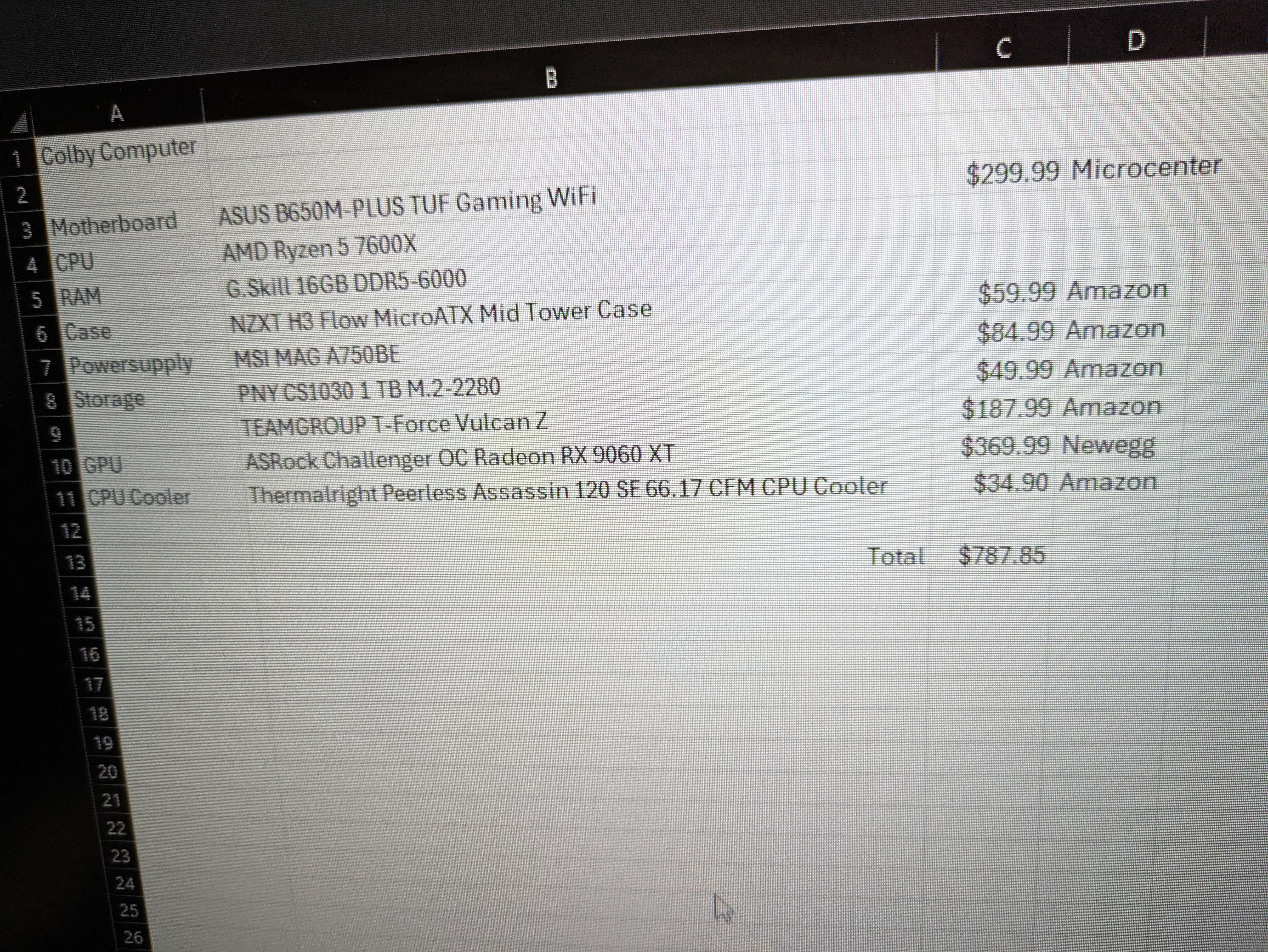

43 Comments
I would get 32gigs of ram instead of 16, only if its possible in your budget
Is that 9060 XT an 16 GB model?
Very nice
Go for 32Gb of RAM and make sure that you get a 16Gb graphics card. Modern AAA games need a lot of memory.
32gbs of ram and swap the CPU to the 7600X3D cause it’s better value and you’ll be happy AF
OP that is not the 16gb model 9060xt and at $369 is a huge rip off make sure you get the 16gb one, will all taxes and what not the one on Newegg cost me about 420(oh yeah🔥) and that’s for the 16gb version
Also for Newegg you can do a payment plan through PayPal and they cover the entire cost and you pay nothing upfront for the graphics card or anything Newegg has if that cost is to much right away, I did it for mine and paid it off in a week so my interest was like $1.20 but it was great since I didn’t have that much all at once.
make sure the gpu is 16gb version, upgrade the 16gb ram to 32gb and check what CAS latency it is, if it’s 30 that would best if it’s 36-38 it’s still acceptable if it’s cheap.
I would suggest a ATX case for extra 10-20bucks if they have one because just think of it interms of it being future proofing because say you want a ATX board in the future or you want a longer gpu, you get a ATX case now you won’t need to swap it out later.
Everything else looks to be in good order though what is that teamgroup T-force vulcan z?
w dad
Fairly good imo. I would say like someone else said to get 32gb instead of 16 as games take lots these days.
Plus always room for additions and upgrades in the future if wanted
Add: also make sure it’s probably 16gb graphics card, can get away with 12gb tbh. Just for future proof ect. But it comes back to what I said earlier. Can upgrade in the future
You would consider the 7700k bundle for 350$. it’s come with 32 gb. Fairly vastly better value. It’s not stretching the budget much.
Also i am not fan on 4to Sata SSD one, You can get nvme for cheaper or similarly priced that are 5 time faster. and increasing the number of nvme will help with nvme having to do alot of heavy writting affecting speed as thier buffer cache get busy.
And you would split your data as much as possible to avoid lost everything in one shot if something happen.
[PCPartPicker Part List](https://pcpartpicker.com/list/R6PDv4)
Type|Item|Price
:—-|:—-|:—-
**CPU Cooler** | [Thermalright Phantom Spirit 120 SE 66.17 CFM CPU Cooler](https://pcpartpicker.com/product/GpbRsY/thermalright-phantom-spirit-120-se-6617-cfm-cpu-cooler-ps120se) | $35.90 @ Amazon
**Storage** | [MSI SPATIUM M480 PRO 1 TB M.2-2280 PCIe 4.0 X4 NVME Solid State Drive](https://pcpartpicker.com/product/xVDQzy/msi-spatium-m480-pro-1-tb-m2-2280-pcie-40-x4-nvme-solid-state-drive-s78-440l1g0-p83) | $64.99 @ MSI
**Storage** | [MSI SPATIUM M461 2 TB M.2-2280 PCIe 4.0 X4 NVME Solid State Drive](https://pcpartpicker.com/product/9vfxFT/msi-spatium-m461-2-tb-m2-2280-pcie-40-x4-nvme-solid-state-drive-spatium-m461-2tb) | $89.99 @ MSI
**Storage** | [MSI SPATIUM M461 2 TB M.2-2280 PCIe 4.0 X4 NVME Solid State Drive](https://pcpartpicker.com/product/9vfxFT/msi-spatium-m461-2-tb-m2-2280-pcie-40-x4-nvme-solid-state-drive-spatium-m461-2tb) | $89.99 @ MSI
**Video Card** | [XFX Swift OC Radeon RX 9060 XT 16 GB Video Card](https://pcpartpicker.com/product/DRYfrH/xfx-swift-oc-radeon-rx-9060-xt-16-gb-video-card-rx-96tsw16bq) | $359.99 @ Newegg Sellers
**Case** | [Lian Li Lancool 207 ATX Mid Tower Case](https://pcpartpicker.com/product/zysV3C/lian-li-lancool-207-atx-mid-tower-case-lan207rx) | $81.99 @ Amazon
**Power Supply** | [Corsair RM750e (2025) 750 W Fully Modular ATX Power Supply](https://pcpartpicker.com/product/jfHp99/corsair-rm750e-2025-750-w-fully-modular-atx-power-supply-cp-9020295-na) | $99.99 @ Amazon
**Custom**| MicroCenter 7700k bundle| $350.00
| *Prices include shipping, taxes, rebates, and discounts* |
| **Total** | **$1172.84**
| Generated by [PCPartPicker](https://pcpartpicker.com) 2025-07-23 23:18 EDT-0400 |
The MSI nvme just end up being the top value atm on PCpartpicker.
The Lancool 207 is one of the best value/Best Out of the box thermal. Not that much more expensive.
https://youtu.be/2RytD3xII-0
I also picked a better quality PSU, Corsair as also fixed normally the problem that the First batch of RM750e had so its a easy pick, no clicky noise anymore. While the MSI PSU is still known to have a really noisy bearing on the fan as their use veeerryy cheap fan.
A singly 7% budget increase.
that mother board is waaaaaaaay too expensive for this build.
unless it includes the CPU and ram.
Dude if your gunna buy something from micro center might as well get a bundle!! Save you some money
You can upgrade your case for 10 dollars more at microcenter H7 Flow (white) 2024 is 70.
https://www.microcenter.com/product/678467/nzxt-h7-flow-(2024)-tempered-glass-atx-mid-tower-computer-case-white
Don’t forget additional fans for the case. It looks like that case only comes with 1 rear 120mm fan. At least add 2 fans in the front – 2x 140’s since they’ll fit and give you more airflow than 2x 120’s.
Do it Colby!
Not sure on that storage; its expensive, you can get away for gaming with a SATA SSD 2Tb drive bay and ditch that $$$ 2tb drive, keep the 50$ pci-e ssd for windows and main and get 32gb instead.
Given the budget it looks like it’s well balanced. I would suggest a single stick 16GB RAM stick so that you can upgrade to 32GB dual channel later on. The 1TB M.2 for 50$ makes me wonder if it’s SATA.. I would go with an Nvme for the boot drive, it’s worth the extra cost.
You have money to pitch in or he doing it all?
There’s some better motherboards you can get for the same price. ASUS hasn’t been having the best luck lately and $300 is pretty steep for a b650. You could get a tomahawk or mortar for almost half the price and that would give you room to do the 32GB of RAM and 16GB 9060xt everyone is suggesting.
16gb 9060xt is much better, and get 32gb of ram, other then that your dad pretty much made the meta build
You can get a [much nicer power supply](https://pcpartpicker.com/product/sqbypg/montech-century-ii-850-w-80-gold-certified-fully-modular-atx-power-supply-century-ii-850w) with double the warranty and better efficiency for $5 more.
You can use a site like [PCPartpicker.com](http://PCPartpicker.com) to price out the build.
What I have is here, but it doesn’t have the Microcenter bundle. [https://pcpartpicker.com/list/Pctd74](https://pcpartpicker.com/list/Pctd74)
That said… RAM should be 32GB.
You probably don’t need 2 NVME drives for gaming. I’d go with the 1x4TB unit.
You’re heavily overshooting your power requirement: you should have a max 20% pad on top if the requirement, not ~50%, although, the minimum it seems you can get is 650-700ish watts, so… eh…
Also, don’t forget Keyboard/Video/Mouse.
For what it’s worth, I would invest in those FIRST as a quality of life purchase. Seriously, don’t overlook these because they’re your most tangible connections to the computer, so make these good, solid purchases.
If you can save up a bit more, I’d stretch for a 7600X3D.
Just my 2 cents but I’d get an ATX case with a bit extra room – you won’t notice squat right now but if you build a new PC or upgrade this one in the future it will be a massive help.
GHG
Why 16 gb ram?
Looks good. Though I’d probably get a cheaper mobo. DDR4 is probably still fine for the next decade.
And for the GPU personally id rather get a used 3080ti as that has more way more raw power and is still in the similar price range.
1. 32gb of RAM. G-Skill Flare 6000mhz kits are cheap. Don’t try for 4 sticks or think you can just slap another 16gb kit in later… modern boards don’t play nice with 4 sticks of RAM.
2. 16gb gpu… do NOT get anything lower. I’d recommend the 9070xt over the 9060xt if you can spare a bit more cash… but at that point, I’d also be telling you to look for a 7600x3d/mobo combo as well.
Solid build. 32gig so you don’t need an upgrade anytime soon.
Edit: or don’t use Chrome 😂
Make sure that’s the 16Gb graphics card. If it’s the 8Gb, *HARD* pass. 8Gb cards should never cost you more than $150 because they are often problematic in modern AAA games.
I also generally suggest people buy the Ryzen 7600 instead of the 7600X, performance is basically the same and the 7600 is cheaper and comes with a cooler – usually that can save you USD$60.
I would also recommend going to 32Gb of RAM. 16Gb is ok in most games, but the price difference is pretty minimal and if you’re using a PC you’ll almost certainly end up running a bunch of stuff at once.
I would ditch the 9060 and get much better used GPU instead, but otherwise it’s a very respectable build for the money.
The second SSD might not be necessary, depending on your use case.
lol
Spend the extra for the X3D variant of the CPU, it’s worth it.
It it pretty good, your dad knows his sh*t
ASRock for gpu? I dunno….
its pretty good value, also 1st thing is make sure the 9060 XT is the 16gb model and not the 8gb model, and i would also change the 16gb to 32gb ddr5 because most modern games couldn’t even handle 16gb anymore, plus windows in general can’t even handle 16gb anymore thanks to all the useless bloatware they install on your system
Is everyone in the US typically buying that many parts from Amazon? Make sure to film everything when opening the packages, US Amazon and even Newegg have problems with sending returns as new wares without checking them.
Get a Samsung Evo Pro for your SSD(s) you can’t go wrong. It’s hands down one of the fastest and it looks like you have a few options. I have tried many different SSDs and these are by far some of the fastest and best built ones on the market. They have sizes in your price range.
Great system for under $800. Just don’t go for the 8gb 9060xt if that’s the model.
The only two changes id make that offer HUGE performance benefits and way longer lifespan for the PC and for little added cost are the 16gb version of the 9060xt and 32gb of ram. If you have to choose between the two, the 16gb of vram matters the most.
why is the motherboard so expensive?
just make sure you get the 16gb 9060 xt
Its ok
Just go with 32gb of ram, and spend less on the motherboard.
Only real change I’d make is getting 32GB RAM. Also is the GPU the 16GB version? If not you’ll want that instead of the 8.
Careful the sum mentioned doesn’t include the the 300 dollar bundle