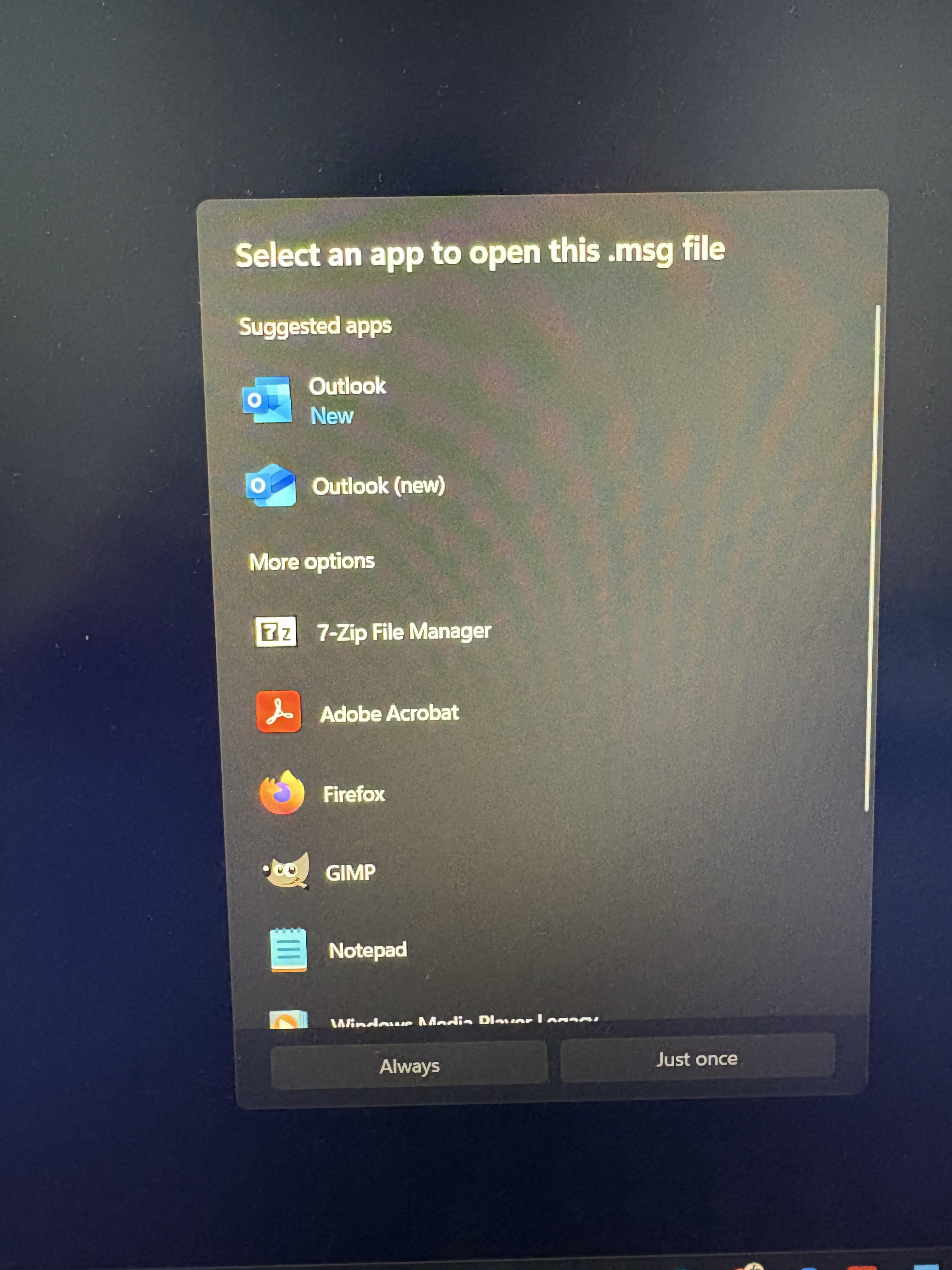
The new one is new. Not the one marked as new. New means new, but not as new as the new one. That said, make sure you don’t accidentally click the one that is telling you it’s new. The other one (the new one) is the new one.
Glad to help clear that up.
No_Tackle_5439
2nd
Away-Situation6093
Outlook(new)
Electrical_Crew7195
Microsoft is such garbage, you would think that working 9 hours a day on windows would make me a subject matter expert yet these things happen to me all the time
G952
Release the new new Microsoft cowards!
jljl2902
Outlook (new) is the newer version; you can verify by the 2024 version of the logo. Outlook marked with New is the newer installation, but an older version; it has the 2018-??? logo.
t9tu
Uninstall all of Outlook, install the pwa of Outlook.
133DK
Guys, it’s a joke, OP isn’t actually soliciting advise lol
ss99838
The one with orange and purple logo.
G3nghisKang
Blue new means app has been installed recently, new in the name means it’s the updated version
maikel87
Maybe they should add some more options to make it more clear, newer and newest.
EastAd3697
Outlook New has a web based interface that comes with a few limitations to features.
Outlook classic is the one above much better to work with.
Termiborg
Outlook (new): The one based on the web interface, standalone software (uninstall it, it’s awful).
Outlook new: The newly installed Outlook, as part of Office, with the “traditional” UI.
New one is running web based over Edge browser. Its garbage. Stick to outlook classic for peace of mind.
the_ebastler
(new) is the new version of outlook, as you can see by the new 2024 logo. The other has recently been installed, that’s why it is subbed as new, but it’s the legacy outlook. They keep both around as business customers get upset when their favorite software changes, so they gotta keep the old one too.
NewManufacturer4252
7 zip gimp and notepad covers all the bases
dbigb
Never name anything “new”. Just don’t do it.
And I’m looking at you too the NT kernel.
Reminds me of where I used to work. We would have forms available on our intranet and whenever a new one was added it was named “new”.
Whenever a form was updated, it was named “updated.”
They NEVER removed the new/updated from the file name. There were forms that had been in place for 10+ years that were apparently still “new.”
I asked, and tried, to get that changed (because it was just stupid) but the companies policies (which were extensive, and also fucking stupid) did not permit.
(Someone, purely to highlight how stupidly extensive and ridiculous the policies and procedures were, once printed them all out for a presentation. It took 6 boxes, 30,000 damn sheets of paper printed on both sides, to print them all out.)
phileasuk
The blue new.
Trans-Europe_Express
Yes (yes)
xXPiLeDrIvErXx
You will know once MS stops harassing you to switch
Sampsa96
Outlook Classic is the better option 🙂
CrowLoud
That one right there dude
Gabryoo3
Outlook (new) is the newer that is basically a web wrapper of Outlook, slow and with ads
Outlook with the “new” highlighting means that it was installed few moments before, but is Outlook with the Microsoft Office pack

33 Comments
lol
Probably the one that says (new)
Nice pic

the one thats new
The new one is new. Not the one marked as new. New means new, but not as new as the new one. That said, make sure you don’t accidentally click the one that is telling you it’s new. The other one (the new one) is the new one.
Glad to help clear that up.
2nd
Outlook(new)
Microsoft is such garbage, you would think that working 9 hours a day on windows would make me a subject matter expert yet these things happen to me all the time
Release the new new Microsoft cowards!
Outlook (new) is the newer version; you can verify by the 2024 version of the logo. Outlook marked with New is the newer installation, but an older version; it has the 2018-??? logo.
Uninstall all of Outlook, install the pwa of Outlook.
Guys, it’s a joke, OP isn’t actually soliciting advise lol
The one with orange and purple logo.
Blue new means app has been installed recently, new in the name means it’s the updated version
Maybe they should add some more options to make it more clear, newer and newest.
Outlook New has a web based interface that comes with a few limitations to features.
Outlook classic is the one above much better to work with.
Outlook (new): The one based on the web interface, standalone software (uninstall it, it’s awful).
Outlook new: The newly installed Outlook, as part of Office, with the “traditional” UI.
Top one is classic version
Does it matter? Both as bad as each other
More like “usable” and “utter trash”.
https://preview.redd.it/a9mlzfbzxdef1.jpeg?width=3024&format=pjpg&auto=webp&s=8899d24a2de3967c1a9789a2f00252b2d660f1f6
New one is running web based over Edge browser. Its garbage. Stick to outlook classic for peace of mind.
(new) is the new version of outlook, as you can see by the new 2024 logo. The other has recently been installed, that’s why it is subbed as new, but it’s the legacy outlook. They keep both around as business customers get upset when their favorite software changes, so they gotta keep the old one too.
7 zip gimp and notepad covers all the bases
Never name anything “new”. Just don’t do it.
And I’m looking at you too the NT kernel.
Oh I hate that so much. DO ONE FUCKING APP.
outlook-v1.5-final-final-release-v1.5.89-final.exe
Reminds me of where I used to work. We would have forms available on our intranet and whenever a new one was added it was named “new”.
Whenever a form was updated, it was named “updated.”
They NEVER removed the new/updated from the file name. There were forms that had been in place for 10+ years that were apparently still “new.”
I asked, and tried, to get that changed (because it was just stupid) but the companies policies (which were extensive, and also fucking stupid) did not permit.
(Someone, purely to highlight how stupidly extensive and ridiculous the policies and procedures were, once printed them all out for a presentation. It took 6 boxes, 30,000 damn sheets of paper printed on both sides, to print them all out.)
The blue new.
Yes (yes)
You will know once MS stops harassing you to switch
Outlook Classic is the better option 🙂
That one right there dude
Outlook (new) is the newer that is basically a web wrapper of Outlook, slow and with ads
Outlook with the “new” highlighting means that it was installed few moments before, but is Outlook with the Microsoft Office pack
Welll, printscreen is not new