
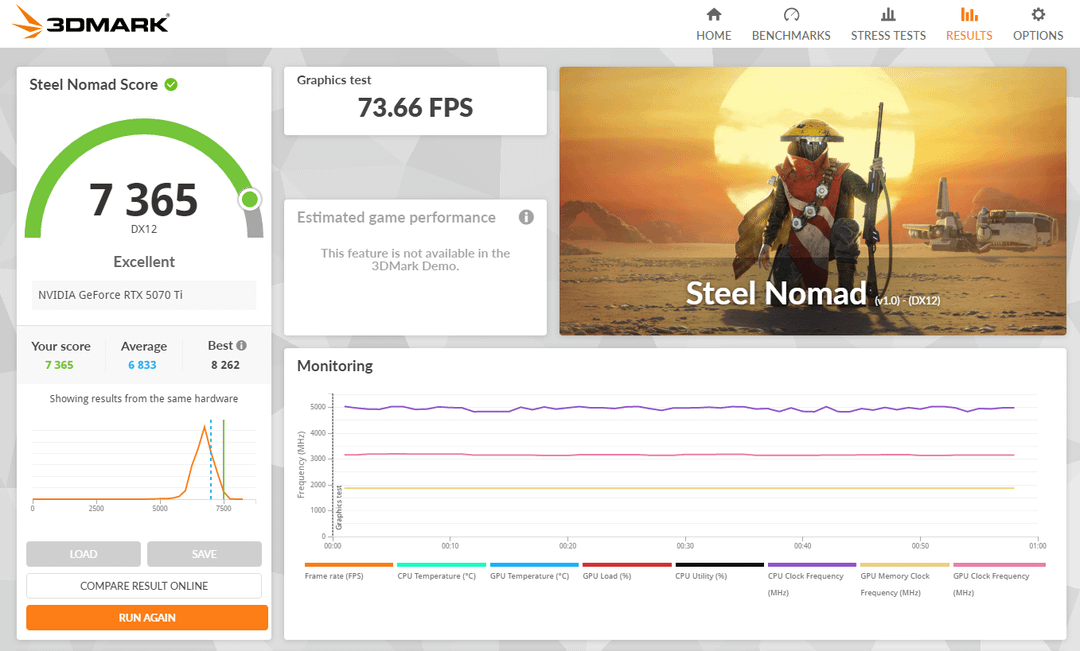
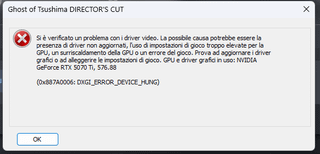
Hi everyone, I'm here to ask some help about OC my PNY 5070 Ti Epic-X OC since I managed to get a stable Mem Clock +1000MHz and Core +300MHz (with TempLim 110% to sustain at 330W max) and Steel Nomad Works.
After that I've tested some games and GoT, Cyberpunk etc. crashed after 5-10 minutes of gameplay.
I've tried to boost the OC a little more at +1500/350MHz and ten Steel Nomad crashed, games have black screen or got more errors etc.
How could I achieve a better stable result since even a little overclock seems to be unstable for the driver?
This GPU is awesome and has great capabilities to reach better results (since terms are good too) and someone get around 8000 score and better stability all around.
My custom GPU is even a good mid-top one, probably the best at MSRP, so why there are these problems?
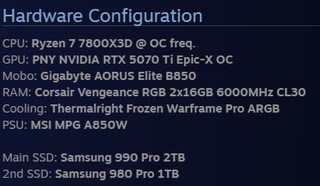
The hw of my PC are in the IMG as third screenshot, to be more specific for further help.
19 Comments
It’s lottery. You can’t do anything about it.
If your crashing in games your not stable.
Bump memory clocks to +3000mhz and you’ll get a higher score. Stable on most 50 series cards
Also, you might get better results from overlocking via the voltage curve as opposed to using the slider.
I ran a OC on mine ASUS 5070ti Prime and have some experience. I don’t think your GPU is stable.
I’d run a few 3DMark no problem but would artifact and randomly crash in other GPU loads like Furmark and Games after.
My overall system is OC with a 5800X3D, I’ve had to drop my OC for both. As I’ve done that over some time the crashing has lessen. Takes time to find true stability, unless you’ve won silicon lottery.
Peel off OC on GPU core say 25mhz would be my suggestion as a start.
Turn to down to +200 and see if it helps.
I already tried rtx 5070ti aorus/ 5080 fe and 5080 inno 3d gaming oc im my pc. All those cards working stable with +350 core + 3000 vram. Games/Stress tests/ benchmarks passed with any errors) you should check drivers and try clean installation. And use msi afterburner
My 5080 is stable at memm +3000 core +325. 350 isnt stable enough so went abit down to 325. Now stable for 4 months No crashes.
Time spy 36282 graphic score
9750 Steel nomad
Buy a 4080 super aero OC 👍🏻
Have you overclocked your system ram by any chance? Modern games are more susceptible to this than vmem oc.
Considering the score is normally 6400-6600 for a 5070 ti you’re not going to hit 8000 without buying a 5080 lol. Your card already has a factory overclock you’ll just have to live with whatever the max stable clock is. Drivers aren’t going to make or break overclocking stability. Some drivers can affect the score but it’s usually not by much
If your games started crashing you should have pulled clock not added.
Games and benchmarks can present different types of loads, all that matters is you aren’t crashing in any type of load, otherwise its not stable.
I can do about +2550 on mem and +220 on clock with a 400w bios on a fully warmed up system before showing performance regression, this puts timespy at 31k for me.
(vedo che sei italiano quindi rispondo così) ho anche io una 5070ti che è stabile fino ai +375/3000 (con la mod di afterburner) considerando i +135 che ha a stock essendo una TUF, ma fidati, lo sweet spot è 2950@0.900-0.930mV. +5% circa sullo stock, anche di più quando bandwidth limited. I +350 sono un ulteriore 2-4% e 50W. E non sarai mai stabile in tutti i giochi, alcuni come The Finals, Control e altri crashano con il minimo OC apparentemente stabile ovunque.
2000 and 300 core should work no problem or mby you could try with voltage OC and see if it stabilizes it
I would be happy with your score. My 5070Ti paired up with a 9800X3D only pulls 7500. That’s with +400 and +2000. You are almost getting that at +350 +1000.
I wonder why yours says excellent at 7365, but my 9070xt says good at 7348-7395.
If 300 doesn’t work for games you’re not stable. Keep memory at 1500 or 2000. Reduce you core clock to 275 then to 250 until you no longer crash during synthetic and in-game.
Are you adjusting the voltage curve at all? I found that my card crashes at certain voltages/power draw. I’m running stable at just under 7500 currently, undervolted/overclocked. It’s running under 300W at peak currently, with temps maxing out at 72* C.
Mine crashed during OC testing when my voltage spiked trying to hit a frequency, so you might be able to get some stability by undervolting and targeting the same clock frequency if you haven’t tried that yet.
It might just be the silicon lottery. I have a Gigabyte Windforce SFF (non-OC) and did a quick undervolting test. Right now, I’m running +550 MHz (~3000 MHz) on the core at 0.900mV, and +2000 MHz on the memory. I’ve been playing Expedition 33 and Oblivion Remastered maxed out at 1440p for a couple of hours without any errors.
Flash the aorus master vbios to give yourself some more voltage headroom.
Gives you power limit all the way up to 400W.