It’s pretty useful. The vast majority of PC users barely know how to press the power button. Stuff like that really helps them. It’s pointless for minority that knows how to use and maintain a PC.
GDog507
“Lower your refresh rate” absolutely NOT, I paid EXTRA to have my 165hz display, why in the FUCK would I throttle my monitor I paid extra for?
Ferro_Giconi
Settings that automatically save me a bit of money on the energy bill when I neglect to turn my PC off for the night aren’t useless.
air__vent
The settings in windows 10 were better to navigate through
YKS_Gaming
the hypocrisy when windows modern standby(s0 sleep) kills way more laptop’s batteries in a backpack
Thenijiway183
My entire 1500w setup now down to 1480w after I turned on all the energy saver recommendations from windows
asamson23
It’s useful for when I keep my laptop to the best energy efficiency mode and it somehow keeps reverting to higher power levels
wigneyr
Idk, dark mode is pretty top tier
Bert-63
I tik max performance in every available spot. Am I wrong?
UnsettllingDwarf
Dark mode is goated tho
NovelValue7311
I try to make it go the lowest possible. My PC will not turn itself off. It just runs until I let it rest. Plus it has 140w CPU…
Intelligent_Ease4115
It’s crazy to me there’s still people who don’t use dark mode.
10ToSfromaSRBalloon
It makes me so angry
Merecat-litters
Turn on Dark Mode is still useful!
vaikunth1991
It’s good for laptops. Not for PCs
flappers87
What’s wrong with this exactly?
This just screams “give me fake internet points for a circlejerk”.
You’ve literally gone into the energy savings recommentations… getting recommendations on how to save energy and you’re complaining?
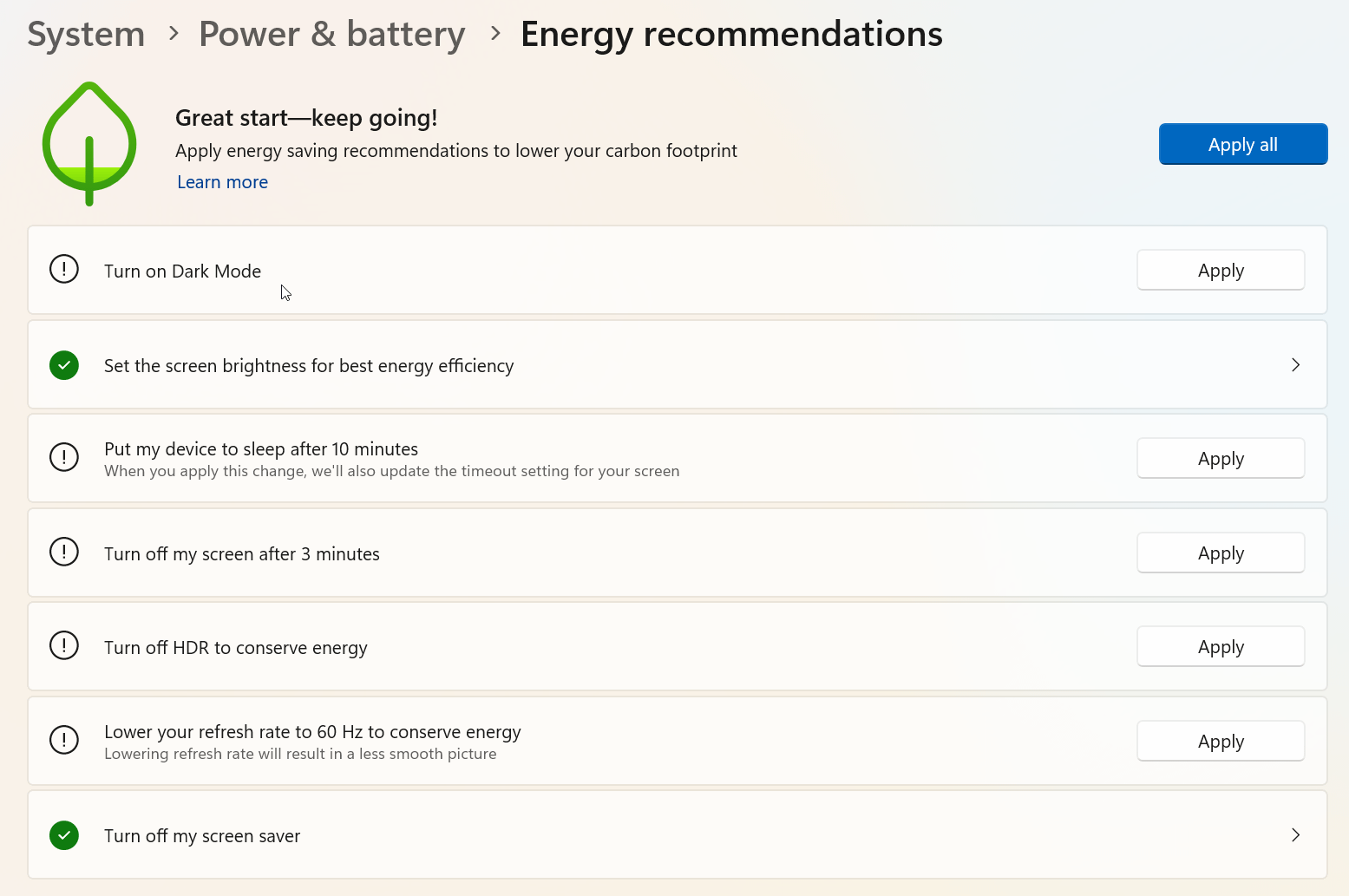
1. Turn on Dark Mode – this reduces the brightness output of your monitors, reducing the amount of power required. It makes sense. Also… not using dark mode in 2025? Really?
2. Setting screen brightness – again, self explanatory. Lower screen brightness = less energy usage.
3. Putting device to sleep after 10 minutes – of course this will save energy, since the power pulled from the PSU while in sleep mode is minimal.
4. Turn off HDR – again, self explanatory. HDR does consume more energy.
5. Lower refresh rate – Yes, this does conserve energy. If you’re on a page asking “how do I conserve energy”, reducing the refresh rate conserves it. It’s like on a mobile device… if you have a 120hz screen and put the phone into battery saving mode, the refresh rate will drop to 60hz to conserve battery. It’s no different on a laptop/ PC.
6. Turn off screensaver – who the fuck is using a screensaver these days? But this is related to point 1,2 and 3. You put your device to sleep instead of using a screensaver, which keeps your PC active.
All of these are *valid* energy saving recommendations. What the fuck are you going on about OP?
There’s on additional point in that list that should be added: Turn off your PC when you’re not using it.
neutralityparty
Too bright
balderm
600w GPU goes brrrrr
u4ea126
Also Microsoft: Forces Copilot in every nook and cranny they can find, using 1000x more energy than all these settings combined.

21 Comments
OP is projecting. This is not useless ffs.
It’s pretty useful. The vast majority of PC users barely know how to press the power button. Stuff like that really helps them. It’s pointless for minority that knows how to use and maintain a PC.
“Lower your refresh rate” absolutely NOT, I paid EXTRA to have my 165hz display, why in the FUCK would I throttle my monitor I paid extra for?
Settings that automatically save me a bit of money on the energy bill when I neglect to turn my PC off for the night aren’t useless.
The settings in windows 10 were better to navigate through
the hypocrisy when windows modern standby(s0 sleep) kills way more laptop’s batteries in a backpack
My entire 1500w setup now down to 1480w after I turned on all the energy saver recommendations from windows
It’s useful for when I keep my laptop to the best energy efficiency mode and it somehow keeps reverting to higher power levels
Idk, dark mode is pretty top tier
I tik max performance in every available spot. Am I wrong?
Dark mode is goated tho
I try to make it go the lowest possible. My PC will not turn itself off. It just runs until I let it rest. Plus it has 140w CPU…
It’s crazy to me there’s still people who don’t use dark mode.
It makes me so angry
Turn on Dark Mode is still useful!
It’s good for laptops. Not for PCs
What’s wrong with this exactly?
This just screams “give me fake internet points for a circlejerk”.
You’ve literally gone into the energy savings recommentations… getting recommendations on how to save energy and you’re complaining?
1. Turn on Dark Mode – this reduces the brightness output of your monitors, reducing the amount of power required. It makes sense. Also… not using dark mode in 2025? Really?
2. Setting screen brightness – again, self explanatory. Lower screen brightness = less energy usage.
3. Putting device to sleep after 10 minutes – of course this will save energy, since the power pulled from the PSU while in sleep mode is minimal.
4. Turn off HDR – again, self explanatory. HDR does consume more energy.
5. Lower refresh rate – Yes, this does conserve energy. If you’re on a page asking “how do I conserve energy”, reducing the refresh rate conserves it. It’s like on a mobile device… if you have a 120hz screen and put the phone into battery saving mode, the refresh rate will drop to 60hz to conserve battery. It’s no different on a laptop/ PC.
6. Turn off screensaver – who the fuck is using a screensaver these days? But this is related to point 1,2 and 3. You put your device to sleep instead of using a screensaver, which keeps your PC active.
All of these are *valid* energy saving recommendations. What the fuck are you going on about OP?
There’s on additional point in that list that should be added: Turn off your PC when you’re not using it.
Too bright
600w GPU goes brrrrr
Also Microsoft: Forces Copilot in every nook and cranny they can find, using 1000x more energy than all these settings combined.
It’S FoR tHe PlAnEt … *adds copilot key*