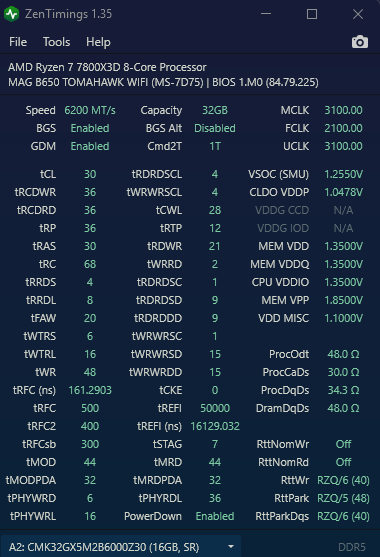
6200 runs perfectly fine but wanted to see if i could get to 6400 somehow.
any other tips like VSOC and FCLK settings is also appreciated, still unsure how it works tbh
any help is greatly appreciated

6200 runs perfectly fine but wanted to see if i could get to 6400 somehow.
any other tips like VSOC and FCLK settings is also appreciated, still unsure how it works tbh
any help is greatly appreciated
3 Comments
Buildzoid from the YT channel Actually Hardcore Overclocking is your best friend. You might be able to hit 6400 at up to 1.3 VSOC
In my personal opinion, if it’s struggling to reach 6400, you may get better results by tightening timings rather than pushing frequency. Heck you might even improve further at 6000 with even tighter timings. With Ryzen at least, latency is the biggest source of performance.
All that being said, you have an X3D chip. Memory speed matters a lot less for you in gaming than us non 3D plebians.
Set fclk to 1/3 of effective memory speed. So 2066 for 6200. 2133 for 6400. Otherwise it desyncs and gets you more bandwidth but worse latency. You need at least 100mhz over this ratio to offset the added latency, so 2166/2200 could be good for 6200mhz, but 2133/6400 is better if you can stabilize it. Or 2100-2200/6300. I recommend Y cruncher VT3 exclusively for stress testing IMC (fclk, uclk). Uclk is the memory controllers speed, which is optimal at 1:1 uclk:mclk. Or 1:2 if going 7800+. If you cant seem to stabilize higher uclk/fclk, try finetuning vsoc and iod voltages. More than necessary can also be bad for stability. Optimal iod is always less than vsoc, by about 10-20%.Write down how far each setting got you in Y cruncher before it errors and move it in the direction which gets you better results. You can try vsoc LLC, it can help because it stabilizes the voltage, try lesser values like 6-7-8. Procodt can also help and it also shifts optimal vsoc voltage. Run the test overnight if the PC does not bother you, I also recommend turning off stop on error because it runs the tests longer than the first error which will give you a better indication of stability (how many errors per x time).
[https://imgur.com/a/luHD1Sd](https://imgur.com/a/luHD1Sd)
Here are my setting try it out big dawg am at 1.53V and 1.28 soc its the maximum i can squeeze every timing if i drop by one it become unstable even voltage wise if i drop by 0.1 its unstable with these settings its rock stable