oh you’re one of these people that think cleaning the registry actually does something. you’re wasting your time with this. this was a small performance boost 20 years ago. nowadays even a million unnecessary registry keys don’t change a thing for your performance. there is a reason why these cleaning applications look so old.
mrAndy_B
Revo Uninstaller – use it to to uninstall and clean the leftovers.
asleeplongtime
what do you think this is doing to your computer?
AnalCoffeeCup
You should’ve seen the results of uninstalling Asus or Norton software. Also, you don’t need to do this.
Tvilantini
Isn’t mutually exclusive to EA. It all depends how the developer coded properly for uninstall. There is great youtube video that goes in detail of that part of procedure in terms of how to create program which will delete every extra file during uninstallation
HarryTurney
Take off the tinfoil hat buddy
Meatslinger
The Registry is basically just a garbage dump for programs to leave old data in.
But as the top-voted comment says, cleaning it doesn’t really do anything unless certain programs have old data that’s interacting poorly, like if something is mucking with the path to another program file. There’s often very little reason to go in there nowadays.
TheHeroYouNeed247
I’ve never trusted built-in uninstallers.
My go to is YourUninstaller, but there are many 3rd party programs that will do a clean uninstall and even set up restore points etc.
Hattix
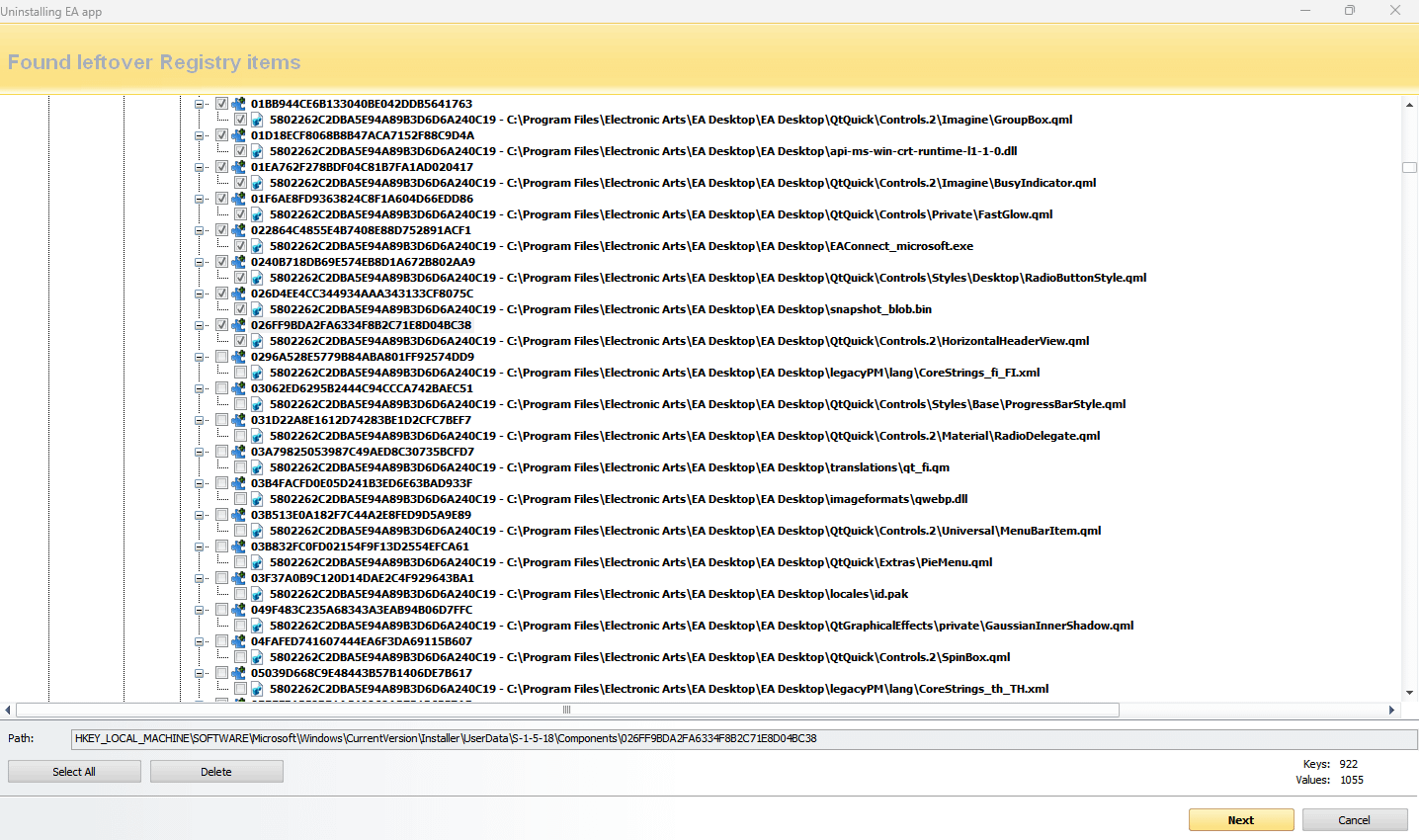
They’re not files, they’re just registry entries in the local system user profile.
There is absolutely nothing to gain from removing them.
Synthetic451
That’s just silly Windows-isms in general and not specific to EA. This is why leaving the task of uninstalling to be decided by each software vendor is a terrible, terrible idea that the entire PC industry has been saddled with for over two decades. It’s why you can’t even get clean GPU driver uninstalls unless you use a third party tool like DDU.
BinaryJay
“Files”
FartingBob
Every single program is allowed to do that to be fair.
csch1992
bro thinks it is still 2015
Ok_Afternoon9326
No shit if you using windows uninstaller😂😂
tihavasap
I uninstall with bcu for this reason. I know it doesnt have any benefit but i dont like programs leaving stuff behind.
If they dont have to be there, why should they be? Cleaning them helps my mild ocd and i get the illusion that im organized lol.
Plus dont like to leave trace of any program i use behind. I feel more private when i clean that.
PenX79
Use Revo uninstaller. Deletes all residue and registry files.
Still-Ad-3083
What do you mean “allowed”? That’s your computer buddy
Armandeluz
Stop buying their shit
Ok_Brilliant3947
Those are mostly trace files
QuantumQuantonium
The EA app is a crime against software and UX.
EA may get a lot more hate than they deserve in some aspects, but they deserve all the hate for this mess and disabling origin.
RetroFroggie
I pretty much only messed with the registry with Sims 2 files, because the registry files can cause one version to not work if another was installed (moving from disc to origin for example)
Wild to see what kind of graveyard EA makes of it
PuzzleheadedTutor807
Wdym allowed? Do you envision some enforcement agency for this lol?
itsLazR
Good god you guys are really scraping the bottom of the barrel to karma farm on “ea bad”

23 Comments
oh you’re one of these people that think cleaning the registry actually does something. you’re wasting your time with this. this was a small performance boost 20 years ago. nowadays even a million unnecessary registry keys don’t change a thing for your performance. there is a reason why these cleaning applications look so old.
Revo Uninstaller – use it to to uninstall and clean the leftovers.
what do you think this is doing to your computer?
You should’ve seen the results of uninstalling Asus or Norton software. Also, you don’t need to do this.
Isn’t mutually exclusive to EA. It all depends how the developer coded properly for uninstall. There is great youtube video that goes in detail of that part of procedure in terms of how to create program which will delete every extra file during uninstallation
Take off the tinfoil hat buddy
The Registry is basically just a garbage dump for programs to leave old data in.
But as the top-voted comment says, cleaning it doesn’t really do anything unless certain programs have old data that’s interacting poorly, like if something is mucking with the path to another program file. There’s often very little reason to go in there nowadays.
I’ve never trusted built-in uninstallers.
My go to is YourUninstaller, but there are many 3rd party programs that will do a clean uninstall and even set up restore points etc.
They’re not files, they’re just registry entries in the local system user profile.
There is absolutely nothing to gain from removing them.
That’s just silly Windows-isms in general and not specific to EA. This is why leaving the task of uninstalling to be decided by each software vendor is a terrible, terrible idea that the entire PC industry has been saddled with for over two decades. It’s why you can’t even get clean GPU driver uninstalls unless you use a third party tool like DDU.
“Files”
Every single program is allowed to do that to be fair.
bro thinks it is still 2015
No shit if you using windows uninstaller😂😂
I uninstall with bcu for this reason. I know it doesnt have any benefit but i dont like programs leaving stuff behind.
If they dont have to be there, why should they be? Cleaning them helps my mild ocd and i get the illusion that im organized lol.
Plus dont like to leave trace of any program i use behind. I feel more private when i clean that.
Use Revo uninstaller. Deletes all residue and registry files.
What do you mean “allowed”? That’s your computer buddy
Stop buying their shit
Those are mostly trace files
The EA app is a crime against software and UX.
EA may get a lot more hate than they deserve in some aspects, but they deserve all the hate for this mess and disabling origin.
I pretty much only messed with the registry with Sims 2 files, because the registry files can cause one version to not work if another was installed (moving from disc to origin for example)
Wild to see what kind of graveyard EA makes of it
Wdym allowed? Do you envision some enforcement agency for this lol?
Good god you guys are really scraping the bottom of the barrel to karma farm on “ea bad”