
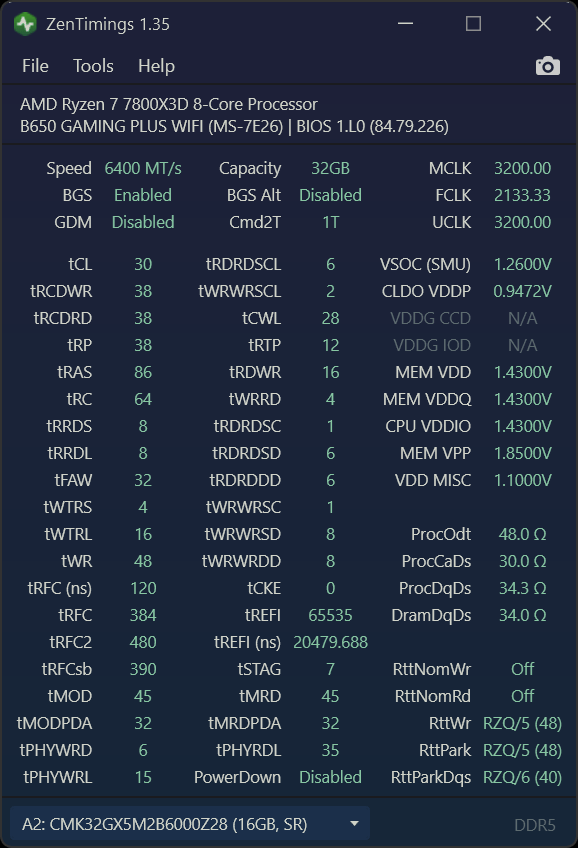
I recently got my hands on some A-die 6000CL28 memory and currently have it running at 6400CL30.
Honestly, I'm completely new to DDR5 tuning, so I've just been mixing and matching different settings. The good news is, my current setup survived 8 hours of Anta777 and is now cruising through Karhu with 10000% no errors so far!
Here are some of the settings I'm using:
- Nitro: 1/3/1
- GDM: Off
- PDM: Off
- Datascatter: Off
My 7800x3D is set to 120W TDP with PBO enabled (no CO).
I basically started with BZ's 6400MHz preset, but I ended up lowering some of his settings since they seemed a bit conservative. Any ideas or advice on things I might have missed?
1 Comment
You should use buildzoids 16 gigabytes hynix timings except keep vsoc where it is.
I’m not sure what you were using, but because your tfaw is at 32, you didn’t use his settings.
Any setting that you already have lower, just keep it at that.
This is impressively good btw. You are at the extreme upper limit of what AM5 can do.
Your next step is fmax +200 or +150, then minimizing curve optimizer per core.
Just redo the tests that you were doing for fmax +200 and add in linpack stress test.
Then for curve, set everything at -10 and let corecycler run overnight. If all good do -20 and so on.
Eventually you will get to the point where one of your cores starts crashing. Then you hard set that core at the higher number by +2. So if one crashes at -20 set it to -18.
You can get clock stretching so when you find the minimum co offset
Do a benchmark as is
Then raise each number by 2, and run it again.
Clock stretching is where the core is almost crashing so it doesn’t do a full clock cycle and it really wrecks performance so you’re gonna want to check this. You can use the Linpack and check Gigaflops. – 20 and – 16 isnt much performance so it’s more important to not clock stretch.
Man your computer is gonna fly.