
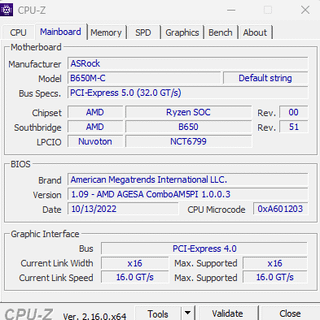
so, i just replaced my old AIO CPU cooler with this FAN and with the help of someone who actually knows pc's, installed it. It is installed correctly, the fan blows air into the radiator (sorry idk pc terms well), and i applied a good amount of thermal paste evenly. Yet my CPU is STILL running hot!! Please let me know what else I can do to fix this, I just want to play my games yet they are crashing, even Minecraft. They are soft crashing though, not restarting my whole pc.
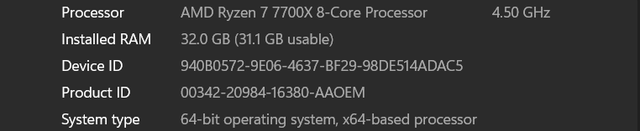
1st Pic- Pc info
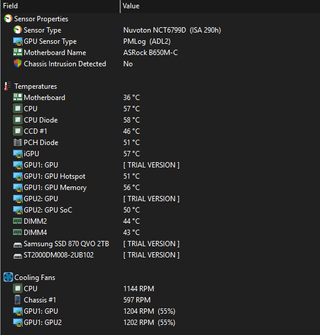
2nd pic- pc temps idle
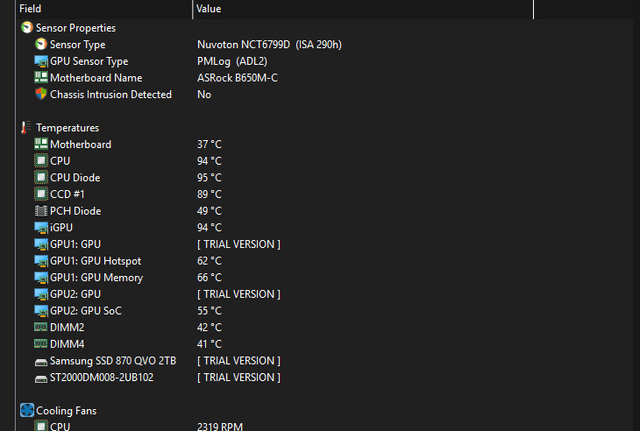
3rd pic- pc temps when running mc world
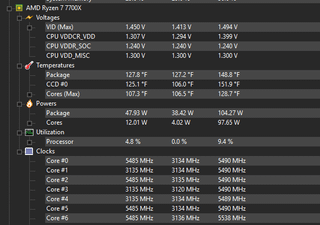
4th pic- idk the person said this was helpful info
5th pic- bios version
3 Comments
Hello Tall_Butterscotch507, and thank you for your submission to Gaming PC! If you are new please check out our rules over at the wiki [here](https://www.reddit.com/r/gamingpc/wiki/rules)!
We have recently added the useful feature of Title Flair! You can set this manually by clicking Flair under your post once you have submitted your post, but if you missed it in the rules there is a much better way that will automatically flair your post!
To do this simply add what your post is about in brackets before your title. For example for a Build Log you can type [Build Log] before your post so that it looks like this; [Build Log]My new awesome build!, and the bot will automatically set your flair to Build Log! This works for Build Log, Build Showcase, News, Hardware News, Hardware Release, Discussion, and Miscellaneous!
Also remember that this is a place for discussing and sharing our love of Gaming Computers! This is NOT the place for help building or determining what parts you should buy, that is better suited for /r/buildapc. Troubleshooting questions should be directed to /r/techsupport. Thank you again!
*I am a bot, and this action was performed automatically. Please [contact the moderators of this subreddit](/message/compose/?to=/r/gamingpc) if you have any questions or concerns.*
Go into your bios and look at the fan speed settings.
If u don’t know how YouTube can explain better than me
This is a Fakespot Reviews Analysis bot. Fakespot detects fake reviews, fake products and unreliable sellers using AI.
Here is the analysis for the Amazon product reviews:
>**Name**: Cooler Master RR-212S-20PK-R1 Hyper 212 Black Edition CPU Air Cooler 4 Direct Contact Heat Pipes 120mm Silencio Fan
>**Company**: Cooler Master
>**Amazon Product Rating**: 4.7
>**Fakespot Reviews Grade**: B
>**Adjusted Fakespot Rating**: 3.5
>**Analysis Performed at**: 07-08-2025
[Link to Fakespot Analysis](https://fakespot.com/product/cooler-master-rr-212s-20pk-r1-hyper-212-black-edition-cpu-air-cooler-4-direct-contact-heat-pipes-120mm-silencio-fan) | [Check out the Fakespot Chrome Extension!](https://chrome.google.com/webstore/detail/fakespot-analyze-fake-ama/nakplnnackehceedgkgkokbgbmfghain)
*Fakespot analyzes the reviews authenticity and not the product quality using AI. We look for real reviews that mention product issues such as counterfeits, defects, and bad return policies that fake reviews try to hide from consumers.*
*We give an A-F letter for trustworthiness of reviews. A = very trustworthy reviews, F = highly untrustworthy reviews. We also provide seller ratings to warn you if the seller can be trusted or not.*