
I've been trying to optimise my Lenovo LOQ for a while to get the best gaming experience. I don't have the space for a big setup, so I tend to play on my laptop.
I've seen other posts in the past referring to Nvidia drivers 537.58, so thought I'd give them a go.
My laptop is a 7435hs, 24gb ram with a 4060.
I run -noreflex and vsync on in game. In Nvidia control panel, I have it set to max performance, low latency mode ultra, fps cap 139 (on a 144hz display), vsync fast and gsync enabled.
I don't "feel" any input latency, but I've no way of telling.
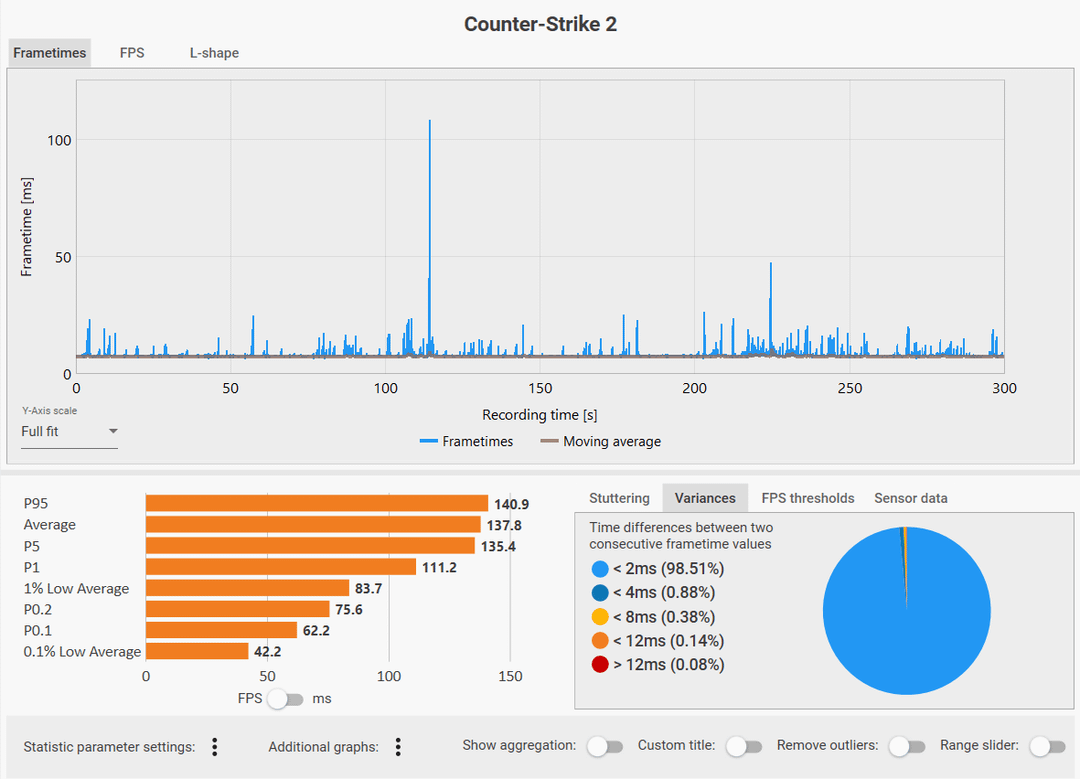
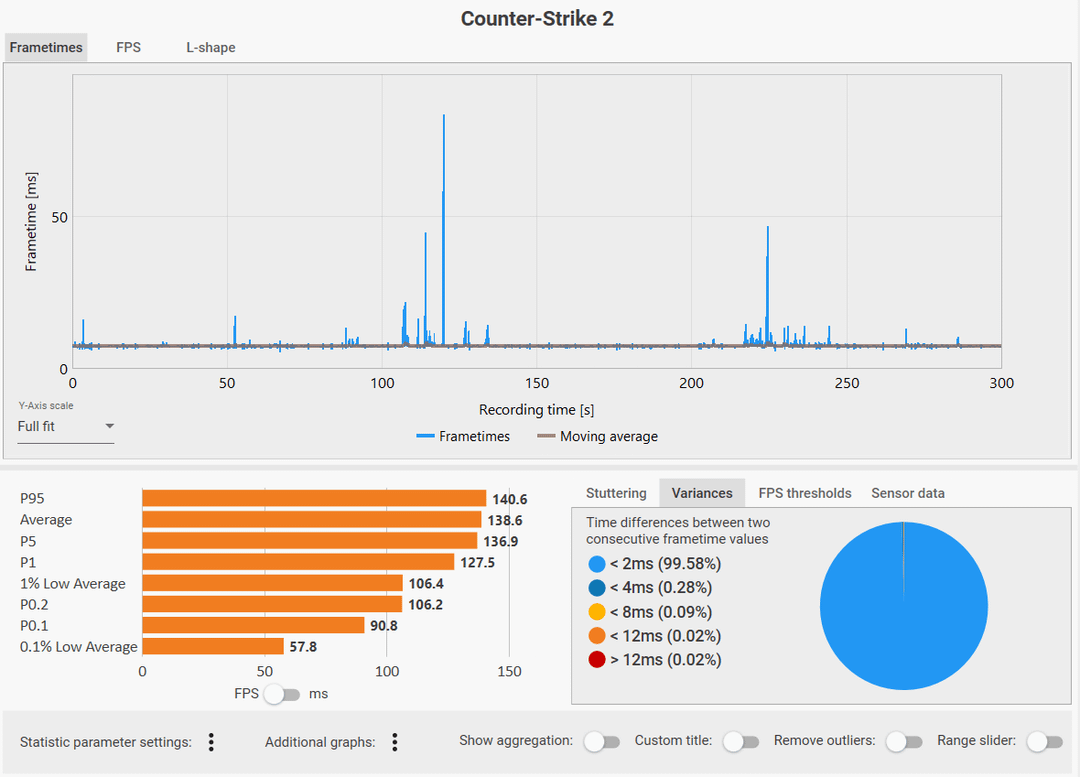
There is a huge difference in performance and framerate variation between my old drivers, 566.49, and 537.58. I'm sticking with 537.58. To test, I have a pro demo saved and I run five minutes at the same time and through the same player POV.
Unfortunately 537.58 wouldn't install on Windows 11 for me, so I had to download the driver, extract it using Winrar (or 7-Zip) and then manually install using Device Manager.
If anyone else wants to try, here is the direct link to Nvidia's website for 537.58:
https://www.nvidia.com/download/driverResults.aspx/%20212701/en-us/
And here are the instructions from ChatGPT to install using device manager.
Extract the driver package:Use 7-Zip or run 537.58-*.exe and let it extract, then cancel the installYou’ll get a folder like C:\NVIDIA\DisplayDriver\537.58\Win10_64\International\Display.Driver
Open Device ManagerFind your Display adapter > NVIDIA GPURight-click → Update driver → Browse my computerPoint it to the extracted folderLet it install manually
This bypasses the OS version check entirely and installs just the driver.
6 Comments
why not compare against the latest?
I spin my head around and shout oooga oooga before launching CS2. Has increased my FPS by 50% no cap.
People on the nvidia subreddit also recommended (and probably still do) this driver in general. I had gone back to it, but it’s meh. The average improves for almost all games, including CS2, but it brought back intermittent stutters like in CSGO. If I remember correctly, after this driver there were at least one (maybe two) drivers with CS2 related fixes, and moving to newer versions made things better (with a lower avg).
If you just want to get your averages up (even in CSGO) – try drivers before 49X or 48X (or maybe even older – I don’t quite remember). You’ll get even prettier graphs.
Using very old drivers with known vulnerabilities already exploited in the wild? Fuck no.
The oldest driver that is not outright a liability is 566.36.
The current one, 576.88 is close enough while fixing many issues with monitors and etc
VSync Fast thrives on as much fps you can have above refresh rate (1.5x, 2x, 2.5x and so on)
G-Sync on the other hand must be at all times under the refresh rate
Could say they are polar opposites
If you must use G-Sync, then pair it with VSync On in the driver (NOT in-game settings)
But the consensus among good players is that G-Sync / FreeSync / VRR in general should be off
It’s a tech that makes sense for video / tv, but it’s outright deceiving for fast-paced online games
You get higher input lag from fps cap way below the hw potential, with the added bonus of unmitigable display-side latency, plus the fatigue-inducing refresh switching at fps drops to the point of visible flickering
Then you proceed to add -noreflex to handicap it further, so to accommodate a fps cap, the gpu sleeps at a “fixed” interval instead of dynamically based on load and refresh rate.
Congrats, you now have “straighter” lines and higher numbers, who cares it’s less realistic because the actual latency is no longer a consideration.
Chasing consistency with G-Sync at 144Hz is counter-productive even for that entry level gaming laptop.
Lower res and video settings and no frame limit would be good for at least 288fps on average and that would make moving shooting and flicking so much easier (the higher the fps, the better the inputs processing).
If you are not actually bothered by screen tearing, then any kind of sync is a waste.
But if you are, VSync Fast alone alleviates that with less downsides at high fps.
Could add a fps_max 320 or 256 in-game to increase consistency and cool without sacrificing much.
> I’ve no way of telling
Use frameview to measure PC latency. In the same vein, turn on reflex. Capframex can’t measure the impact it has on latency. It’s the wrong tool for the job.
Edit:
* Set the v-sync fast option to application controlled. It’s to be used when g-sync is not available. Otherwise it adds half a frame of latency. It might already be overriden by the in-game option, or the other way around. No idea.
* Turn off low latency mode. It’s a similar option to reflex but less integrated, and therefore not as good.
* Max performance is the same as reflex + **boost**.
* Use the in-game, not driver, v-sync option. Yes, the devs are right about it being better.
Hi, have u updated all your bios/firmware and chipset drivers to the latest along with latest windows update with the alt tab fix?
I’ve notice a few years ago that those things are very important and without updating them, newer nvidia drivers can cause problems.
If u do not update anything at all, staying at lower driver can be beneficial until the game itself stop working properly with the old driver and you are forced to update everything all at once.