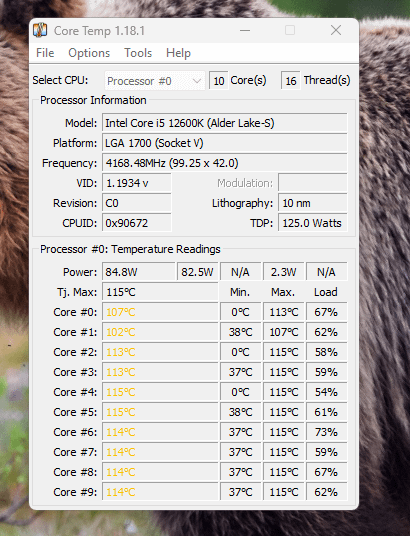
Is this bad? Very hot temps on 12th i5-12600K. Additionally, my CPU fans don’t seem to increase in speed when its hot

Is this bad? Very hot temps on 12th i5-12600K. Additionally, my CPU fans don’t seem to increase in speed when its hot
30 Comments
This is the cooler I am using -> https://pcpartpicker.com/product/brVD4D/corsair-h150i-pro-473-cfm-liquid-cpu-cooler-cw-9060031-ww
You have thermal paste applied? I know obvious question.
Is this bad? My brother in Christ your CPU is going to die any minute.
It’s not bad, it’s totally fucked up, make sure the cooling is set right and the pump is working
Good god shut that thing off NOW and do not run it again until you figure out the problem!
Try checking fan settings in the Intel app?
Your CPU is turning to quartz. Get a new cooler.
Cooler maybe not reaching the CPU. I would reseat it and test again.
– cooler isn’t mounted properly
– Left the sticker on the cooler
– no paste
– didn’t plug in the sata power for the Corsair controller
– didn’t plug in the CPU fan header from the Corsair controller
Those are the places I would start. My h110 (240mm) had 0 issues cooling an i7-7700k (hot boy) or the 5800x that replaced it (equally hot boy).
Edit: if all those things check out, you may have a faulty pump. RMA the cooler.
I’m amazed it is running
Are you using an AIO liquid cooler?
Is the pump running?
When you grab your tubes do you feel any liquid moving through?
Have you wiped and re-applied thermal paste?
Do the fans come on during post boot?
You might have a failed cooling unit, like everyone is stating here. Those temps aren’t normal.
Jesus…. your cpu is struggeling as hard as gordon ramsay with his new chefs in hells kitchen!
There IS something wrong, big time
I don’t even think this should be possible, I’m pretty sure it should force itself to turn off at these temps.

Looks like you hooked something up wrong. If you need some help, hit me up tomorrow. I work at 3 am so I’m off around 1pm PST
You’re past Tjunction, so I would say a definite yes.
Looks like another CPU is dying from lack of air

Says right there tj max temp is 115c, and you’re hitting it. I would say that’s bad.
I’m not sure how you are exceeding the TJ Max of 100C for Intel. It should have throttled your clock speed and or shut off after exceeding those temps
Did you remove the plastic from the cooler?
OP, I was having this issue too and it took repasting two times, cleaning my air cooler plate several times with alcohol and qtips, getting a 13th Gen thermalright plate before the damn thing acted normally. Mind you, this was a replacement CPU from Intel because my previous one had degraded.
Now I can game hard and it sits at 53C to 76C( momentarily).
have to ask make sure the plastic peel off on the AIO pump that thermals to the back of the CPU is no longer attached also get ur fan curve going
Is Anthrax bad? It wasn’t me Rhonda!
I mean that’s straight up impressive! if the goal is to run as close to TJ Max without your computer automatically turning off I believe you win!
You’re likely having something silly going on like you still have the sticker on your cooler or no thermal paste or fans not plugged in or somesuch.
The system should have shut off at this temp, LIke WTF grab a cheap Peerless assassin before you need an entire new setup
just get a new AIO its cheaper than worrying check the pump and fan speeds if not time for new aio
How is it still running and not shutting down? I think the safety is dead too. It should’ve auto shut down after it hits ~100c.
What cooler?
Did you remove the protective sticker from the cooler ?
I would bet you have a dead pump on your hands and the coolant isn’t circulating. Have you cleaned the dust out of your AIO lately?
Probably time for a new AIO.
How many watts were you pulling to get those temps?