
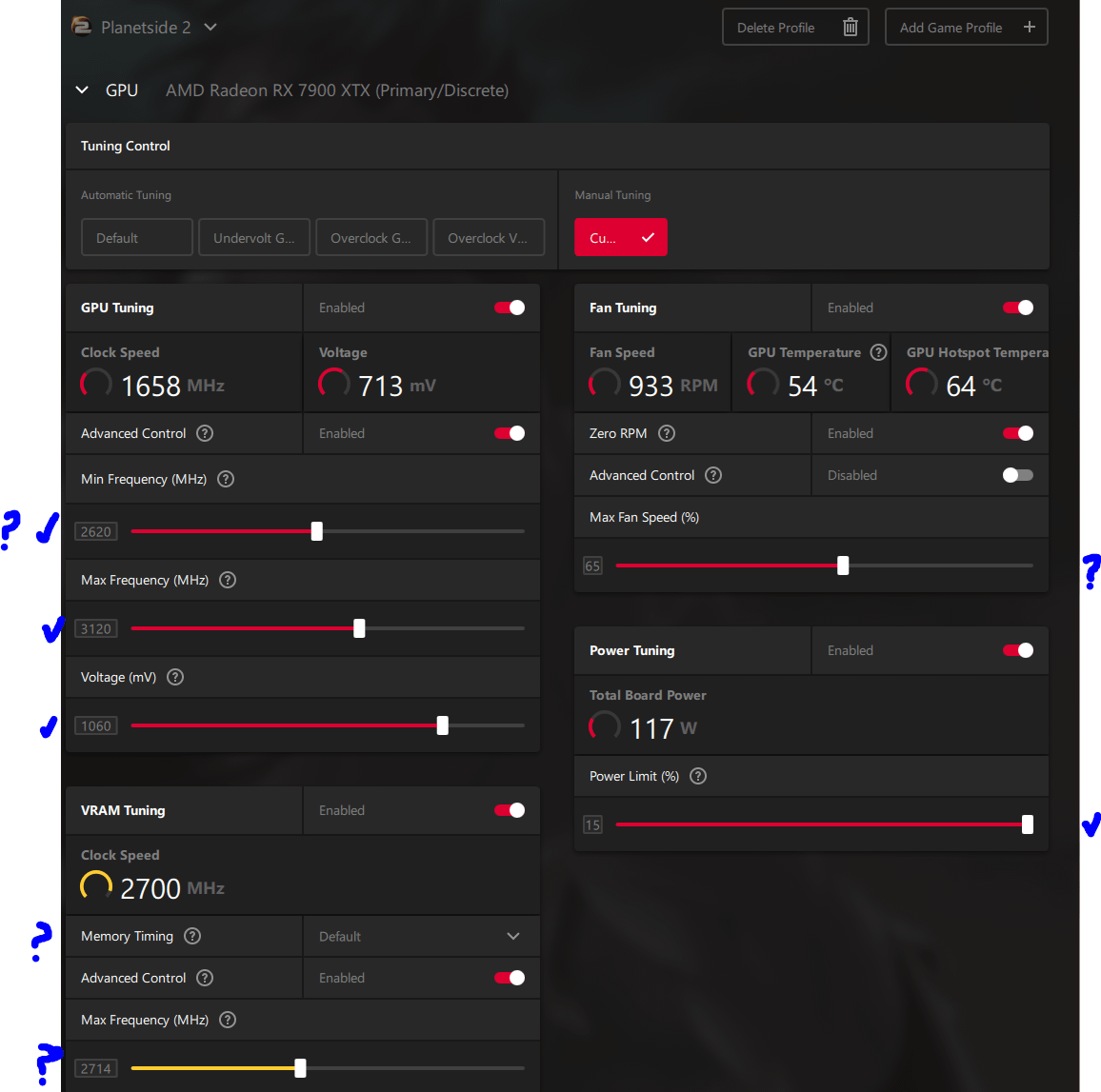
Purely for FPS stability and gaming. Testing in 5 increment values. First time messing with GPU overclocking settings.
GPU tuning:
-Min frequency is set to 2620, I watched a video and they basically said for RDNA3 they set a 500 MHz difference between min and max frequency. Is that correct or should I make it a 100 MHz difference?
Voltage (mV):
-I set it to 1060 cause 1055 it crashed pretty quickly. Is this value fine?
VRAM max frequency (MHz):
-Set it to 2714 because that sets it to 2700 from a video I saw. I haven't really touched this setting and don't know how to improve this area, do I increase or lower it until the game crashes?
Fan Tuning:
-Does anyone have a good custom Fan speed/temperature settings?
Power Limit (%):
-Is 15 good for FPS performance and if I lower it, performance goes down?
Memory Timing:
-Default or fast timing? I heard people got problems when using fast timing.
2 Comments
Set min clock back to 500mhz. Anything higher just screws up performance and idle states.
Most games need 1110-1125mv, 1060mv may be fine for benchmarks but it’s definitely not fine for 4k games or Esports. Every title boost the card differently.
Fast Timings is slightly better than Default but it’s only minor. If you can’t push high clocks then it’s worth using lower clocks + fast timings. If you can push high clocks then default can get you a bit further. It requires multiple game testing to see where you crash or get performance reductions/artifacts.
Enabling ASPM in your BIOS and OS can save some power for your GPU (and NVME) which can help with temperatures and in theory boost the clock a bit higher in thermal constrained scenarios.
I think that is going to cause instability’s. You need volts to reach 3100, wich leads to not enough power left for 2700 on the mem.
At least that is what i am stuck with.