A lot of the time it just means that you’re completely fucked.
navagon
Replace the cable first, before you consider more drastic options.
IcyDev569
Something very similar happened to me a few months ago and i just unplugged it for a few minutes and it was fine for another few months and then i did it again and it didn’t happen since then.
DayneTreader
Time for a new monitor
Delta7904
If changing the cable doesn’t work it usually means you need a new monitor
BB0ySnakeDogG
Got another monitor you can test? If it’s the same on another one could be GPU.
Benio2514
If it does this then goes back to normal, it could be the solder joints going bad (and it works again after they warm up). It’ll fail permanently very soon.
aberroco
Cold bug. Typical case. Either heat up your room, heat up the display with hair dryer (just be careful – you want it warm, not melting, and you could damage matrix by overheating it) (also, if you use hair dryer, most likely you should aim at the bottom side, usually circuits are there), or just wait long enough for electronics to warm up.
It’s a typical issue with bent displays. Never buy bent displays.
Unfixable, but not critical, it could work like that for years.
Though, if your is stuck like and not warming up, maybe your case is the exception, or maybe some connection just broke completely.
Evilsmurfkiller
She’s dead Jim.
poofume11
One does not simply recover after this boot
Pekish_
Satan is trying to contact you
Dunder_Chief1
Does it have any on-screen display (OSD) for config menus for the monitor?
If that OSD doesn’t show clearly, that tells us one thing, which leans to catastrophic issues.
If the OSD does show clearly, that means another thing, which leans more toward an option of the cable or connection being a culprit if we’re lucky.
yobonga
It means you’re watching Netflix
Known-Cook6163
It means ,time for some monitor shopping!
DkoyOctopus
its over.

worldrenownedballdr
It means you are about to go monitor shopping.
Shimitzu1
This is VA panel issue. Typical for VA, you can heat it up and use normally or replace for non VA monitor. This is not a problem. One of my monitors is like that for 4 years and it works just fine after it warms up
_MaZ_
Defrag your monitor
Shockku
Try different cable. Happened to me too. I thought my monitor was simply too old, but changing the cable fixed the issue. Cables are cheap.
Canuck457
With any luck a ghost will exit from the display
xXZer0c0oLXx
Did a little creepy dead girl crawl out by chance 🤔
DeusKether
Man and I thought my flat pink screen was bad
BrokenSil
I’ve had a VA panel do that when I turn it on for years. Works perfectly once I let it heat up a bit. Takes longer in winter.
Hattix
It means the panel has delaminated and the edge contacts were only making good contact after it had warmed up and the surfaces expanded.
Now they’re not.
akeanti_tapioca

Benithio
The end, my friend.
VXMFu
It means it’s time to replace it.
xitones
I have a similar problem with my DisplayPort connected monitor, there is days it happens and days it doesnt, i managed to figured it out being the cold, if the room is too cold, the monitor does this until the cable/connector/room heats up. Takes max 1 min and then it works flawlessly for the rest of the day.
Common issue with curved VA panels from ye old days. I put up with this Samsung monitor for many years before I got tired of waiting for it to go back to normal.
I got it used for £80 when it was going for a lot more back then. It lasted at least 7 years.
Low-Army-1192
It’s fucked
Stiddles
Your brain is broken, replace your brain first, if that doesn’t work try your eyes. If it still looks the same try the computer, video card, monitor, cable, in that order…
DarkwyndPT
Best case scenario: your cable isn’t connected correctly.
Worst case scenario: your GPU has gone to hell!
Luigi_testa2011
It means that the time has come to throw it from the terrace
Zatura24
I have a monitor with similar issues. For me it always has this startup issue at 144hz. I’ve never had it when I’ve set the display to 120hz, so I just kept it at that. Hopefully it will not get perma stuck for me as well 🥲
SwimmingDutch
It sees dead people..
Bewitchingchick
So long, farewell, to you my friend goodbye for now until we meet again
ChewingHidesTheSound
It means a nice funeral is in your future soon
LimesFruit
This happens to my HP ZR24w monitor when it is too cold in the room.
BubDaBylder
Apart from what had already been suggested, turning down the refresh rate also worked for me. After some time you can turn it up to “normal” again
MrXroxWasTaken
It means something ain’t right
plers_
Best case, HDMI cable damaged or not connected properly, check this before you do anything else, try another cable and monitor before you spend any money.
Most likely, damaged HDMI port on either the cable, monitor or PC.
In ascending order of expense*…
– hdmi cable/ports broken
– monitor/TV (port) broken
– non-GPU PC component broken (i.e. CPU, motherboard)
– unlikely
– GPU (port) broken
* Depending on your GPU/TV,
YMMV
popaninja

omaGJ
My side monitor did this over the course of like 2 years, but progressively got slower to reach the clear normal screen. I got a new PC and it still did it for a bit but then out of no where it no longer has any problems with it lmao. It works as if it was brand new and never had any problems. I dont know what in the world would fix it because I didnt do anything but it did fix. I was told it just means your monitor is dying but after what I just described: i have no *fucking* idea 🤣🤣
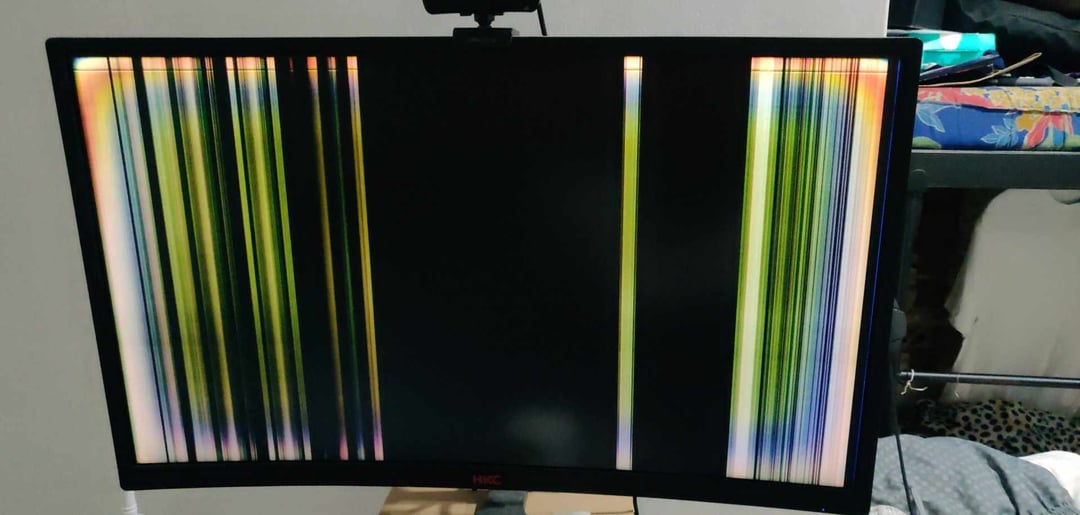
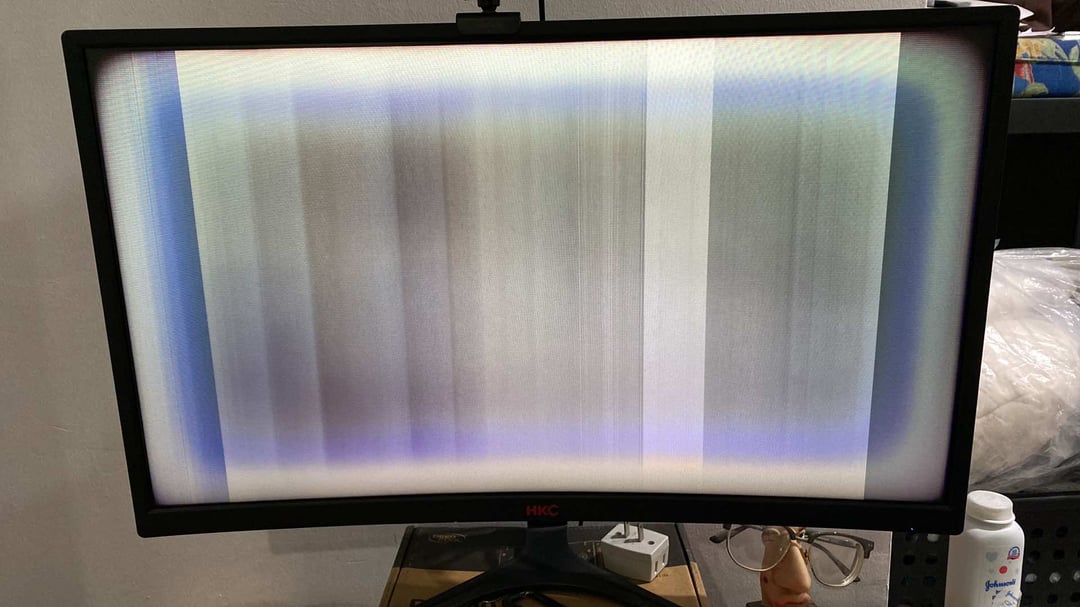

46 Comments
A lot of the time it just means that you’re completely fucked.
Replace the cable first, before you consider more drastic options.
Something very similar happened to me a few months ago and i just unplugged it for a few minutes and it was fine for another few months and then i did it again and it didn’t happen since then.
Time for a new monitor
If changing the cable doesn’t work it usually means you need a new monitor
Got another monitor you can test? If it’s the same on another one could be GPU.
If it does this then goes back to normal, it could be the solder joints going bad (and it works again after they warm up). It’ll fail permanently very soon.
Cold bug. Typical case. Either heat up your room, heat up the display with hair dryer (just be careful – you want it warm, not melting, and you could damage matrix by overheating it) (also, if you use hair dryer, most likely you should aim at the bottom side, usually circuits are there), or just wait long enough for electronics to warm up.
It’s a typical issue with bent displays. Never buy bent displays.
Unfixable, but not critical, it could work like that for years.
Though, if your is stuck like and not warming up, maybe your case is the exception, or maybe some connection just broke completely.
She’s dead Jim.
One does not simply recover after this boot
Satan is trying to contact you
Does it have any on-screen display (OSD) for config menus for the monitor?
If that OSD doesn’t show clearly, that tells us one thing, which leans to catastrophic issues.
If the OSD does show clearly, that means another thing, which leans more toward an option of the cable or connection being a culprit if we’re lucky.
It means you’re watching Netflix
It means ,time for some monitor shopping!
its over.

It means you are about to go monitor shopping.
This is VA panel issue. Typical for VA, you can heat it up and use normally or replace for non VA monitor. This is not a problem. One of my monitors is like that for 4 years and it works just fine after it warms up
Defrag your monitor
Try different cable. Happened to me too. I thought my monitor was simply too old, but changing the cable fixed the issue. Cables are cheap.
With any luck a ghost will exit from the display
Did a little creepy dead girl crawl out by chance 🤔
Man and I thought my flat pink screen was bad
I’ve had a VA panel do that when I turn it on for years. Works perfectly once I let it heat up a bit. Takes longer in winter.
It means the panel has delaminated and the edge contacts were only making good contact after it had warmed up and the surfaces expanded.
Now they’re not.

The end, my friend.
It means it’s time to replace it.
I have a similar problem with my DisplayPort connected monitor, there is days it happens and days it doesnt, i managed to figured it out being the cold, if the room is too cold, the monitor does this until the cable/connector/room heats up. Takes max 1 min and then it works flawlessly for the rest of the day.
https://preview.redd.it/u6xhe2ym8i9f1.png?width=1440&format=png&auto=webp&s=fc78d0a8abd3189efe87fa5534d41a4af7ceb4bb
Common issue with curved VA panels from ye old days. I put up with this Samsung monitor for many years before I got tired of waiting for it to go back to normal.
I got it used for £80 when it was going for a lot more back then. It lasted at least 7 years.
It’s fucked
Your brain is broken, replace your brain first, if that doesn’t work try your eyes. If it still looks the same try the computer, video card, monitor, cable, in that order…
Best case scenario: your cable isn’t connected correctly.
Worst case scenario: your GPU has gone to hell!
It means that the time has come to throw it from the terrace
I have a monitor with similar issues. For me it always has this startup issue at 144hz. I’ve never had it when I’ve set the display to 120hz, so I just kept it at that. Hopefully it will not get perma stuck for me as well 🥲
It sees dead people..
So long, farewell, to you my friend goodbye for now until we meet again
It means a nice funeral is in your future soon
This happens to my HP ZR24w monitor when it is too cold in the room.
Apart from what had already been suggested, turning down the refresh rate also worked for me. After some time you can turn it up to “normal” again
It means something ain’t right
Best case, HDMI cable damaged or not connected properly, check this before you do anything else, try another cable and monitor before you spend any money.
Most likely, damaged HDMI port on either the cable, monitor or PC.
In ascending order of expense*…
– hdmi cable/ports broken
– monitor/TV (port) broken
– non-GPU PC component broken (i.e. CPU, motherboard)
– unlikely
– GPU (port) broken
* Depending on your GPU/TV,
YMMV

My side monitor did this over the course of like 2 years, but progressively got slower to reach the clear normal screen. I got a new PC and it still did it for a bit but then out of no where it no longer has any problems with it lmao. It works as if it was brand new and never had any problems. I dont know what in the world would fix it because I didnt do anything but it did fix. I was told it just means your monitor is dying but after what I just described: i have no *fucking* idea 🤣🤣

guitar hero
It means
🥀🙏💀