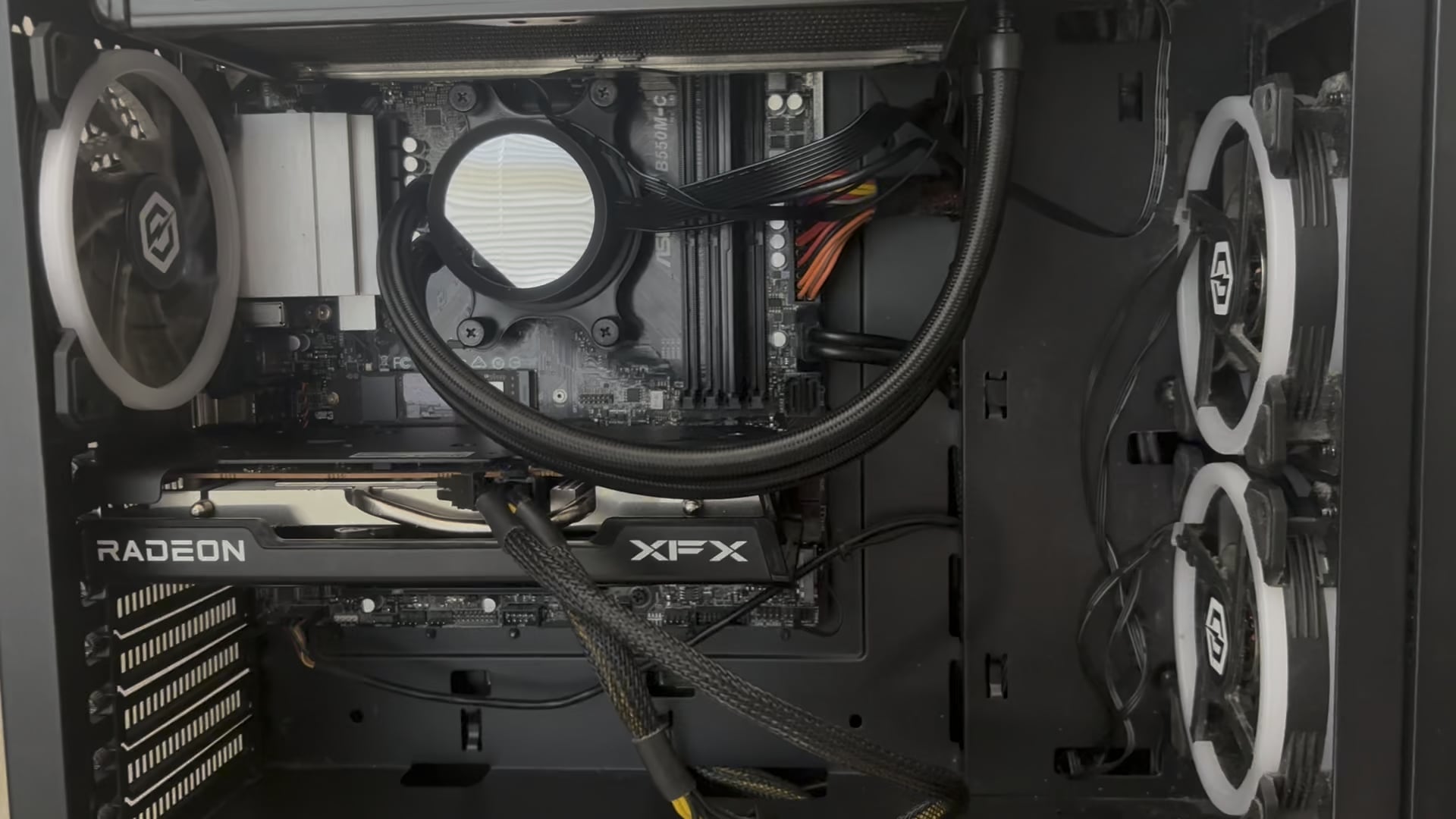
clean cmos? i hope you meant clear. is the battery fully plugged in? something is shorting the board and it instantly stops receiving power and turns everything down again.
also you meantioned changing RAM, i only see one module in your 3rd slot is that correct?
Ok-Tax2930
Check for loose or severely bent/damaged power cable.
Powerful_Security_82
try putting the old ram in (1 stick) and see if it works. if not, reseat the power to the motherboard and if that doesn’t work try pulling gpu. if it still happens pull the cpu and see if it posts. it should then show bad cpu and bad ram. if it doesn’t it might be a bad MB.
Nidhoggr84
A loose RAM module can cause power issues. Remove and reinsert the RAM module.
Can you post a closer picture of the front panel header area of the motherboard (lower right)? That’s looks incorrect.
Powerful_Security_82
your MB is an asrock b550m-c, right?
Powerful_Security_82
i think it is just flashing a bad dram light because you don’t have ram in.
zcomputerwiz
Check your power cables.
Do you have a spare PSU?
bumblebeeowns
Can you let me know when you find a fix for this?
Curious about it.
I had this issue and it was RAM issues.
This was years ago.
Overall_chickman6053
More info: my first issue was that after changing ram, my pc had no display and the “DRAM” and “CPU” leds went on.
I saw a comment that told me to clear cmos and I did that, then I turned the pc on and now the power goes on and off (as seen in the video)
Edit with more info: the prebuilt came with one stick 8gb 3200 mhz, I bought a pair of crucial 32gb (each) 3200mhz and it showed display and worked perfectly (using the 3 ram sticks). I then thought that I wanted dual channel with the two 32gb sticks so I removed all the ram and installed the 2 sticks in the 1st and 3rd slot, the pc turned on just fine but it showed no display, I made a post and the only comment told me to clear cmos, so with a screwdriver I connected the two pins on CLRCMOS1, plugged everything back in and the power went on and off (as seen in the video)
KEYGETS
I had the same thing recently. My ssd was dead and had these hickups. Try to disconnect your main hdd /ssd/m.2 where your os is installed and start your pc again. If you can go to bios you need a new storage device
Edit: my ssd was dead and had big power draws from my psu. So the fans turned on and off again
zelln1x
1. Unplug PSU completly
2. Remove CMOS battery
3. Click the power button repeatedly for 20 seconds in order to drain all the leftover electricity in the motherboard
4. Plug back the CMOS after 10 minutes
5. Plug PSU back and fire away.
If issue still persists do the following:
1. Unplug PSU completly
2. Remove CMOS battery
3. Click the power button repeatedly for 20 seconds in order to drain all the leftover electricity in the motherboard
4. Plug only 1 ram stick in
5. Plug PSU and boot, go into BIOS, disable XMP.
6. Shut down PC
7. Unplug PC
8. Add the 2nd RAM stick
9. Boot PC up and if you dont get the issue you can restart and enable XMP again
You are welcome
Nickelbag_Neil
Did you unplug anything when you swapped RAM?
quietstormx1
What are your ram sticks?
What did you have before and what do you have now?
There is something fucky with UEFI where if you have different timings, well it doesn’t like that too much and have to install stick by stick making sure you have the correct settings in bios.
I had the same issue when I installed two new sticks with SLIGHTLY slower CAS latency and panicked my ass off.
Kul-Tiran
I would try to replace psu first before going and replacing mobo and all that. It seems like that could be it also, then you don’t have to worry about losing windows sun and all that bs too
themoldyunicorn
I am pro technician. Looks like a short is causing the mobo not to post. Likely either board, or psu. Clear cmos, turn psu off, disconnect power, then put screwdriver in between clear cmos pins
Don’t think that will help.
You may need to consider getting spare parts to swap them out.
Otherwise take it to a professional
Pied67
I think the power supply is toast.
cCBearTime
Here’s how you troubleshoot this OP:
Unplug EVERYTHING from the “outside” of the PC that isn’t the power cable for the PSU. Mouse, KB, screen, everything.
Hit the power button and see what happens. If it turns on and stays on, you got a bad peripheral device. Shut down, plug something back in and try again until you find a device that keeps it from booting, and then replace it.
If it still does the same thing, move to the inside.
From inside: unplug EVERYTHING (even the GPU) except:
-24-pin Main Power
-4 or 8-pin CPU Power.
JFP1 connectors in the very lower right (power button, power led, reset, and hdd led).
-AIO Pump power, and its fans.
You will have no video, but this is OK, we just want to see if it says on when you hit the power button.
If it says on, just like the outside peripherals, start plugging things back in one at a time and try again until you find the culprit.
If it does not, then it’s time to suspect the PSU, MOBO, or CPU, which can be hard to diagnose without known good parts to swap in and out.
Report back with your findings and we’ll go from there.
Good luck!
GotAnyNirnroot
My best troubleshooting advice is to start again, outside of the case!
Slap the mobo on top of the mobo box.
Then install as few components as possible, and attempt a boot.
Eg, CPU, box cooler, 1 stick of memory, and pair cables.
If you can boot, then just slowly add 1 more component at a time..
It sucks, but hopefully you arrive at the conclusion that you just installed stuff incorrectly the first time!
Overall_chickman6053
Guys I gtg but I found that is either the mobo or the psu, I still need to test them
Overall_chickman6053
I will post an update
Emergency-Ad666
What yall talking about? Put the godamn ram stick in the second slot from left to right
Ok-Beyond-8118
Had this exact thing happen. Replaced my motherboard and computer runs great now. Mine was an ASRock too
davez6855
Does this happen immediately once you turn on the PSU switch?
schmittfaced
its probably all the dust on the fan, cant kick up to speed so it refuses to boot, like a car engine left in gear when trying to start it 😂
Fresh-Put645
Double check all the connections to each components. If it continues, then it’s possible that the RAM you changed is a bad one.
*had the same problem before
Pinsir929
Do you hear anything coming from the PSU? Cause it looks like a relay switch inside the PSU saving your components. Or the PSU itself is the issue.
LordAinzOoalGown1
Op do this. Start unplugging extras. Barebones it down to just the mobo, cpu, power supply, and one ram stick only. NO HARD DRIVES or SSD’s. Remove them. If your CPU has a F or K in it then Leave your gpu plugged in. Do that and see if your computer posts. Disconnect your cpu fan as well. Your heat sink is enough to keep your pc running in the bios. Don’t worry it will be fine. When you turn on your pc just short the 2 pins that your power switch connects to.
This will tell us if a core component is malfunctioning. Core components of your pc is the psu, mobo, ram, and cpu and gpu if your cpu doesn’t have built in graphics. These are the only components you need for a functioning computer. Operating systems just allow you to use your pc.
If it posts it means either you have a hard drive that has shorted, a fan is shorting, your power switch is shorting, a usb port is shorted, or something along those lines.
Subsinuous
Get a new battery. EOS.
Apprehensive-Pin5641
Your cable management died that’s for sure.
Sorry I had to 😅. Seeing as there were already plenty of helpful comments.
TBMGhost
tell me when any updates happen
DuggenHeim
I had something just like this happen with an older build I was putting together for fun with spare parts.
I’m pretty certain it had something to do with the CPU not sitting correctly. No damaged pins luckily so resitting it finally fixed it. It could have also been the heatsink not applying the right amount of pressure but either way, it worked. I had tried everything else like taking out the ram, cmos, gpu, psu, and nothing worked
Jinrex-Jdm
Yes
B1gFl0ppyD0nkeyDick
Looks like your power supply did.
Healthy-Yam-7962
Top up on blinker fluid and u are good
Praydono
I have this happen to my MSI motherboard when plugging into JRAINBOW1. I think it’s a short of some sort since I’ve seen other electronics behave similarly when shorting. Check your motherboard standoffs or try taking it out and setting it on its box (or any box that can hold it up, should be cardboard) and unplug your smaller things like fans and RGB devices
vipervoid123
OP You have a short on your motherboard.
Can try to take the motherboard out of the case and try to boot it again see if it able to boot.
life_konjam_better
I think your RAM may not be slotted well, this seems more like a grounding issue caused by improperly inserted RAM.
NightLasher617
I dunno, maybe.
IndividualCamel7964
Im looking at your page and you have a post about 100 days ago where you bent the pins on your cpu did you use that cpu? Also this seems to be a reoccurring thing where you try to do good but bad happens! If I were you nexr time just find a tec!
IndividualCamel7964
Sorry bud just seen the other picks. Sorry for being an ass! But did you fix the issue? To me it looks like a cpu or mob issue! Thats why i asked about the cpu! I hope and pray you get it sorted out.
Stefan3D
Soooo… I had the same issue. Turned out that I didn’t pushed the RAM so good into the spot.
42 Comments
clean cmos? i hope you meant clear. is the battery fully plugged in? something is shorting the board and it instantly stops receiving power and turns everything down again.
also you meantioned changing RAM, i only see one module in your 3rd slot is that correct?
Check for loose or severely bent/damaged power cable.
try putting the old ram in (1 stick) and see if it works. if not, reseat the power to the motherboard and if that doesn’t work try pulling gpu. if it still happens pull the cpu and see if it posts. it should then show bad cpu and bad ram. if it doesn’t it might be a bad MB.
A loose RAM module can cause power issues. Remove and reinsert the RAM module.
Can you post a closer picture of the front panel header area of the motherboard (lower right)? That’s looks incorrect.
your MB is an asrock b550m-c, right?
i think it is just flashing a bad dram light because you don’t have ram in.
Check your power cables.
Do you have a spare PSU?
Can you let me know when you find a fix for this?
Curious about it.
I had this issue and it was RAM issues.
This was years ago.
More info: my first issue was that after changing ram, my pc had no display and the “DRAM” and “CPU” leds went on.
I saw a comment that told me to clear cmos and I did that, then I turned the pc on and now the power goes on and off (as seen in the video)
Edit with more info: the prebuilt came with one stick 8gb 3200 mhz, I bought a pair of crucial 32gb (each) 3200mhz and it showed display and worked perfectly (using the 3 ram sticks). I then thought that I wanted dual channel with the two 32gb sticks so I removed all the ram and installed the 2 sticks in the 1st and 3rd slot, the pc turned on just fine but it showed no display, I made a post and the only comment told me to clear cmos, so with a screwdriver I connected the two pins on CLRCMOS1, plugged everything back in and the power went on and off (as seen in the video)
I had the same thing recently. My ssd was dead and had these hickups. Try to disconnect your main hdd /ssd/m.2 where your os is installed and start your pc again. If you can go to bios you need a new storage device
Edit: my ssd was dead and had big power draws from my psu. So the fans turned on and off again
1. Unplug PSU completly
2. Remove CMOS battery
3. Click the power button repeatedly for 20 seconds in order to drain all the leftover electricity in the motherboard
4. Plug back the CMOS after 10 minutes
5. Plug PSU back and fire away.
If issue still persists do the following:
1. Unplug PSU completly
2. Remove CMOS battery
3. Click the power button repeatedly for 20 seconds in order to drain all the leftover electricity in the motherboard
4. Plug only 1 ram stick in
5. Plug PSU and boot, go into BIOS, disable XMP.
6. Shut down PC
7. Unplug PC
8. Add the 2nd RAM stick
9. Boot PC up and if you dont get the issue you can restart and enable XMP again
You are welcome
Did you unplug anything when you swapped RAM?
What are your ram sticks?
What did you have before and what do you have now?
There is something fucky with UEFI where if you have different timings, well it doesn’t like that too much and have to install stick by stick making sure you have the correct settings in bios.
I had the same issue when I installed two new sticks with SLIGHTLY slower CAS latency and panicked my ass off.
I would try to replace psu first before going and replacing mobo and all that. It seems like that could be it also, then you don’t have to worry about losing windows sun and all that bs too
I am pro technician. Looks like a short is causing the mobo not to post. Likely either board, or psu. Clear cmos, turn psu off, disconnect power, then put screwdriver in between clear cmos pins
Don’t think that will help.
You may need to consider getting spare parts to swap them out.
Otherwise take it to a professional
I think the power supply is toast.
Here’s how you troubleshoot this OP:
Unplug EVERYTHING from the “outside” of the PC that isn’t the power cable for the PSU. Mouse, KB, screen, everything.
Hit the power button and see what happens. If it turns on and stays on, you got a bad peripheral device. Shut down, plug something back in and try again until you find a device that keeps it from booting, and then replace it.
If it still does the same thing, move to the inside.
From inside: unplug EVERYTHING (even the GPU) except:
-24-pin Main Power
-4 or 8-pin CPU Power.
JFP1 connectors in the very lower right (power button, power led, reset, and hdd led).
-AIO Pump power, and its fans.
You will have no video, but this is OK, we just want to see if it says on when you hit the power button.
If it says on, just like the outside peripherals, start plugging things back in one at a time and try again until you find the culprit.
If it does not, then it’s time to suspect the PSU, MOBO, or CPU, which can be hard to diagnose without known good parts to swap in and out.
Report back with your findings and we’ll go from there.
Good luck!
My best troubleshooting advice is to start again, outside of the case!
Slap the mobo on top of the mobo box.
Then install as few components as possible, and attempt a boot.
Eg, CPU, box cooler, 1 stick of memory, and pair cables.
If you can boot, then just slowly add 1 more component at a time..
It sucks, but hopefully you arrive at the conclusion that you just installed stuff incorrectly the first time!
Guys I gtg but I found that is either the mobo or the psu, I still need to test them
I will post an update
What yall talking about? Put the godamn ram stick in the second slot from left to right
Had this exact thing happen. Replaced my motherboard and computer runs great now. Mine was an ASRock too
Does this happen immediately once you turn on the PSU switch?
its probably all the dust on the fan, cant kick up to speed so it refuses to boot, like a car engine left in gear when trying to start it 😂
Double check all the connections to each components. If it continues, then it’s possible that the RAM you changed is a bad one.
*had the same problem before
Do you hear anything coming from the PSU? Cause it looks like a relay switch inside the PSU saving your components. Or the PSU itself is the issue.
Op do this. Start unplugging extras. Barebones it down to just the mobo, cpu, power supply, and one ram stick only. NO HARD DRIVES or SSD’s. Remove them. If your CPU has a F or K in it then Leave your gpu plugged in. Do that and see if your computer posts. Disconnect your cpu fan as well. Your heat sink is enough to keep your pc running in the bios. Don’t worry it will be fine. When you turn on your pc just short the 2 pins that your power switch connects to.
This will tell us if a core component is malfunctioning. Core components of your pc is the psu, mobo, ram, and cpu and gpu if your cpu doesn’t have built in graphics. These are the only components you need for a functioning computer. Operating systems just allow you to use your pc.
If it posts it means either you have a hard drive that has shorted, a fan is shorting, your power switch is shorting, a usb port is shorted, or something along those lines.
Get a new battery. EOS.
Your cable management died that’s for sure.
Sorry I had to 😅. Seeing as there were already plenty of helpful comments.
tell me when any updates happen
I had something just like this happen with an older build I was putting together for fun with spare parts.
I’m pretty certain it had something to do with the CPU not sitting correctly. No damaged pins luckily so resitting it finally fixed it. It could have also been the heatsink not applying the right amount of pressure but either way, it worked. I had tried everything else like taking out the ram, cmos, gpu, psu, and nothing worked
Yes
Looks like your power supply did.
Top up on blinker fluid and u are good
I have this happen to my MSI motherboard when plugging into JRAINBOW1. I think it’s a short of some sort since I’ve seen other electronics behave similarly when shorting. Check your motherboard standoffs or try taking it out and setting it on its box (or any box that can hold it up, should be cardboard) and unplug your smaller things like fans and RGB devices
OP You have a short on your motherboard.
Can try to take the motherboard out of the case and try to boot it again see if it able to boot.
I think your RAM may not be slotted well, this seems more like a grounding issue caused by improperly inserted RAM.
I dunno, maybe.
Im looking at your page and you have a post about 100 days ago where you bent the pins on your cpu did you use that cpu? Also this seems to be a reoccurring thing where you try to do good but bad happens! If I were you nexr time just find a tec!
Sorry bud just seen the other picks. Sorry for being an ass! But did you fix the issue? To me it looks like a cpu or mob issue! Thats why i asked about the cpu! I hope and pray you get it sorted out.
Soooo… I had the same issue. Turned out that I didn’t pushed the RAM so good into the spot.
Ok friend good luck!
