
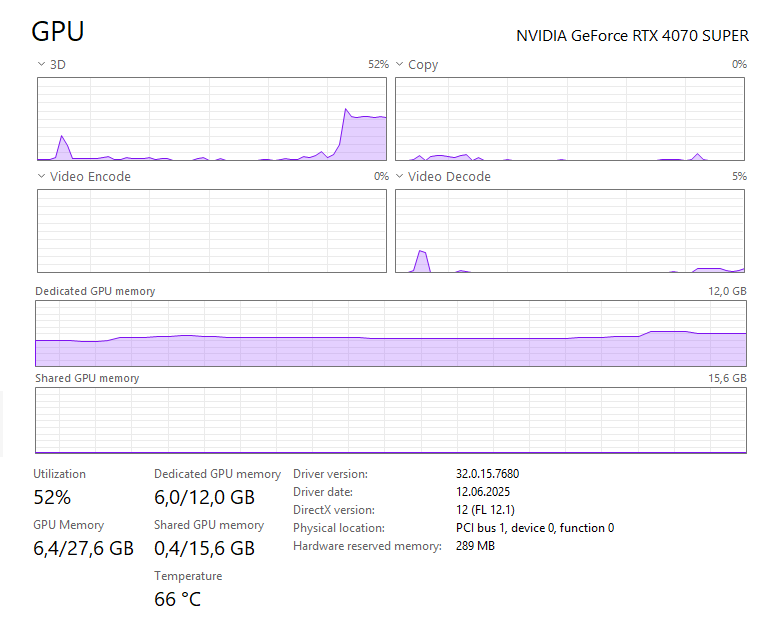
This hasn't been a thing before, my attention drew to it because my PC was suddenly ramping up the fans for a Youtube video. Playing 1440p60 fullscreen, it uses tiny amounts of Video Decode and at least half of my 4070S 3D rendering pipeline. What the hell is happening? Anything I can find online, if at all since there's not much to find, points into nothing. Already tried changing the ANGLE flag, didn't do anything.
For info, this happens both on Chrome and Edge (with Chrome being fresh installed specifically to test this) so extensions aren't at play.
17 Comments
Turn of hardware acceleration
Nvidia settings
Disable the Video Super Resolution feature
Do you use RTX improving of videos in browsers? Maybe this is it.
this is the glass transparency effect around the video.
i think you can turn it off in YouTube settings
same as video previews.
Util % can be affected by clock speeds. Usage that doesn’t increase clocks above idle can show a large util percentage even though it’s a tiny fraction of full clock util. Check your GPU-Z to see what kind of power it’s actually pulling.
(ignore my CPU util. That’s just Homeworld in the background)
https://preview.redd.it/4ob6ilnpmv7f1.png?width=2560&format=png&auto=webp&s=fabd433e2b6e8885602a31b81c979d0ba99f3ef7
You probably have video upscaling turned on, you can turn it off in the Nvidia control panel
Nvidia upscaler… It is super dope.
The task manager GPU usage is completely meaningless btw.
The GPU itself also clocks down on low usage, so even on idle you’ll be running at some 30% of a low clock speed.
Youtube crypto mining on computers that use adblock now
The odd side of PCMR where people don’t like their components used. Do you ‘debloat’ windows to use less RAM too? Lol.
I mean it’s using the GPU to uncompress video steam.
Plot twist, bro is getting remote-crypto-mined.
I just disable hardware acceleration in my browsers.
You cannot trust Windows Task Manager for a proper GPU usage assessment. Use a different tool like MSI Afterburner. I pointed this out a few times over the years:
https://preview.redd.it/elrytjxjtv7f1.jpeg?width=1375&format=pjpg&auto=webp&s=fe52ce21311749b92d66ff0fa7436f259985d8c8
From Windows Task Manager itself you cannot see whether the graphics card is still in its idle clock speed or not. Big oversight from Microsoft when they introduced that GPU tab.
Yeah on 12 gb of vram don’t use this if gaming and watching videos at the same time.
But the feature is awesome. Upscales live sports from 720,1080p to 4K, makes anime look much better. Also for Disney + upscales well, they lock browser based video to 1080p
so your telling me all those bars arnt high scores? awww man
Ambient mode may also lead to high gpu usage.