
Hey folks,
I’m currently running DDR5-8200MHz Viper Extreme 5 RAM, but I just can’t get it stable – even at 8000MHz, it’s flaky. I’ve tried tweaking voltages and timings, but no luck so far.
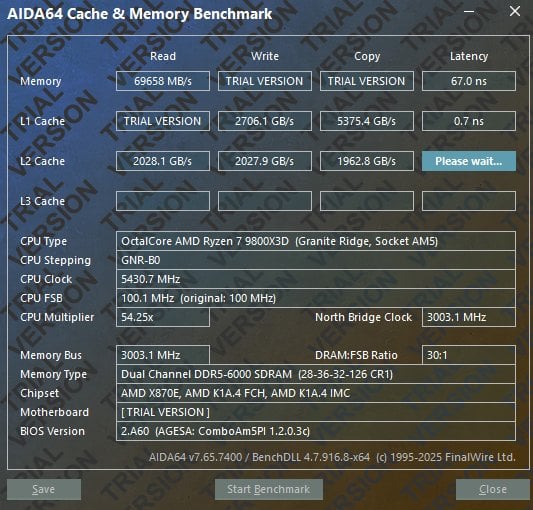
On top of that, I’m seeing poor latency (75ms) in AIDA64 and generally weak 1% lows in games, which is pretty frustrating (not even half my average fps).
So I’m thinking about switching to a more stable 6000MHz kit with tighter timings (CL28 or maybe CL26), since that seems to be the sweet spot for many AM5 setups.
Right now I’m considering:
- Lexar Ares DDR5 Gen2 6000MHz (CL28/CL26)
- Corsair Dominator / Vengeance 6000MHz (CL28)
Has anyone tested both? Which kit would you recommend for better latency, stability, and 1% lows in gaming?
Also, is the jump from CL28 to CL26 actually worth the extra money?
My system:
- CPU: Ryzen 7 9800X3D
- Motherboard: MSI Tomahawk 870e
- GPU: RTX 4090
Update:
Managed to get these stable. https://imgur.com/a/Nuz0HHp
6000@2200
Starting to think the CPU OC was the problem causing the crashes. The CPU is now 60c while using TestMem5 and the RAM is 46c. Before the CPU was 95c. See https://imgur.com/a/ZYqOAtK
14 Comments
In my opinion DDR 8000 isn’t worth the hassle, because of the async clock malus. 6000 MT/s CL28/30 is absolutely fine.
Going from CL30 to CL28 or even CL26 is often not worth the money, if the price is substantially higher than a few bucks.
With a 9800X3D, I don’t think you’re even getting anything by going so high on the memory, about 6000 to maybe 6400 is where you’re getting all the gains.
U could just stay with this kit and tune it down to 6000-6600 cl28. depends what ur imc likes 1:1. there are enough easy hynix timings u could use for this.
Edit: dont forget that AIDA64 is probably scam. Ingame 1p lows are also heavely dependent from how bloated ur windows is or what else u have open. (RGB software/Chrome/discord/steam etc pp)
6200/2200 mem/fclk wins any day of the weak or if you can get to it
Oh and that latency is the X3D tax taking effect
8000CL34~38 is a bit faster, but since you cannot get it stable, 6000CL30 or 6000CL28 is totally fine. You can also try a little overclock to 6200 or even 6400Mhz.
6000CL26 is not worth it since the price goes through the roof and the performance gain is irrelevant by 2 ticks of tCL. The real gains are at manually adjusting secundary timmings.
Besides all that, you dont need to change your memory, try to downclockt it 8200@6000.
My 9800x3d with gskill 6000mhz cl30 is 81ms latency and its been stupid rock solid so far, 1% lows have been fantastic
Best case scenario, run at 6400 or 6600 at 1:1 ratio for UCLK and MCLK, whichever is stable with the tightest timings. Kinda gives you the best performance without instability hassle.
Can you post a screen shot of Zen timings?
The 9800x3d is mostly bound by fclk so run either 6000 or 6200 with as high as possible fclk or 6400@2133/6600@2200 (3:2 fclk : uclk sync) and then fine tune the ram
Nitro 1-2-0 or 1-2-1
Robust memory training = enabled
Nitro burst lenght x8 x8
tsme = disabled
igpu = disabled
svm = disabled (disables virtualization)
fclk vdci mode = predictive can help with stability, with no performance impact as far as I know
Increasing vddg’s can help with higher uclk, not higher than 0.05 below vmisc (with vmisc at 1.1 vddg’s max 1.05)
fclk and uclk also depend on vsoc. For 6000@2000 1.05-1.15 should be fine, on my 48gb kit I need 1.27 for 6400@2133. Would not go higher than 1.30
btw Zentimings pic would be good if you want advice on ram
tRFC?
If you don’t know how to overclock memory or reset your cmos/bios, stick with the highest expo setting that will boot (5600 or 4800) or swap the kit.
If you are willing to overclock, you have an amazing kit for that, so here’s what you need to know:
If a memory kit will run at bandwidth higher than 5600mt/s is dependent on your ram kit, cpu (memory controller silicon lottery), and motherboard. In this case, the ram and your mobo are not bottlenecks whatsoever, and you can start testing the cpu memory controller by setting your ram kit’s expo voltages but copying the frequency and timings of a cl30 6000mhz kit.
To go higher than 6000, set uclk:mclk ratio to 1:1, then try higher frequencies- 6200, 6400, 6600, (ENSURE mclk:uclk stays at 1:1, boards like to decouple them to ensure compatibility but decoupled will greatly reduce performance.)
test for stability after each change with an hour of occt memory, y-cruncher vt3, and/or 2-3 cycles of anta extreme or anta absolut profile in testmem5.
Any instability: test errors, bluescreens, trouble booting (failed POST), etc; clear cmos according to your motherboard’s instructions.
Are you actually trying to get 8200 stable?
I have viper extreme 5 2x24Gb 8200 CL36 running @ 6400 CL30 @ 1.4v. Didn’t try 6000 or 6200, but sure It will run @ 6000 CL28. So I don’t thing you really need to switch your kit.
I need help, I just built my first PC with Ryzen 9800