
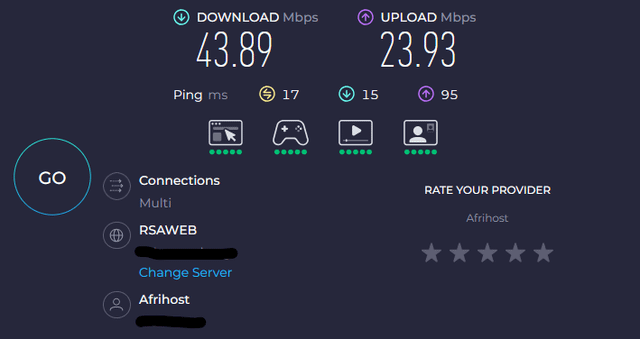
I am running on a 50 Up 25 Down internet. My PC is connected over 2.4G Wi-Fi about 6 meters away from the EAP (through walls). The first image shows my normal speeds.
I recently purchased the following headphones from a local (reputable) online store:
https://www.evetech.co.za/marvo-pulz-70w-wireless-gaming-headset/best-deal/20115.aspx
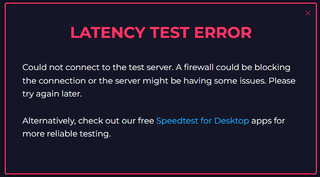
Whenever the headphones are connected (to my PC or to my laptop) using the 2.4G USB adapter/dongle mode, it kills the internet speeds for ANYONE connected. The second image shows my device not even being able to run a speed test, however usually it will report between 0.5 – 1 mbps when they are connected. This occurs to all my devices that are connected. Regardless of whether they are closer or further from the EAP.
Many of our devices do not support 5G (My PC network adapter does not, nor does mine or most of my families cellphones) so switching the Wifi to 5G is not an option. I have tried running the WiFi on different channels (1, 6, 11, and others) without success.
I am fine to use the headphones over bluetooth, but there is an audio delay in games, and the audio quality is terrible. I bought them to use them wireless, so dont really want to have a cable plugged in (which is what I have been doing lately).
Does anyone know any solution to be able to use the headphones over the USB dongle, without causing every user connected to my network to suffer extreme speed drops?
10 Comments
Remind me! : 3 days
There are some headphones on Amazon that are operating well above the FCC power limit and will effectively jam wifi. You can test it using a digital microwave leak detector, they can be picked up for between $20 to $30 IIRC
Needless to say it’s not exactly good for you to be exposed to this much radiant energy either, even if it’s not ionizing.
edit:
the fact that these can set off the alarm calibrated for a leaking microwave should be a hint for all you “but it’s not harmful” types. You’re confusing “isn’t known” with “can’t” even though it actually is known to some extent.
If you had actually checked you would have found data going back to the early 50s and 60s showing it can be harmful.
[https://www.ncbi.nlm.nih.gov/books/NBK208983/](https://www.ncbi.nlm.nih.gov/books/NBK208983/)
>Many of our devices do not support 5G (My PC network adapter does not, nor does mine or most of my families cellphones)
how old are these devices? time to buy a few decent wifi cards, this seems like an issue that happens due to very old and specific 2,4ghz inteferences. newer cards won’t have that issue. my wifi card is 10 years old soon and i use two wireless headsets, a wireless keyboard and a wireless mouse next to it. not even once did i have any connection losses within the entire 10 years i have this card. and it was just 20€…
You can use android app like wifiman or wifi analyser to see what is happening to the wifi signal when plugged in vs when unplugged.
I suspect that that the USB dongle is causing jam between all the channels available in 2.4Ghz. Just to inform 2.4Ghz has only 14 channels and if there are is lot of congestion then, you see terrible performance.
On your routers settings, see if you change the 2.4ghz channel. Can stop interference
Cool, Wifi Noise Canceling Headphones 😀
Sound like a bad frequency cutoff on the headset/tongle, causes noise on the Wifi Channels and thus the speed gets reduced.
I’m gonna be honest I’ve never even heard of Marvo as a brand. I also HIGHLY recommend not buying from evetech, I don’t know where you heard that they’re reputable, but I’ve had multiple friends get shafted by their customer support, sometimes even sabotaged. If you’re going to do online shopping I recommend Wootware instead.
If you can, try send them back for a refund, because the headset is obviously not working as intended. And if you are dead set on wireless headsets, don’t buy the cheap ones, they will 99% of the time disappoint you. (Mind you this is coming from an music enthusiast, if the quality is good enough for you, that’s completely fine!)
You could try wrapping the dongle in foil to dampen the signal.
Hello fellow south-african.
Wireless headphones, especially cheap and nasty ones from evetech (avoid them) are prone to producing more radio signals than needed, things like bluetooth, wireless headphones, microwaves, etc all operate on 2.4ghz which affect the channel health.
All you can realistically do is live with it, or return the headphones and get something with a bit more ‘quality’.
For a semi-decent set of *wireless* headphones, you’re looking at R2,000 minimum, there’s a reason the marvo units & other ‘knockoff’ brands from evetech are so cheap. 🙂
I’ve come from using R2,000 wireless logitech headphones to these, which are MUCH better:
[https://www.wootware.co.za/corsair-ca-9011235-na-hs80-rgb-wireless-premium-carbon-black-gaming-headset.html](https://www.wootware.co.za/corsair-ca-9011235-na-hs80-rgb-wireless-premium-carbon-black-gaming-headset.html)
My monitor was doing the same becuase the upscaling mode on the nvidia app was set to “aspect ratio” after I set to no upscaling it was back to normal. A lot of devices using the 2.4ghz band to connect interfere with wifi unfortunately