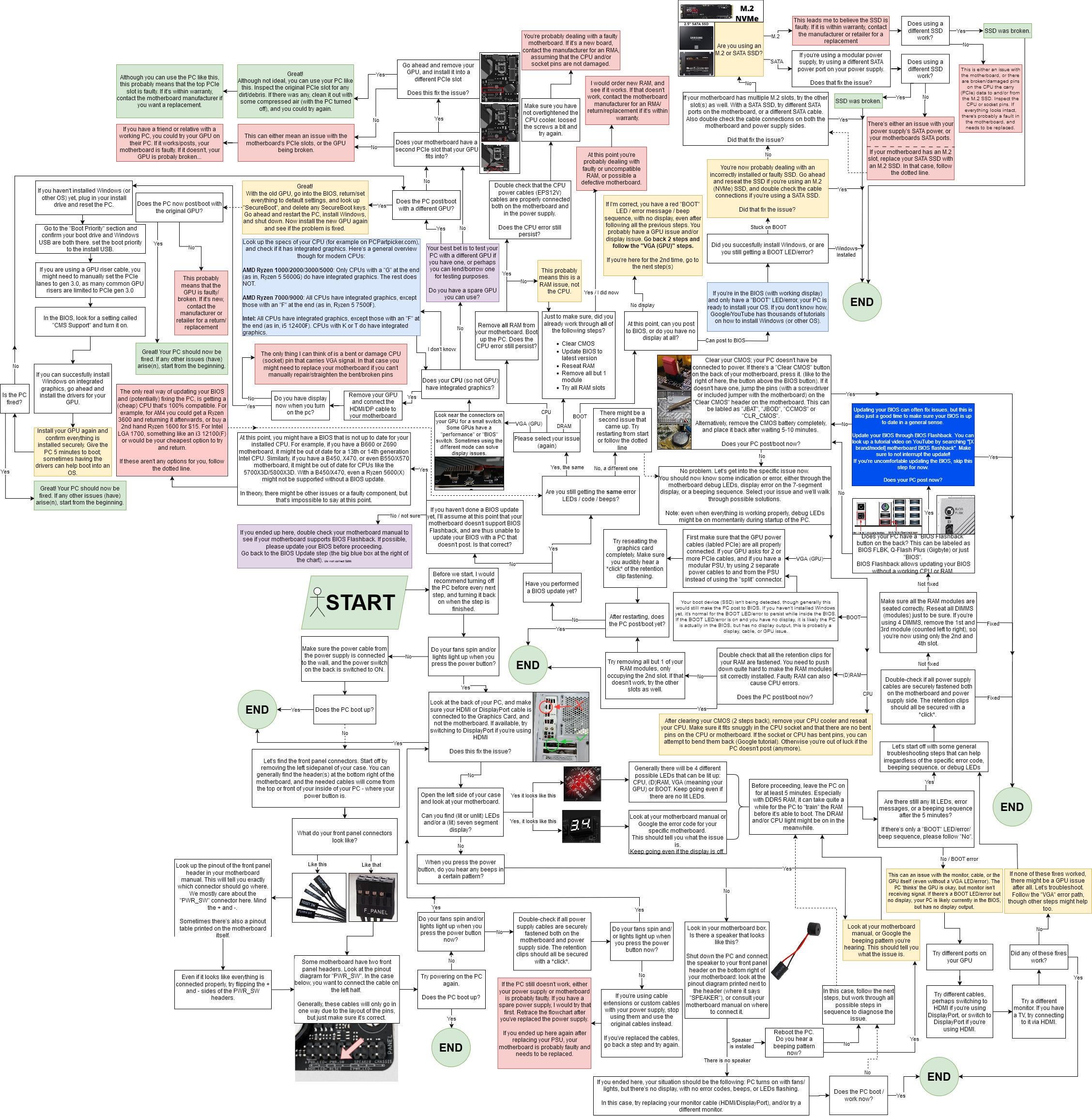
High res for those watching on mobile (thanks Reddit): https://imgur.com/9cbwXvE
If you guys have any suggestions, please let me know 😉

High res for those watching on mobile (thanks Reddit): https://imgur.com/9cbwXvE
If you guys have any suggestions, please let me know 😉
4 Comments
High res for those watching on mobile (thanks Reddit): [https://imgur.com/9cbwXvE](https://imgur.com/9cbwXvE)
This guide came to be after fixing probably around 80-100 PCs over the past 6 years or so, fixing and building PCs as a side-hustle during uni. If you guys have any suggestions, please let me know 😉
At first glance it looks very cumbersome to read but looking at it step by step it actually looks really good and understandable.
Sadly the people that would benefit from this kind of flowchart are the type of people that dont read manuals for starters lmao, but this is really good.
Before I started I figured I’ll come up with a dumb and unlikely problem first and see if this fixes it:
Some SI was updating firmware on some hardware and forgot to pull it out before shipping. Computer turns on, but happens to have a bootable mini USB plugged in the back with DOS on it, so it boots to that every time. Cause computer looks like weird hax0r letters => clearly broken.
I’m amazed this actually would arrive to the problem (so long as the machine has an integrated GPU) and instructions are followed holistically.
I had broken displayport cable delivered with my computer. It was so dumb and took me way too long to figure out what the issue was (thinking I messed something up while building but the LEDs didn’t indicate anything wrong).
If I thoroughly followed a chart like this I would’ve found it in a few minutes lol.