
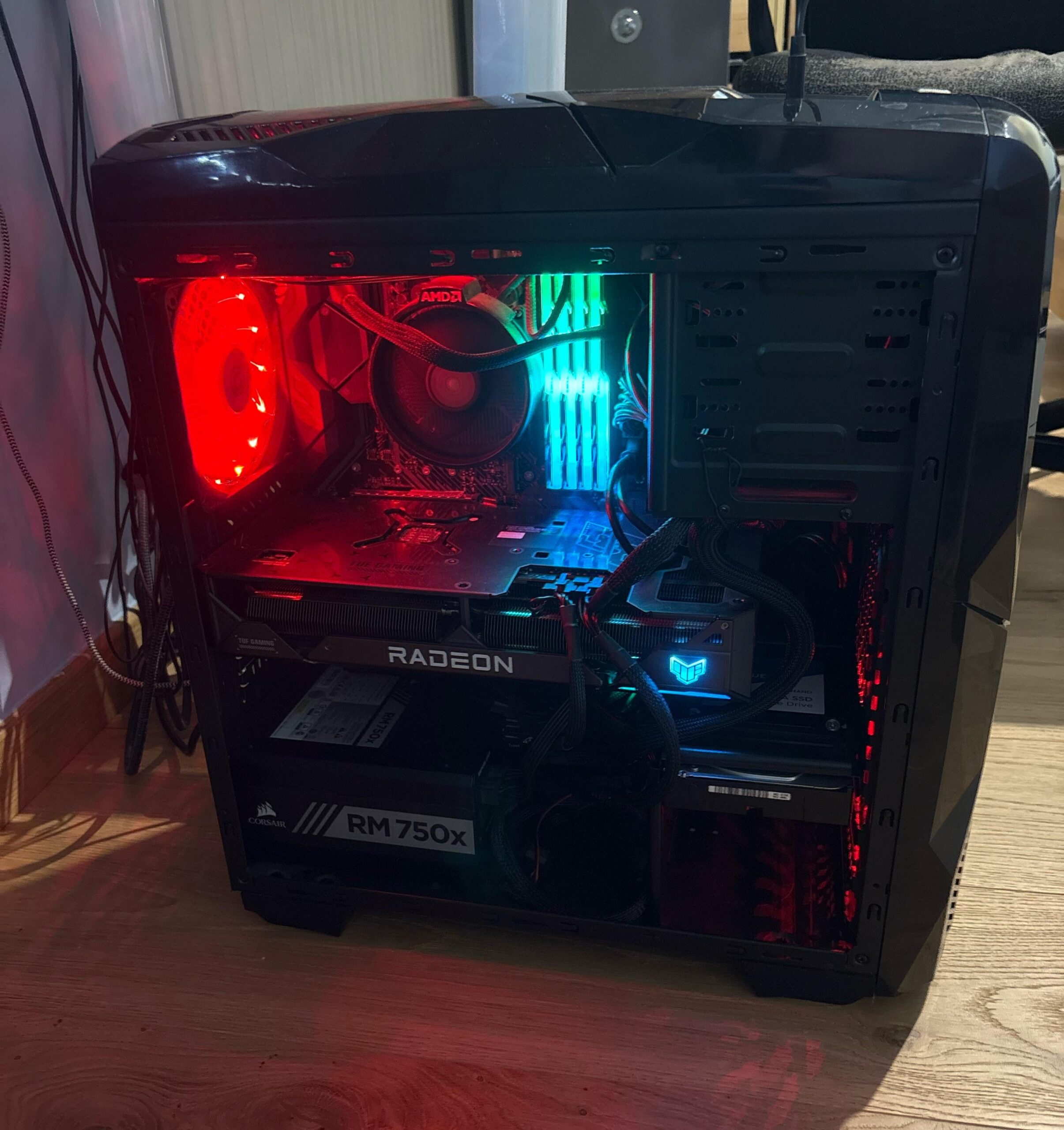
Like the title says, my pc is always crazy hot and I’m worried that it could break sooner or later because of that.
I’ve got a Radeon 7800xt with a Ryzen 5 5600x with the stock CPU fan, 32 GB of RAM and three fans: two on the higher left corner (one on the side panel and one on the roof panel) and one on the bottom right.
Now I’m keeping it “open” to have a bigger airflow, but it doesn’t change much: it’s always hot as hell and the fan are spinning like crazy, even when doing simple tasks as browsing the internet. What could be the problem, in your opinion? A lacklustre cooling setup? A non optimal PC case? A potentially dated or underpowered/bottlenecking CPU? The clutter caused by all the cables? Dust formations in some subtle corners? (Idk is this one, as I clean my pc with an air spray once every two weeks)
Thanks in advance for all the advices
33 Comments
If you remove the side panel and the overheating issues go away – it’s a case problem.
Also the stock cooler isn’t amazing but it shouldn’t cause your issues with web browsing.
I dont see a temperature reading..just a pre dertimined color temp sync That can be set to anything
Stock cooler
Shitty case with no air flow.
This are your 2 issues
What temperature do you call crazy hot?
I have old case as well, i tried to clear the space as much as possible. I would remove the hdd cage and have a fan on top right pulling down cool air to the cpu. I have setup like this (total 3 case fans) and it runs very cool.
https://preview.redd.it/bxx8ybkjxh6f1.jpeg?width=3024&format=pjpg&auto=webp&s=1e379e225001cb0bfd1b83b7e0b41c6ca144ce58
any numbers???? define “overheats”.
with that shit cooler 50c idle is not even bad, i used to get 110 on full cpu load
You’d be very surprised to learn how hot these components can get while maintaining a healthy voltage. Unless your PC is literally shutting off due to thermal limits, you’re okay. The 5600x can maintain temps up to 80°C without harming itself over time.
Obviously this is not a *great* temperature, and you’re going to see performance fall off. I’d highly recommend getting a better cooler for your processor.
Remember, the ambient temperature around your components will directly affect how cool/hot they are. If your CPU is producing mass amounts of heat, that stock CPU cooler is just blowing hot air directly onto your other components.
Consider a tower air cooler, or even a decent AIO cpu cooler.
Then, consider your fan configuration. You want neutral or positive pressure inside your PC case.
Negative pressure (pushing more air out than you’re pulling in) will cause air to seep in around the edges of your case other openings (or worse, around your exhaust fans)
You want to be providing an equal to or greater amount of cool air with intake fans, than you are removing hot air with exhaust fans.
Edit: fixed Fahrenheit typo to Celsius
Please define “crazy hot”. what actual temp?
Buy Magnitech mesh to cover your PC, and buy an aftermarket CPU fan very cheap and better than the stock cooler from AMD
How hot actually is it? What component is worrying you? The stock coolers for Ryzen chips are decent but not enough for overclocks. Some of the default bios clock profiles cook your CPU even with decent cooling.
What do you mean with crazy hot? What’s the airflow direction of each pc case fan? Did you checked Task Manager to se what’s the actual CPU/GPU load is?
yea man just leave that side panel off,
Some temps would be great, components, and a little backstory. Always ”overheating”, since you built it? Or what?
That looks like a hotbox office case. Get something with more mesh.
Likely due to poor case airflow if I were to guess based just on the case. Is the cpu, or gpu getting hot? More details can help everyone point you in the right direction my friend.
I would say to either do as much as you can to get better fresh air in and hot air out. As it’s an old case, you can try and open up some space in the front of the PC so the fans actually can do their work.
I read, but I cant remember while I am writing atm if u even had a fan in the front.
Change cooling paste for the CPU.
Or just get a better case for airflow. It’s pretty cramped in that case.
There are prolly lots on the used market that is better than the one you have. But I would say to get a new one.. And maybe a better CPU cooler. There are really good ones from like cooler master that is really cheap but performs better than the AMD stock.
Above is hardware related.
Now maybe it’s software related? Check when pc just started in the task manager if there is something in the background using alot of resources.
If you combine the hardware and software issues, you get a pretty toasty PC.
Probably the 20 year old case tbh.
What’s hot about it?
Good airflow cases are cheap as hell nowadays. Just do that and you will be good.
What are your actual documented temps? It’s entirely possible the fans are cranking because of a bad fan curve or some software and not because the cpu or GPU are actually hitting an unacceptable temp. And if you’re basing it on feel, even air coming out of a GPU we’ll within it’s temp range is going to feel hot as hell to your skin which is comparing it to room temp.
replace the cpu cooler, check the fan curve for the gpu and see if theres any open slots for more fans because it definitely looks like theres not enough fans/space for fans. check the CFM of the fans you have in there, theres a chance you have shitty fans so even if theyre working hard they arent pushing enough air
Take the sticker off the bottom of the AiO
I joke but so many people have left it on accidentally
It’s probably overclocked, dial it back down by resetting your Bios to default if you have no clue how to reset the clock rate. See if that help or it could be there isn’t enough thermal paste on the CPU/ badly fitted heat sink. For a few dollars you can get a really nice heatsink I’d replace that either way.
“Crazy hot” means nothing. Give us temps. Also, that case is awfully suffocating, get a better one. Same goes for CPU cooler
Back in the day, when crossfire was common, I used to leave the side panel off because temperatures got far above the maximum under load.
Try running MSI Afterburner and see if that helps reduce the temperature, allowing you to see what is happening
I would remove everything, give it a good deep clean, in case the temperature sensor is malfunctioning or a fan is not spinning freely
Next, run Windows in safe mode or reinstall Windows in case something is running in the background.
Do you have both fans that push air inside the case and push it out? If not, thats the porblem
What are the temperatures when you do normal stuff or when you game?
I would turn off the red light and change it to blue. Red means fire, blue means ice
Assuming this isn’t new BUT did you build or buy pre-made? Any chance the cpu still has the sticker on it and that’s what’s causing your overheat?
My pc is practically just like this; except I have a top fan that pulls air out, that’s very large, and very loud when it gets to it, the back fan is an intake, check your fans to see what direction they are pulling, that can make all the difference in cooling situations.
https://preview.redd.it/xzwi849h7i6f1.jpeg?width=4096&format=pjpg&auto=webp&s=a334286f7036c4ed5852de01ac24400c1373b150
Gpu cools itself, pulls air in and puts it out the slots in the sides, my case has mesh on the side to let the hot air out from the gpu. No water cooling, I stay at 30c while browsing and 50-60 while gaming. Both cpu and gpu.
Numbers my man. We need em
Check for a plastic peel not removed on the CPU heatsink.
Your case is of abysmal quality and ancient. Get one with actual ventilation.