
 Image: Nintendo Life
From the menu or settings screen, it might not appear that you can play Mario Kart World over LAN (Local Area Network).
However, just like its predecessor, it’s absolutely possible to play MKW via LAN mode – it’s just hidden in the menu options. Here’s how to find it…
On this page: Mario Kart World: How To Access The Hidden LAN Mode Option
1.Mario Kart World – How to Play in LAN Mode2.Why use LAN over regular local wifi?3.Er, why is this option hidden?4.What is LAN exactly?
Mario Kart World – How to Play in LAN Mode
Here’s how to access Mario Kart’s LAN option:
On the main menu screen, highlight Wireless Play (the fourth option)
Hold down ‘L’ and ‘R’ at the same time and click the left analogue stick in
Boom: ‘Wireless Play’ will have been replaced by ‘LAN Play’ and you’re free to create a room and play as you would otherwise.
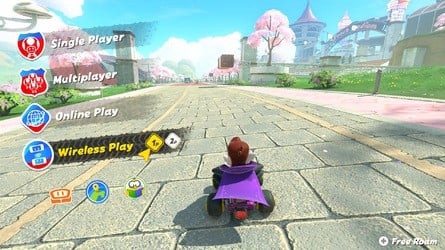
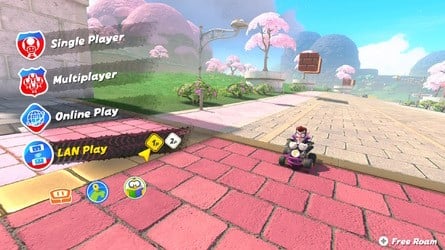 Images: Nintendo Life
(Thanks to Howwy23 on Reddit for flagging this hidden option!)
Why use LAN over regular local wifi?
With local wireless play, you’re limited to eight Switches, so with two players each, that’s a maximum of 16 in-person players at once.
Connecting via LAN, it’s possible to connect more Switch 2 consoles together – up to 24, in fact.
Er, why is this option hidden?
Probably because it’s unlikely to be useful to 99% of players. If you’re hosting a Mario Kart tournament with loads of people and — importantly — Switch 2s, this is a useful option. For the vast majority of players, though, local wifi play is sufficient.
What is LAN exactly?
LAN stands for Local Area Network and essentially means you’re communicating only over your local network, with zero data being transferred to servers or anywhere beyond your immediate vicinity. The benefit to this is the absolute minimum lag possible.
While there’s an Ethernet port in every Switch 2 dock (unlike the first generation Switch, which required the use of a LAN adaptor – although the Switch OLED’s dock had an Ethernet port added), it’s possible to play via WLAN (Wireless LAN) if you set up a hotspot.
A niche option, perhaps, but a welcome one.
If you’re after more Nintendo Switch 2 advice, check out our Switch 2 guides for more useful info.
[source reddit.com]
Up Next: How To Aim Items
Related Games
See Also

Gavin first wrote for Nintendo Life in 2018 before joining the site full-time the following year, rising through the ranks to become Editor. He can currently be found squashed beneath a Switch backlog the size of Normandy.