
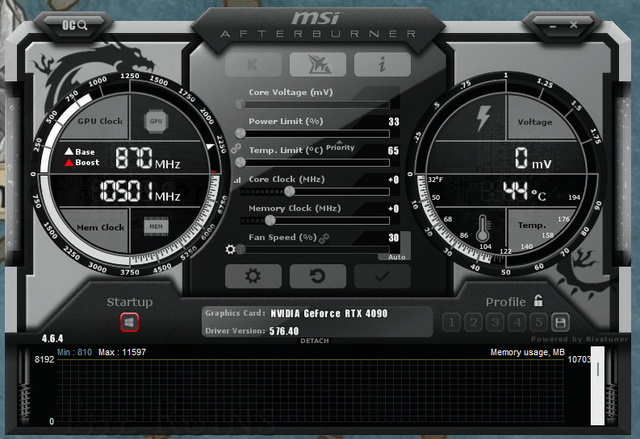
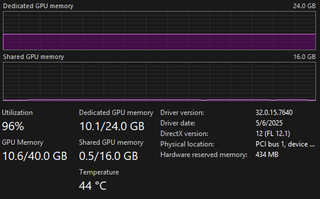
The screenshots are from MSI Afterburner and Task Manager. I've had my 4090 for about a year now and I've never seen it get much above 10gb of VRAM usage. If it does, I get large stutters and FPS drops. The only thing I can think of is that my motherboard is a generation behind. (It's a ROG Strix Z390-E).
Could the motherboard be the problem or is it something else?
28 Comments
Your pcie is a 3.0, so that will probably be the problem.
Either using PCIe 3 x8, or it’s your old cpu
its not the motherboard, could be some sort of weird memory caching setting where your VRAM is set to be used as RAM for some reason, or the memory chips are dead
Try on another pc if it seems still 10gb then your vrams are gone..
Have you actually done anything that *needs* more than 10 GB?
What games do you play and at what resolution?
The easiest way to use a lot VRAM is to play Cyberpunk 2077 at 4K with all RT features
I would argue that having your power limit and temp limit at 1/3 of what it should be is likely part of the issue. VRAM useage does draw power.
Is it something to do with resizable bar in bios?
What do you see when you run nvidia-smi -q in cmd and look at FB Memory Usage?
It’s a 3080 in disguise 🥸
Just because you have a lot of VRAM does not mean it’s going to get used. There are other factors. Games do not need 24gb of vram the average is 10gb.
power limit max, prioritize
and temp limit max
check if this works.
Why is your Power/Temp Limit set to 33%/65°C? Hit the Restore on your MSI Afterburner.
Are you sure it’s actually am issue with VRAM usage and not related to
1) the way weaker CPU
2) the 33% power limit, possibly resulting in issues?
You’ve artificially limited the card to not let it go above 33% power use for some reason, just put that on 100% and I’m sure it will go back to what it’s supposed to do
30 percent fan speed and 33 percent power limit is most certainly your problem. Reset ur setting and uninstall this app that is usless unless you want to overclock
Reset those afterburner settings to default 😭 the factory decided its fine so unless its running at 90c its fine
Broskie power limit is about 1/3 and he wonders why is his gpu using just a bit over 1/3 of the memory HMMMMMMM…..
Nice 3060
As others pointed out, check with default afterburner settings.
Otherwise we can exchange gpus, my 4070 can use all its 12gb 🙃
[Solved]
Apparently, at some point while using MSI Afterburner to monitor things like usage and Temp, I accidentally set the power limit of my GPU to 33%. After fixing that, I’m hitting 17gb of VRAM usage with no problems.
Don’t limit the card to 33%, you’re killing the performance
You can play with the voltage and undervolt it, maybe also limit the power to 90-95%.
Undervolting your CPU and GPU is always a good idea.
Keeps temps low, keeps noise to a minimum, helps with longevity and keeps the power consumption low (or at least lower)
PSU wattage?
Use [DDU](https://youtu.be/PciMRjwIxSM?si=VaP9jznt00s7Cazm) to re install the GPU drivers
Reset the Afterburner
So much money. So little brain.
First missing ROPs, now missing VRAM??
Maybe it’s Nvidia trying to handicap your card so you’ll get a 5090? /s
what game is it?
Bro’s shifting at 2000RPM on the Highway and complaining his car isnt going fast