
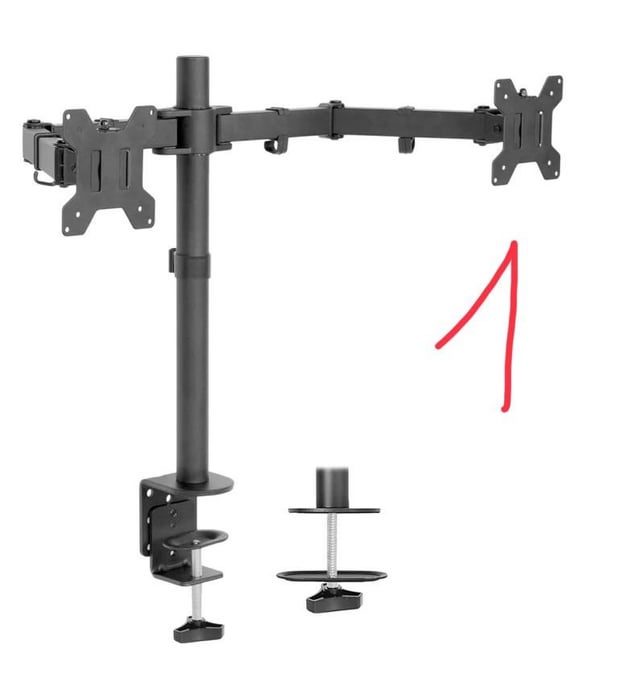
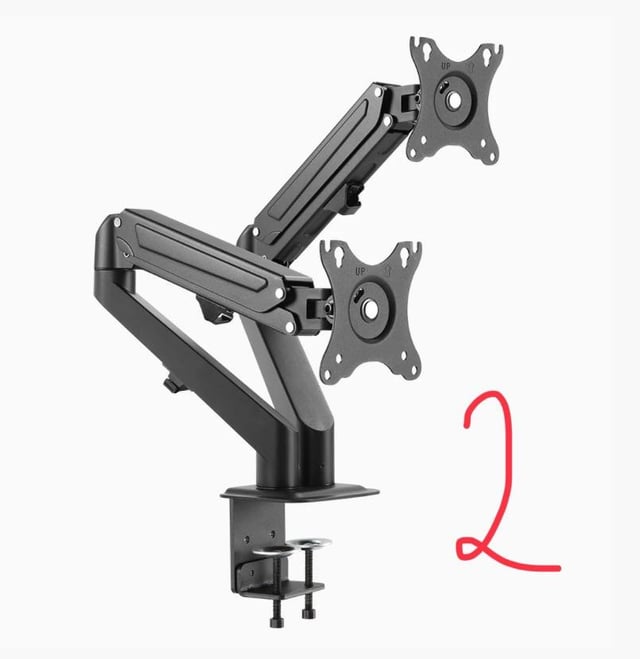
I’m looking into these mounts but I heard that the monitors are easly prone to shake when typing on your keyboard. I don’t know how true that is, if anyone has tried either of them lmk what your experience with them is please. Number 2 is 10$ more expensive.
Thanks in advance lads.
38 Comments
Really depends on the quality of the mount… ive had mounts that look almost exactly the same and some are just built better, some shake, others dont.
number 2 will definitely shake with the cheaper versions but what you gain is its much easier to move them around. Number 1 is what I settled on for my main monitor for gaming becasue the shake was something that frustrated me.
Also using arms that hold two monitors at once is clean, but be aware you’re quite limited on size and positioning. Another option is two Single arms if you think that’ll be an issue for you.
I have an arm setup very akin to the second picture. They do shake if you bump your desk but not when typing, that requires a bit more force. Also a good thing to note is how sturdy your desk is will directly impact this. My desk is decent but not the sturdiest thing ever. I have a 27 inch flat auxiliary monitor and my main 32 inch curved display on the dual arms and tbh it was one of the BEST decisions I made to clean up and customize my desk layout.
If you have a monitor with a very large / bulky stand like I do (an ROG monitor with the heavy ass annoyingly large stand) this is a game changer
I use both of those types of mounts and neither has shaking issues. If your desk doesn’t shake when you type, those mounts won’t shake. You just have to tighten all the bolts enough, especially the one at the bottom that clamps to the desk.
If your desk does shake, then all types of mounts will shake except ones which don’t touch the desk at all.
The first one is how my monitors are mounted. Because I go for the cheapest best option it was the choice for me. I expect cheaper versions of number 2 to fail at some point. There’s a lot of “brands” of number 1 but they’re all the same at the cheaper end as far as I can tell.
I have a triple arm, definitely pushing the limit on it. I drilled a hole through the desk and set it that way with a grommet it’s much stronger.
I’ve used #1 before. No issues. Solid. It would shake as much as a monitor just sitting on your desk would, so not really unless you are shaking your desk.
I got the 2nd one and let me tell you its better to buy two separate arms then something like in this picture
I have #2 have had it for 4-5 years no issues to this day. Just remember you have to have one banger of a desk. That clap will destroy any wood almost.
Trust me I know.
Consider the monitor weight & quality. I bought one which said my monitor weight was below tolerance and it collapsed while I was playing a game
Have a total of 5 monitors mounted on the exact same mount as #1. Now, my desk is one that I made from 3/4″ plywood and 2x4s, so it’s definitely heavier than something you would get from ikea, but I’ve never had an issue with them shaking. I rarely move them, so the ridged mounts work for me, if you want to be able to move them around often, then the type that #2 is would be better.
I have number 1 in my job and works really well, no moving at all, sturdy, can adapt very well
Had the first one at work – not exactly this model, but this very design.
Works okay I guess.
Also consider desk. I had a plastic desk and it bent under the weight of the monitor arm and monitors.
I prefer the arms with hydraulics / gas arms. I find since the tension is adjustable you get less of the shaking as that gas powered bit has some play.
Used a similar one at work. Nothing bad to say.
I have the first one. It’s aight but I’m wanting to upgrade to something nicer and more robust.
my wife has something similar to number 1. no shake. but keep in mind there is limited articulation. if you have 2 different monitors you won’t be able to adjust the height to match things up.
i have something similar to number 2 minus the up and down movement. no shake unless you really move the table. wish i had the up and down movement. get something with good reviews.
https://preview.redd.it/da84kp0tk45f1.jpeg?width=3862&format=pjpg&auto=webp&s=0a43bbad1b39a2c360f18a5b8038909d126d611a
I don’t feel any shaking
2nd is gold.
I’d personally take the second type , but for mounting on the wall.
I’ve bought hundreds of both types for work. The amount of shake is entirely dependent on the quality of the desk. A cheap mount on a nice, heavy, level desk wont shake but an expensive mount on a cheap, flimsy, desk will shake.
Have #2, no issues at all.
There’s a few factors to consider:
Thickness of your desk. Thin desks bow under the weight.
Size/weight of your monitors. Large heavy monitors are going to sag and wear out the springs faster. Also having them higher up affects the desk stability making it top heavy, this is where shaking plays a part.
Quality of the mount. I spent a decent amount on a heavy duty mount. It has a wider clamp and stronger springs so it’s not as prone to the same sagging problems. At least not as fast. A cheaper mount will likely have thinner springs that won’t counteract the weight for as long.
So as long as you have a decently wide desk, with a decently thick top, and don’t buy the cheapest arm you can find, you should be alright.
Not too familiar with #1 but #2 is hot garbage. We have a few at work and I tried to make it work, but about 1 hour into setting up monitors on them and getting it aligned, I completely gave up and found completely different arms because of how bad they are. I would recommend literally anything else over those
I have both, never noticed my monitors shaking.
I am at the no.2 right now, and just tapped my hands with medium force onto my desk and they did shake a little.
With normal typing there is no movement though.
Second picture somehow reminds me of the 3 dragons head meme.
I have both of these exact mounts on my desk.
Number 1 is stable as a brick shithouse. It won’t budge but it has less freedom of movement, particularly vertically. I use this mount for a 4:3 LCD that’s used as a secondary monitor for my primary PC as well as a primary monitor for my DOS/W98 PC.
Number 2 is less stable but allows significantly more movement. It doesn’t wobble when I type but it does wobble if the desk or floor shakes. This mount holds my Primary monitor used for personal and work matters. The other arm has a laptop mount to hold my work laptop which is used as a 3rd monitor.
I have one similar to 2. Works great.
I have number 1. Monitors dont shake with my desk. overall I quite like it
Something I didn’t think about though, was I have two different monitors and the right monitor is permanently slightly higher than the left. Also with how close my desk is to the wall, there is about 3inchs of space between the two monitors
I use #1 at home for gaming and #2 at work. Don’t have a problem with them at all. If your desk is sturdy, the mounts won’t be a problem. But if your desk shakes, the whole thing is going to shake.
Idk if anyone mentioned this but id reccomending shelling out some more cash to buy two single monitor stands instead of a dual one. It gives you more freedom but will eat up more desk space with their mounting clamps.
They’re terrible
i use 1
https://preview.redd.it/p8xf2bxdc65f1.jpeg?width=8160&format=pjpg&auto=webp&s=f904a19bba4b198a80b40989f886cd21c62eb1f4
I use the first one and it shakes when I’m using my wheel with force feedback but that’s it
I have both types. I prefer type 2
But both feel strong in all my monitors. They’re all 27”
I have the second mount almost exactly. It’s totally fine and I love it.
Got #1 at work. The tilt isn’t too good at holding up larger monitors. It relies on a square shouldered m10 bolt with a nyloc for clamping friction, but you can’t get enough counter torque on the nut to tighten it enough. I replaced bolt with one with a hex head and used 2 spanners on it. Seemed to work, but an irritating design oversight.
No issue with typing wobble though.
The problem i had is when the hinge connecting the arm to the stand started to bend and one monitor was then lower than the other.
Have used both style mounts, prefer #1 because the adjustable “floating” aspect of #2 was never used in my case. Very happy with stabilty of both, no shaking as you described. Both were clamp mounted on Ikea desks. Time reference in use, had #2 style for 12 years, until I upgraded to larger monitors that exceeded the arm capacity, been with #1 style ever since (last 4 years).
My recommendation is go with #1, fixed height mount, unless you absolutely, positively need “floating” arms for some obscure reason. Had them, never used that feature in 12 years, so save your money.