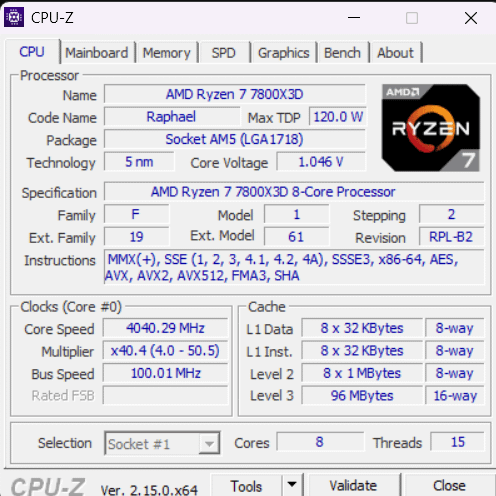
You can turn individual cores off in BIOS or Ryzen Master, but I know you would not have done that intentionally. You might want to reset BIOS? (Be careful if you have an encrypted drive or other security setting enabled, before resetting, of course.)
sebchleb
Now after picking advanced cpu option or sum in bios my pc doesnt turn on and cpu and dram light are on WTF?!
Nikolas_500
Yeah sorry my 3200U needed that extra thread
sebchleb
Okay, the light are gone after CMOS reset and my missing thread is back! I appreciate all the support. Cheers!
AssassinBoo123
No no it’s actually 15+1(it was an offer at launch not anymore)
SISLEY_88
OP they did the Rick ROPS on you…
kerthard
It’s hiding out with those ROPs that Nvidia lost.
Michaeli_Starky
It’s a new tariff
Dilegit
Depending on what motherboard you have, like a gigabyte board I know has what is called x3d turbo mode that disables hyperthreading in favor of core performance.
Hour_Bit_5183
How the hell….what the…….I wonder why it did this???

18 Comments
your 16th thread got tarrifed
You can turn individual cores off in BIOS or Ryzen Master, but I know you would not have done that intentionally. You might want to reset BIOS? (Be careful if you have an encrypted drive or other security setting enabled, before resetting, of course.)
Now after picking advanced cpu option or sum in bios my pc doesnt turn on and cpu and dram light are on WTF?!
Yeah sorry my 3200U needed that extra thread
Okay, the light are gone after CMOS reset and my missing thread is back! I appreciate all the support. Cheers!
No no it’s actually 15+1(it was an offer at launch not anymore)
OP they did the Rick ROPS on you…
It’s hiding out with those ROPs that Nvidia lost.
It’s a new tariff
Depending on what motherboard you have, like a gigabyte board I know has what is called x3d turbo mode that disables hyperthreading in favor of core performance.
How the hell….what the…….I wonder why it did this???
Win+R -> Msconfig -> Boot -> Advanced boot options -> uncheck “max cores”
You got the nvidia kind
C lang joke? /s
That thread tore💔🥀
That’s odd. I thought OP enabled some X3D mode but apparently not. Why is only one thread missing?
You silly, theard count start at 0
I took it