Honestly man, looks super functional for work and occasional gaming. Awesome setup
StringStrangStrung
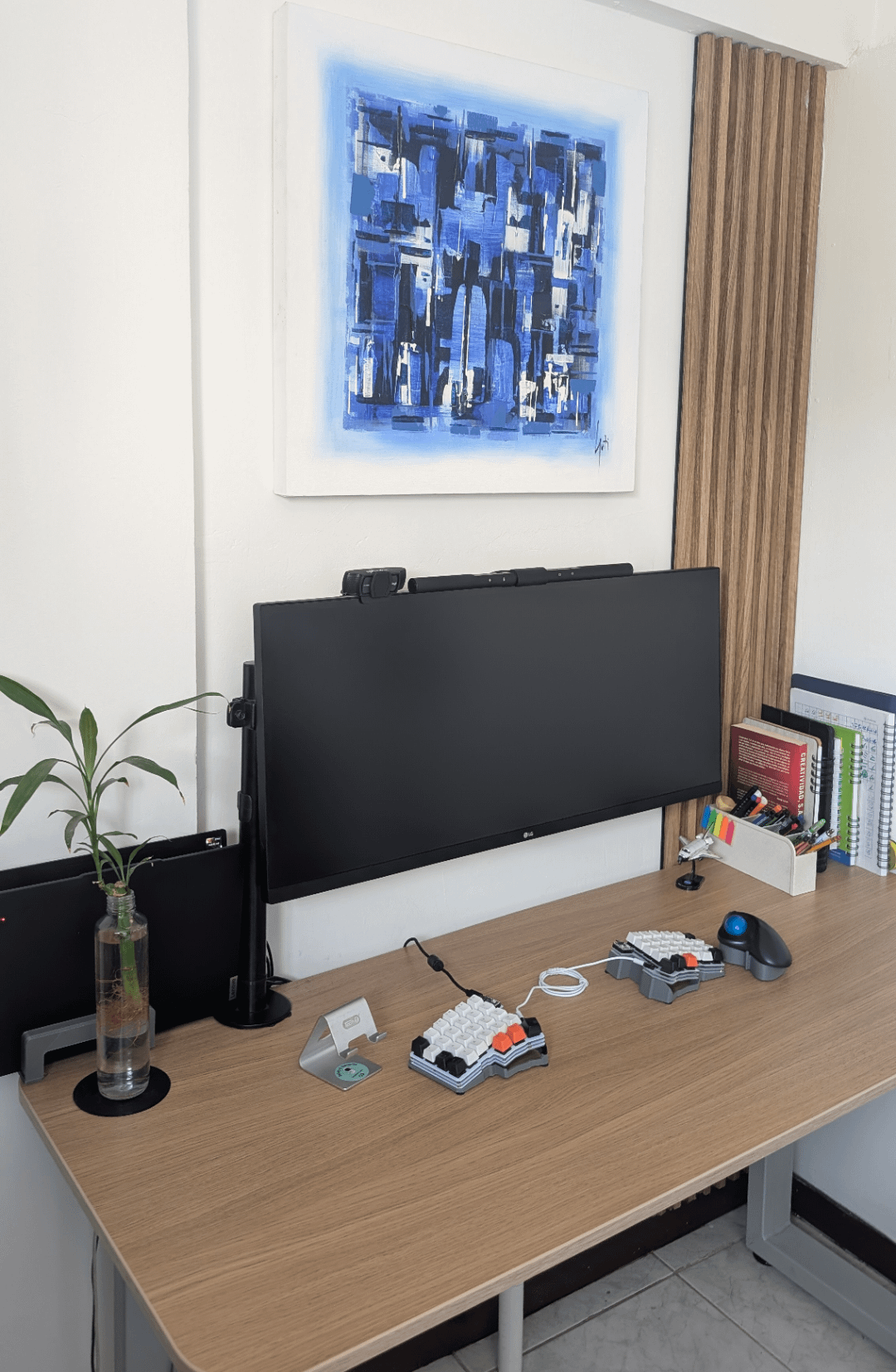
Split keyboard AND a ball mouse? Do you enjoy pain?
Jokes aside, nice setup. I like the desk.
Aarib_pro
Nice clean work/gaming setup 🔥
cmacy6
This makes me wonder, has anybody made a split keyboard where the right side also functions as the mouse?
mq2thez
You seem to care about ergonomics, so:
Biggest suggestions would be to have someone take a photo from side of how you’re sitting while using the desk. The keyboard and mouse are pretty far from the edge and monitor is quite far from the edge. Monitor top also looks fairly high.
All of that means you may be hunching your shoulders forward (fixed by having m/kb right on the edge of the desk where you have your elbows in the right position and don’t need to hunch), leaning your head forward (to be closer to the monitor, depending on resolution) and or moving your head up and down as you look at different vertical spots in the monitor (fixed by moving the monitor to be maybe halfway across the depth of the desk, depending on what gets you).
You could also try moving your mouse between your keyboard to avoid your right arm rotating too far out of “normal” range of movement when using it.
Human-Lab3268
My only suggestion would be to experiment using the mouse in between the split keyboard; it changed my (wrist-painful) life.😀

10 Comments
Honestly man, looks super functional for work and occasional gaming. Awesome setup
Split keyboard AND a ball mouse? Do you enjoy pain?
Jokes aside, nice setup. I like the desk.
Nice clean work/gaming setup 🔥
This makes me wonder, has anybody made a split keyboard where the right side also functions as the mouse?
You seem to care about ergonomics, so:
Biggest suggestions would be to have someone take a photo from side of how you’re sitting while using the desk. The keyboard and mouse are pretty far from the edge and monitor is quite far from the edge. Monitor top also looks fairly high.
All of that means you may be hunching your shoulders forward (fixed by having m/kb right on the edge of the desk where you have your elbows in the right position and don’t need to hunch), leaning your head forward (to be closer to the monitor, depending on resolution) and or moving your head up and down as you look at different vertical spots in the monitor (fixed by moving the monitor to be maybe halfway across the depth of the desk, depending on what gets you).
You could also try moving your mouse between your keyboard to avoid your right arm rotating too far out of “normal” range of movement when using it.
My only suggestion would be to experiment using the mouse in between the split keyboard; it changed my (wrist-painful) life.😀
https://imgur.com/a/lFd99KM
How ergonomic it is your setup? “YES”
what keyboard is that?
What montior mount are you using? I have a similar one with a smaller monitor, and it’s beginning to tult from the weight.
If you’re wanting to maximize the clean aesthetic, and add one more element of function, I would go with the following:
Small wall shelf for books, relocate laptop to an under-desk mount, and include speakers.
You could also do none of that, and still have a clean setup, because you already do 😎