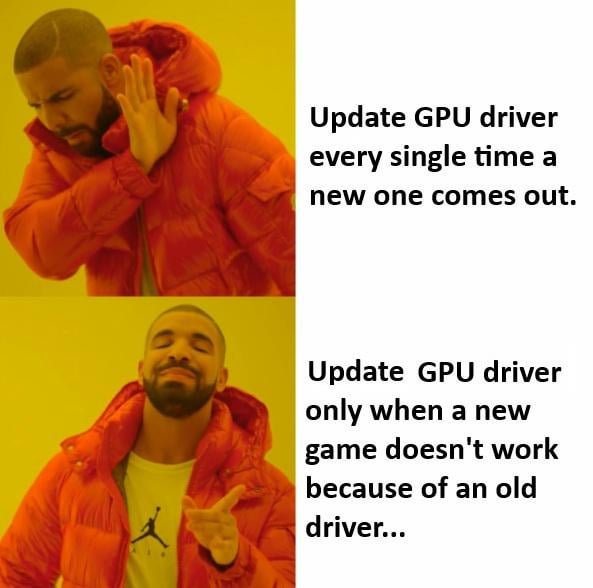
At this point, if current driver works just fine why even bother with the possible risks? By the way, how often people actually update their drivers?

At this point, if current driver works just fine why even bother with the possible risks? By the way, how often people actually update their drivers?
40 Comments
I update my drivers every time I happen to open the nvidia app on accident.
Used to update ASAP. I like updates in general, along with their potential improvements and a small sense of risk. I develop software for a living, so maybe that’s why.
However, I’ve been stuck at 572.83 for a while for the first time in my life. This “sense of risk” just became too much.
Priorities change when you only have 1mbit/second internet connection.
Prior all this mess? Every new one.
Now? Until its fucking okay
I used to wait and see on new graphics drivers. until a week ago when playing Doom TDA and it keeps crashing/freezing, i relented and updated it, no issue since. AMD btw.
I update mine whenever I want to game. I have toddlers, so I may go a few weeks to a couple of months between gaming. So, making sure things are recent is just part of my routine now. If a game doesn’t work due to an update, I choose a different one and hope the next update fixes it. I don’t have the luxury of being picky when my alone time is finite.
New drivers have significant optimizations for more recent games, if you don’t play new releases and you haven’t had any issues then there really isn’t a need to upgrade. You should still consider it to be a potential issue when trying a game that is new to you though.
Every WHQL driver (non optional) driver.
Read the release notes. Is it a critical fix? Is it a security fix? If it’s “no” to those, I don’t update as long as things are working.
I used to update as soon as the app told me a new driver was available and never ran into any issue with Nvidia drivers. Lately I’ve had to stop doing that because of numerous black screen issues either during the installation of a new version or randomly after boot. It’s been very fun lately…
Once you have a functional system up and running that may be okay but what am I supposed to do installing nvidia drivers on a newly built system? Roll a dice?
I’ve always been in the habit of “if it ain’t broke, don’t fix it” when it comes to both drivers and firmware. You generally should only update these if there’s specific fixes to improve performance/stability/security and if new software/games requires the updated driver or firmware.
I unfortunately got roped into updating past 566.36 nVidia driver because I’ve been playing a lot of new games lately and the game ready drivers are suppose to have fixes/stability for a couple of games I play.
this has always been the way.
I update to every new drivers but I hold up until I finish playing game/s that I already started to avoid possible recompilation of the shaders or stutters
I update it when it fixes a bug I’m having, includes support for a game that I play, or fixes a security issue with the software.
That’s pretty much it.
Generally with most IT software/bios upgrades, unless you have a problem you know is meant to be fixed with the patch/update, let someone else be the guinea pig.
I have never updated video drivers unless there was an issue. too many things could go wrong.
I’m in between. I do not generally install updates immediately, and I’m fine being way behind on driver version. But I do occasionally get the urge to update to the latest drivers to see how they perform.
I updated my drivers back in nov 2024 because I was getting lines on my monitor. Turned out the monitor needed RMA. Haven’t updated since and happy not to (4080S)
If it ain’t broke don’t fix it has always been a truism. Leave your drivers alone unless you’re fixing something or gaining some tangible benefit.
Sometimes new driver contains security fixes.
I used to do it quite frequently, but after I started hearing about various issues.. I won’t update them again unless there’s an issue with the games I’m playing currently.
One only does if they have had a recent bad experience. The HD6990 had driver issues when it was released and caused system crashes. 6 months out they released a new driving, fixed it all… Awesome… until a driver a few months later broke it again. So I stayed on that old working driver, and that is the driver my newphew is using since me gifting him a machine with that card.
Otherwise install the latest drivers and versions… hell.. unigetui makes keeping up to date on all your software a breeze. Some people are motivated by fear and fear of change, others like new experiences. If it works, well let me fuss with it and see what can be better. I can roll back or reinstall if something breaks.
I stay on Studio Drivers unless I buy a brand new game and that is rare. They just seem way more stable.
i update whenever never had an issue
I used to update my driver everytime a new one came out.
But stopped doing that in the last few months due to the nvidia shenanigans.
I’m on a 3090.
Even prior to Nvidia’s shenanigans I chose not to update to their latest drivers. 90% of the time, they don’t add much. Only reason I would update is if there’s a vulnerability.
With AMD, I’ll update more often, since they might update a feature like afmf and I use their software more often.
With Intel, it’s almost always update instantly.
Been for weeks @ 572.70 and everything runs fine.
Was looking forward to new drivers. Especially when a new game was released.
But now with Nvidia’s mess, I’m holding onto my driver until something goes majorly wrong.
Nvidia fanboys many years ago: I can’t buy AMD because bad drivers, reee
Nvidia fanboys when Nvidia fucks drivers: just don’t update 🤡
Im in the same boat. New driver updates have caused most of my pc gaming problems in the last year
Updating when my games act funny. That’s usually how I find out a new GPU update is out.
With older gpus it’s not worth it to update to the latest driver because it most likely doesn’t bring any performance gains or anything and only makes things worse
My AMD driver updated to the most recent one and it broke multi displays. I remember the days when I was excited about getting new drivers and patches because it made things better, now you are guaranteed nothing.
Happened to me last night with Cyberpunk on my 4070 8GB laptop, and I had just been commenting saying 8 was fine if you turn settings and res down via upsampling. Remoted into 4090 rig and was like OH, Okay. Just need to update drivers again for THIS game. Wonder what other games this will now break…
I update drivers only because it gives me a false sense of achievement and productivity in my day.
Every time there’s a new driver.
But I’m also on AMD, so I’m able to miss all the chaos and fuckery that’s been going on with nvidia.
ain’t broke, don’t fix it.
I’ve still been updating every driver update…damn intel arc lol
Most AMD users aren’t aware that Adrenalin will self update in the background. I forgot to turn it off because I wanted to stay on 25.4.1. I was looking at a few things on my daughters PC and realized hers auto updated, so I checked mine, knowing things felt slightly worse lately, and it updated mine to 25.5.1 as well. That explains why things seemed off.
https://preview.redd.it/gblllxkjqr3f1.jpeg?width=700&format=pjpg&auto=webp&s=44c674a6e017d307ee2a93f1690d7485c6ac6466