

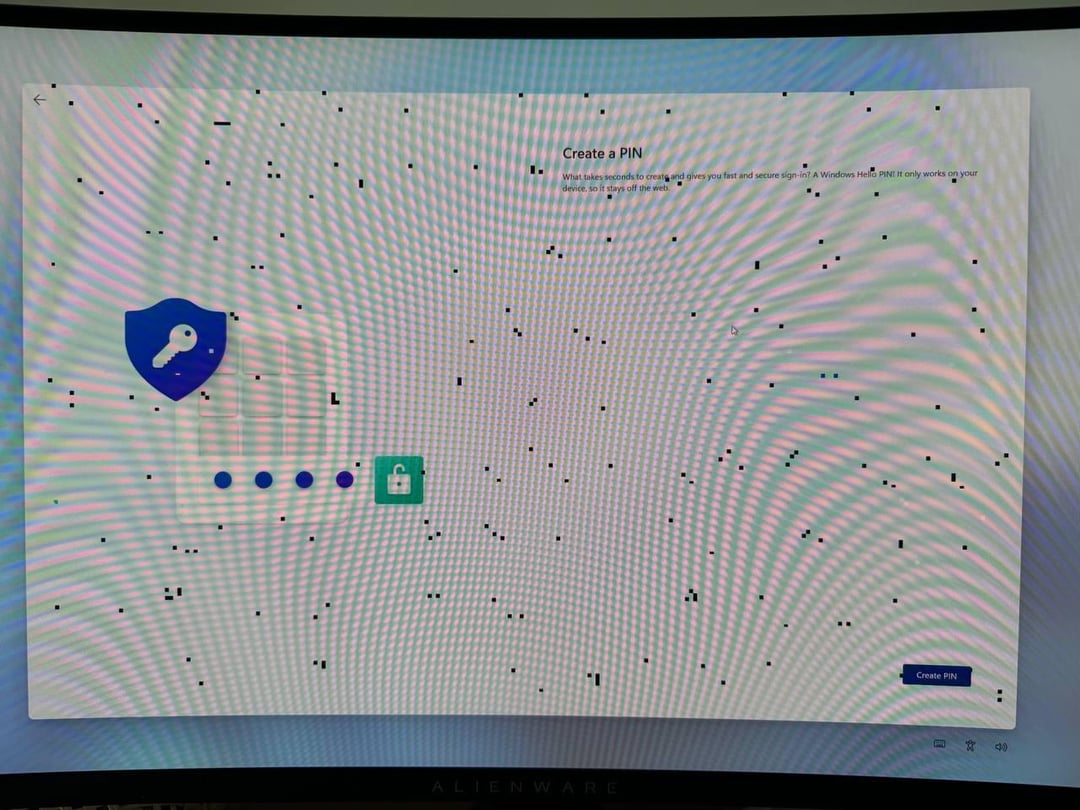
Brand new 9070XT Red Devil GPU, I bought it last week. These artifacts appear in all games, and in browser images and videos. They result in frequent system crashes too
Removing drivers with DDU and trying different driver versions didn’t help. SSD wipe and clean Win 11 install didn’t help. The GPU was always plugged in with three separate 8-pin cables form a 1000w Corsair power supply
is this a Hardware defect? What should I do?
25 Comments
I’d do a warranty on it
Have you tried to use another cable? If you have crashes, the cause must not be the cable but… I think it’s worth a try to be sure.
You didn’t pay for broken goods. Return.
Brand new? It’s probably a defective unit. I’d return and get another one (if possible). If not, this is what the warrenty is for. RMA it.
Before you do, try a different cable and make sure all cables are fully seated.
Vram overclocked too much, if not, rma it
Yeah, probably bad vram
Instant RMA! Shit sometimes happens. You will get a replacement without any issues.
Out of curiosity, do the artifacts go away if you underclockv ram?
Either it’s the display port / hdmi cable, or the vram is fucked. If changing the cable doesn’t fix it, then it’s RMA time. Probably a bad solder joint.
It’s very likely defective VRAM. 100% a reason to RMA the card.
Thats a sign of VRAM failure. RMA
Is it Silicon Lottery look like?!
Manufacturing defects happen. Swap it out, probably be fine.
Bathtub curve can happen.
This is memory fail!
I once bought a Sapphire Vega 56 Pulse brand new from Mindfactory.de and unfortunately experienced the same artifacts. I just sent it back and they sent me a new one without hassle.
Extremely easy and painless experience, that GPU might still be working for all I know, since I sold it a couple of years after to upgrade.
It happens, it can happen even with a 5090. Not even iPhones are free from manufacturing defects.
My point is that even if there are products that have close to zero failure rates, no electronic device ever produced is free of failure, there might be a hairdryer that maybe had only two flukes, but zero is impossible.
It might pass QC and then after a few hours of use it fails.
Send it back and get a new one.
It’s a vram error. If you have warranty, simply return it
Looks like possibly a bad cable.
Did you try with a different displayport/HDMI cable?
How is this even a question? Just return it already!
Your vram is giving up, rma it
These artefacts are most likely vram so not the gpu itself
o7
Yeah, that looks like a Card failure. Maybe check the Cable you are using first as a last resort so customer Support doesnt fuck around but Warranty it otherwise. Remember: dont open the card xD
Always take the easy/cheap solution or easy/cheap answer first. First, make sure your DP cable isn’t damaged. If you can, make check your monitor. Then check your warranty and start that process.