
I had an X670 in white from MSI due to a bundle-only deal at Microcenter back when nobody could get their hands on the 9800X3D, took it so I could actually get one. I couldnt stand looking at the white in my wood case anymore so I caved.
Fast Forward to now, I snagged the X870E Asus Proart:
9800X3D
Astral 5090 (Air)
64gb DDR5
X870E ProArt Asus
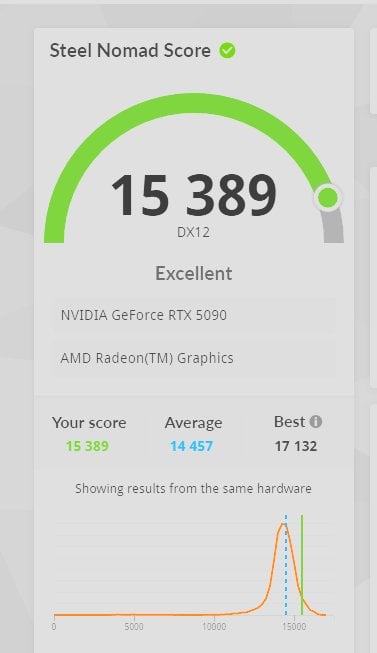
My Steel nomad scores were peaked at 15389 before the motherboard change +200 Clock + 750 Mem.
Now at the same settings, Im lucky if I peak 15190-15210 before I hit crashed at +300/+1500. 15257 is the highest I got eventually. You can see I spent multiple sessions going up and down, and so on here – SN (steel nomad) [score] [clock] [mem]
Curious if I'm missing something major here
– Yes reset/reinstalled drivers clean
– No lane bifurcation, confirmed running 5.0 @/16
– Max power 3d settings always
– Desktop power mode and all that set to prefer max
– Fans 100% for all runs
– Temps nice and cool in the low 60's
She'll start crashing at +300 clock so it appears "I'm giving her all she's got Cap'n!"…. Also noticed repeating runs with the same settings yielded much different results sometimes too.
Help me out, thanks!
4 Comments
Yes. Different training of memory timings can easily cause a 1-3% performance swing.
Post a ZenTimings screenshot of both boards.
It’s usually disabled by default but you can double check to make sure PCIE ASPM is disabled in the bios. I noticed lower scores with this enabled.
Do clean install of windows, then manually tune your PBO settings and memory timings, then try again.
I sure wouldn’t call that “tanked.” But any number of variables could affect your score and performance. I’d take a look at your PBO settings, your motherboard power limits, your voltagescand your fan curves.