
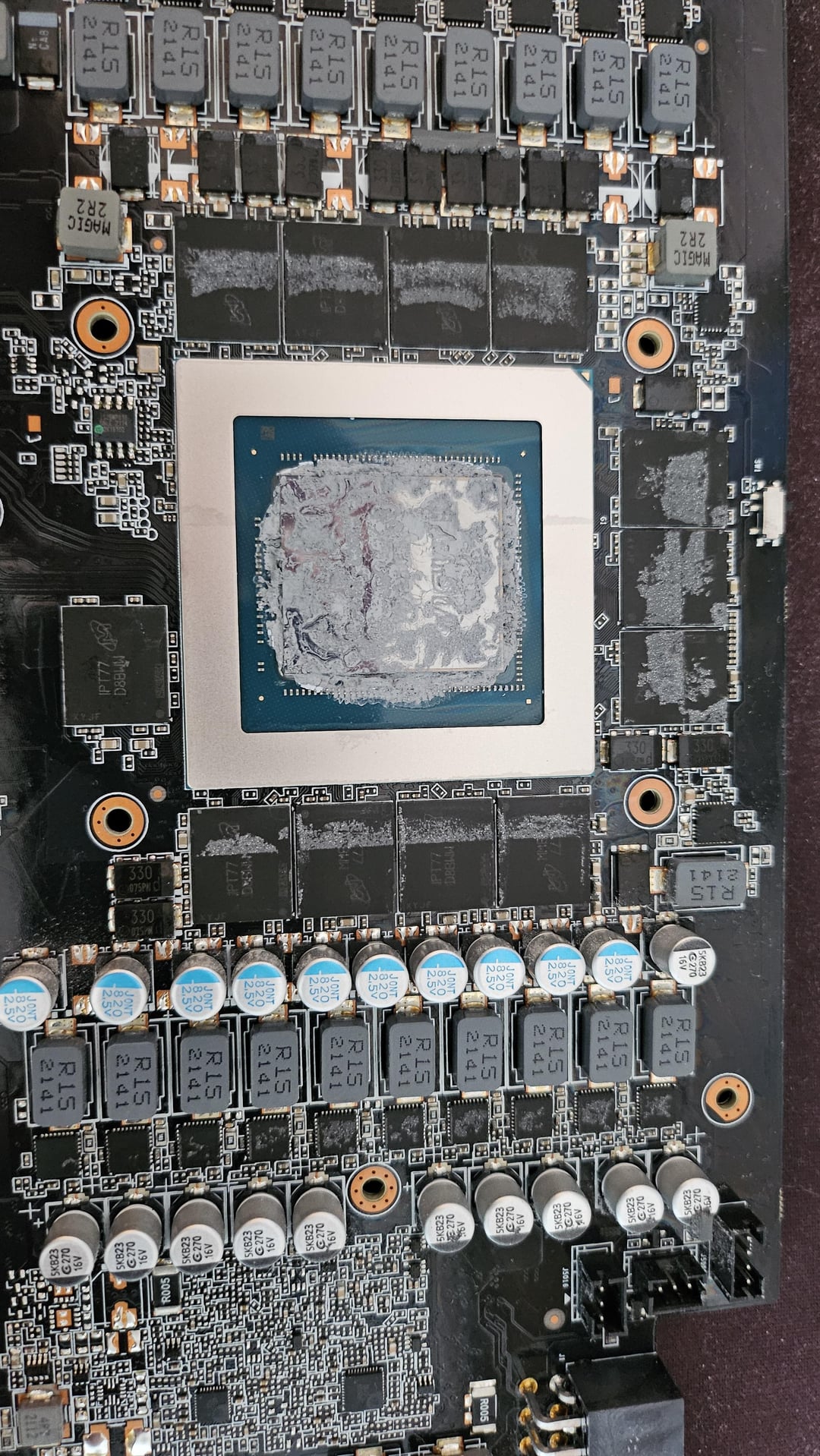
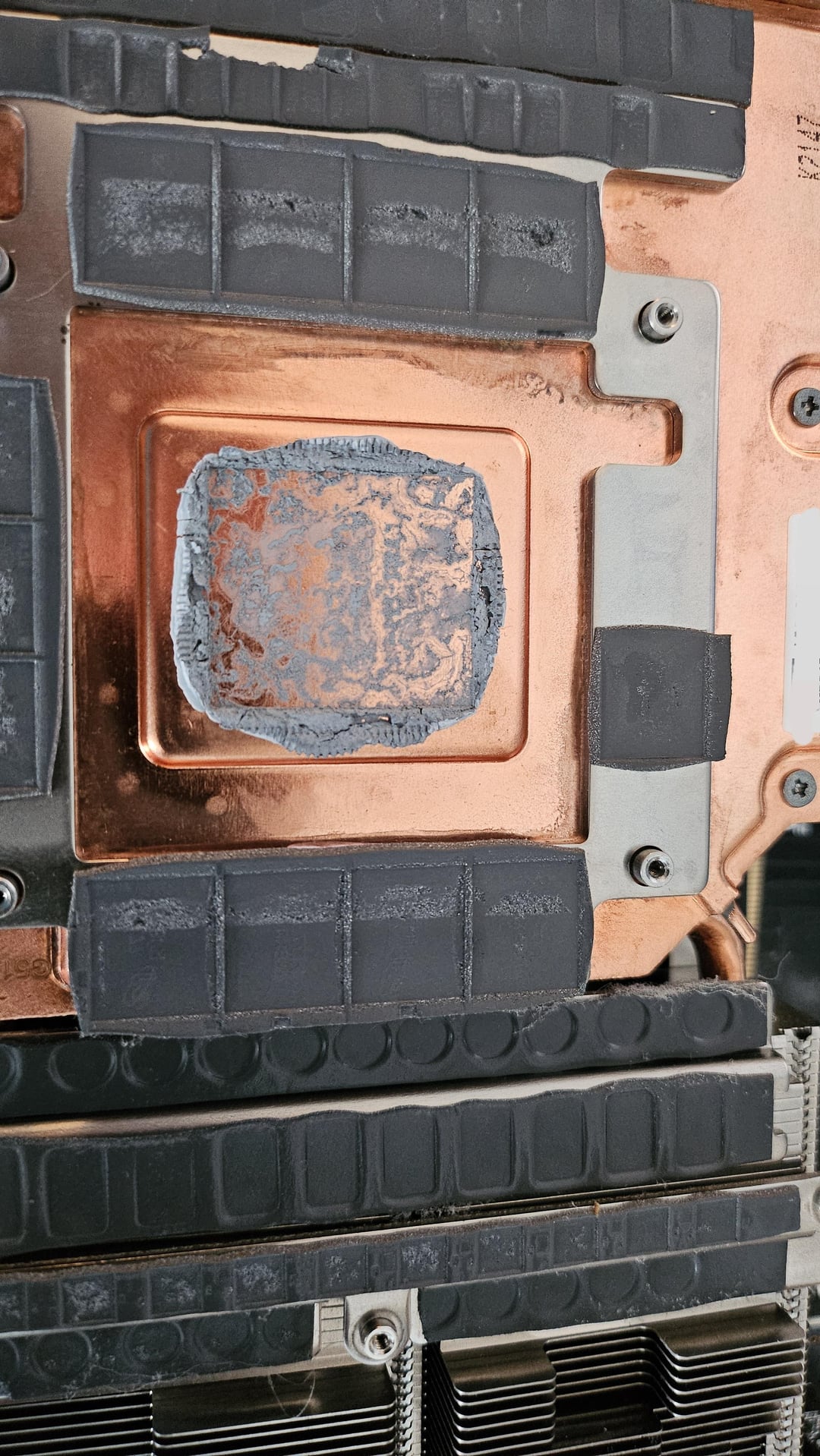
I've had my Gigabyte Aorus 3080ti for almost a couple of years now and started having issues with it at about a year in where artifacts would pop up all over my screen while gaming. The issue got worse quickly and within a week I had no video signal at all. Started the RMA process and waited weeks to get a response from their support team. They said they couldn't replicate any problem, but they would go ahead and replace the thermal compound and send the card back.
Received my card back and it seemed to work alright. Roughly two months from starting the RMA to getting it back. About half a year later my card started to randomly crash the driver while gaming and require a reboot. Things kept getting worse over the next couple of months to the point that my card would thermal throttle at 90C while putting out <20fps on Rivals or Oblivion within minutes of starting. Sometimes a hard reboot would fix it for awhile. Started thinking it was a sign to trash this card and swap to red team for awhile, and decided I might as well look inside first. Even if I broke something, I was prepared to replace it.
Holy crap the thermal paste job was so bad. Everything was hard as a rock and dry, and there were gaps all over. Cleaned it up really well and spread an even layer of artic silver out across the GPU. Was surprisingly easy to take apart and reassemble. Ran the card through numerous tests and games, no longer goes above 72C and runs smoother than she did out of the box. 😭
Learned my lesson to never trust Gigabyte RMA again if they claim to replace thermal compound. Might go ahead and order some new pads, as well. These looked so bad.
22 Comments
Looks like pretty standard thermal paste and paste application.
I’m guessing your case doesn’t breathe. What do you have and how is the GPU positioned?
It’s been 18 months… and it sounds like you previously had thermal issues after the same timeframe. What kind of environment is that card in? What case? What fan curve? Is it near the sea/ocean? Super humid or dry environment?
I’m not a Gigashit fan by any stretch, but I think there is something going on specifically with your PC and/or environment
gigabyte in generall is a joke i try to avoid them as much as possible
I remember seeing where a publication tested a gpu after a year and it had massively higher temps due to the paste drying up. Seems they’re using garbage paste. PTM 7950 would be a good replacement. My gigabyte 3080 ti went up in smoke and they replaced it with a 4070 ti in about 2 weeks.
PTM 7950 is the way to go, you’ll have pump out again if you put paste on it. And honestly, the pics of the paste look pretty standard, so Gigabyte didn’t mess up there, it’s just that large silicon dies will have pump out when mated to large copper coldplates due to the difference in the coefficient of thermal expansion. Just the reality, and PTM or another pad-based TIM is the only way to REALLY solve it.
I just finished taking apart my gigabyte 3080 oc, and it also looked to bot have enough thermal paste. Currently, I am designing a mount so I can put two nocturnal 120mm fans on it. I’m excited about the thermal and noise reduction. Fortunately, I wasn’t struggling with crazy high thermals
thermal paste seems fine tbh, it is supposed to be a very thing layer, less than 1mm. Is not icing on a cake lol
Long long ago, during the Socket A days I had to RMA a gigabyte motherboard. Back then their RMA dept would refuse it unless it was mailed from the store you purchased it at. I jumped through the hoops but I’ve avoided the brand since lol
gigabyte is a joke. I had to sent mine for RMA twice in 6 months. same issue, power failure, started 6 months after purchased. so I demanded a brand new replacement and they gave it. once I got it I just sell it off.
Reapply the thermal paste for the gpu die, do you have a trustworthy friend to lend him/her to test the gpu out for a week to see if the problem still occur?
Those pictures looks fine to me. I don’t see the issue.
I had the same issue with my Asus TUF 4080 Super. It seems like the OEM thermal paste Asus and Gigabyte use is garbage.
To add to what u/zcomputerwiz said, When I had my 3090 on a vertical mount, the ram chips on the rear were getting to around 90 degrees. I eventually added a custom mount for a 80mm fan to pull the hot air out from behind the GPU, it seems in that case the air wasn’t moving behind the card, so that area was getting really heat-soaked. The fan fixed the issue completely, dropped the temperatures by like 10-15 degrees.
My card looked like that after I sent it to get RMA for my middle fan not working, they didn’t repaste it either and I would have random shut offs, my computer would just die before I took my card apart and redid the thermal paste
Which tech company actually has a good RMA process is what i wanna know…
Get some ptm7950 and your gpu is good for the rest of its life
fucking right they are a joke. I’ve had nothing but problems with Gigabyte for 15 years. I had an RTX 3090ti that I needed to send back for warranty. I live in Canada, needed to pay for it to be sent to the US. The Customs officials wanted to talk to Gigabyte about it for some reason or other, but Gigabyte refused to talk to them. So Customs called me saying they needed information from Gigabyte. I kept calling Gigabyte to tell them and they just kept acting dumb saying they don’t know why Customs needs to talk to them, they never have had to before, etc, etc. Customs sent my package back twice because they couldn’t reach Gigabyte. Both times I had to pay for shipping that never happened. I made a massive complaint, Gigabyte offered to send me a pre-paid shipping label, even had UPS come pick it up. It reached the board, Customs stopped it, tried to contact Gigabyte, Gigabyte refused to talk to them. They called me yet again, said they needed to talk to Gigabyte. I tried calling Gigabyte numerous times a day for a week, trying to reach the manager that was supposedly handling this, but he refused my call every time. The card got shipped back to me and the manager still refused all of my calls.
I would be willing to bet you have another problem.
Like, fr, the artifacts just went away with some therma paste? Was it overheating originally? Did you bother reseating it after you had the problem the first time?
Me personally, I’d put in liquid metal TIM. Although it is very risky, got to be careful.
My Gigabyte 3080ti just died a bit out of warranty. Card doesn’t show up in Windows. It’s the only card I’ve ever had die. I baby my cards. Big case with plenty of fans in my cool basement man cave. I pulled it apart looking for a burnt capacitor or other tell tale sign but couldn’t find anything. It’s the most expensive card I ever bought. I won’t be spending more than a grand on a gpu ever again.
Hi direct to die thermal paste needs to be thicker. This paste is the image looks like it “pumped out” over time. I have worked with artic silver (specifically #7) and I will believe you will have the same issue in a year (depending on the numbers of thermal cycles) I personally now use thermal grizzly cyronaught but other suggestion of TPM750 possibly even better.
Thermal paste on thermal pads??? What’s next? thumbtack in your new shoes?
They did replace the paste and application wise it looks fine. OEM paste is just garbage and dries up quickly.