if u know how yes. but it wont affect performance if plugged in right and do not move to much
MasterJeebus
Its going to be a hard repair that may not work. I suggest skipping that ad and just find a working one with no physical damage.
XsNR
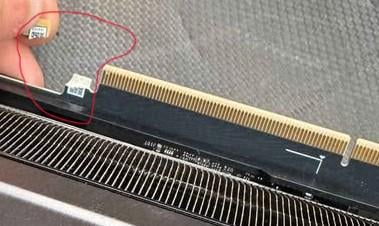
Pretty sure those tabs are just for the retention mechanism on PCI, so if it was supported correctly, it would be fine. As for fixing the actual chunk that chipped off, you could probably re-attach it, but unless it was perfect, you could risk it not connecting properly.
Myzhi1
That part just helps locks the card into the PCIe slot. The other is screwed into the case.
As long as the card is still screwed into the case, it’s ok to not use that broken part.
Cave_TP
You can just glue it back on, that part just locks the GPU in.
hirtz21
While you could repair it by gluing it back on, that piece isn’t critical, unless you move your case around a lot. Otherwise, just be careful
exterminuss
repairable would be the third question to be asked here,
#1 would be: does it work
#2 do you have to fix it,
cause that part is just fpr the card to stay locked into the PCIe slot,
some vertical mounts don’t even engage that part, e.g. don’t lock the GPU, cause gravity is enough.
If the price is right i’d buy that card same as one with the piece still attached,
be mindfull though, somebody who breaks that of might not have been carefull with their hardware and done some mor damage,
never buy used without testing
USSHammond
Is it repairable? No. That part of the pcb is physically broken off. It’s not gonna affect anything though. There’s no circuitry there. It’s just the pci slot lock. Make sure it’s screwed in tight and supported and it’ll be fine
SangerD
If i were to bet then this is 100% gigabyte card
Krentenkakker
You can do without that retention clip, but the biggest question is, how did it break because the pcb traces could also be damaged if the seller used a lot of force to take it out, the card has been dropped or the card cracked out of its slot because of weight or shock.
Careless_Cook2978
That’s a total loss. Not.
Luna8Moo
Don’t listen to people saying it’s nothing and just for retention, technically it should be just for it, but in modern cards the PCB doesn’t have much room and even that minor damage could ruin some traces inside PCB (it’s multi layer), in fact it’s a very common issue with new rtx 5xxx series mostly Asus I guess, most of the time it needs proper repair with micro soldering involved as there are traces to vram near this piece, can’t repair without microscope.
Achillies2heel
You don’t ‘need’ that tab for the card to work. You may have issues with locking the card in place without the bracket screwed in.
Accomplished_Tip3597
just ignore it. some people saw that part off on purpose. it’s just there to lock your card into the pcie slot. the card works the same without it.
SirGeorgington
It might still work. As long as there aren’t any traces run through that part, which there shouldn’t be but I don’t want to say with 100% certainty is the case, then it will work fine but may be a bit loose in the pcie slot.
Redpin
If the card doesn’t boot at all, the actual damage is likely elsewhere, so I can’t say.

17 Comments
It’s an rtx 4090
if u know how yes. but it wont affect performance if plugged in right and do not move to much
Its going to be a hard repair that may not work. I suggest skipping that ad and just find a working one with no physical damage.
Pretty sure those tabs are just for the retention mechanism on PCI, so if it was supported correctly, it would be fine. As for fixing the actual chunk that chipped off, you could probably re-attach it, but unless it was perfect, you could risk it not connecting properly.
That part just helps locks the card into the PCIe slot. The other is screwed into the case.
As long as the card is still screwed into the case, it’s ok to not use that broken part.
You can just glue it back on, that part just locks the GPU in.
While you could repair it by gluing it back on, that piece isn’t critical, unless you move your case around a lot. Otherwise, just be careful
repairable would be the third question to be asked here,
#1 would be: does it work
#2 do you have to fix it,
cause that part is just fpr the card to stay locked into the PCIe slot,
some vertical mounts don’t even engage that part, e.g. don’t lock the GPU, cause gravity is enough.
If the price is right i’d buy that card same as one with the piece still attached,
be mindfull though, somebody who breaks that of might not have been carefull with their hardware and done some mor damage,
never buy used without testing
Is it repairable? No. That part of the pcb is physically broken off. It’s not gonna affect anything though. There’s no circuitry there. It’s just the pci slot lock. Make sure it’s screwed in tight and supported and it’ll be fine
If i were to bet then this is 100% gigabyte card
You can do without that retention clip, but the biggest question is, how did it break because the pcb traces could also be damaged if the seller used a lot of force to take it out, the card has been dropped or the card cracked out of its slot because of weight or shock.
That’s a total loss. Not.
Don’t listen to people saying it’s nothing and just for retention, technically it should be just for it, but in modern cards the PCB doesn’t have much room and even that minor damage could ruin some traces inside PCB (it’s multi layer), in fact it’s a very common issue with new rtx 5xxx series mostly Asus I guess, most of the time it needs proper repair with micro soldering involved as there are traces to vram near this piece, can’t repair without microscope.
You don’t ‘need’ that tab for the card to work. You may have issues with locking the card in place without the bracket screwed in.
just ignore it. some people saw that part off on purpose. it’s just there to lock your card into the pcie slot. the card works the same without it.
It might still work. As long as there aren’t any traces run through that part, which there shouldn’t be but I don’t want to say with 100% certainty is the case, then it will work fine but may be a bit loose in the pcie slot.
If the card doesn’t boot at all, the actual damage is likely elsewhere, so I can’t say.