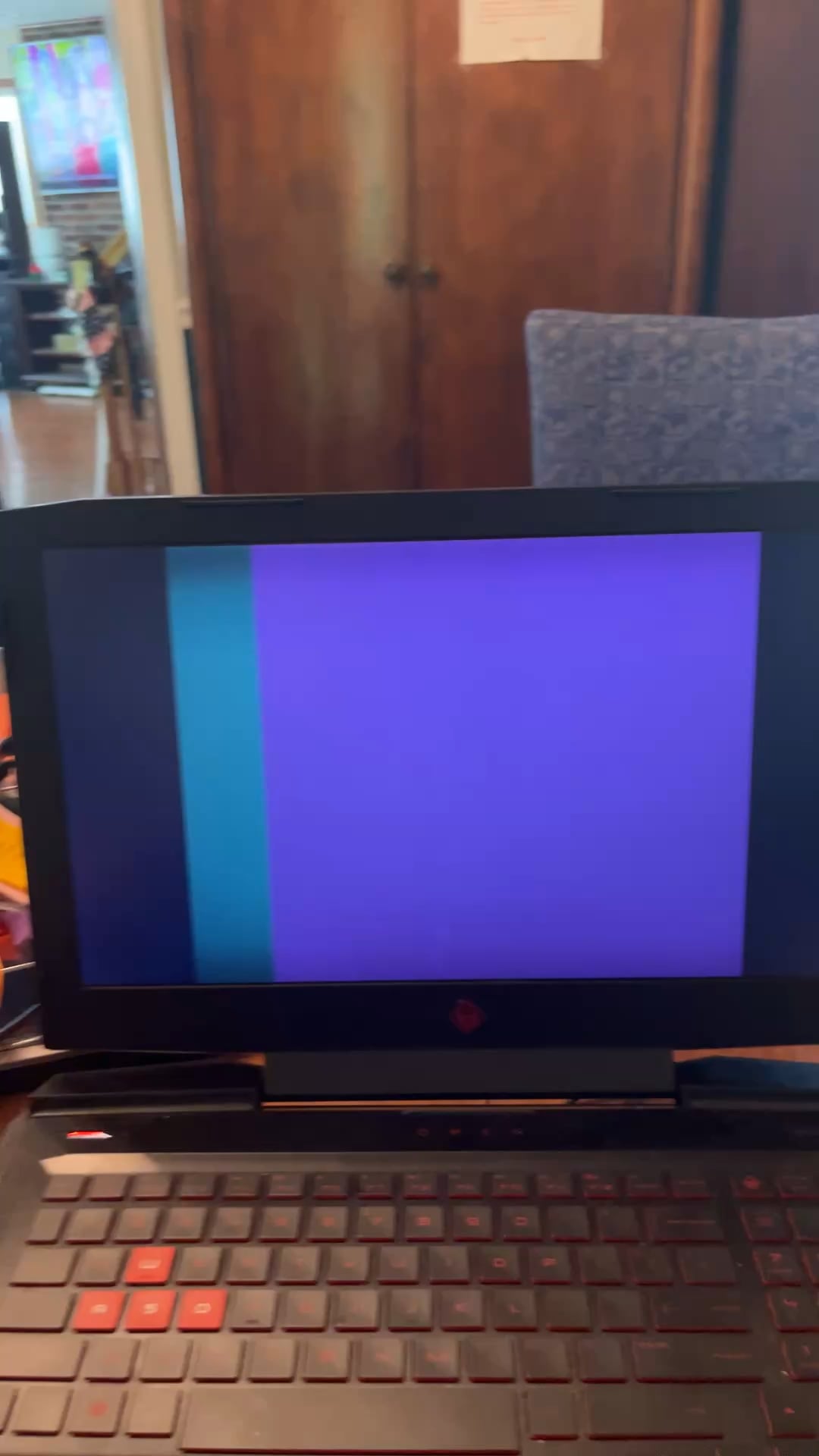
Looks like a cable or connector came loose inside.
AsleepAddendum2222
My monitor is doing the same thing
drdidg
Maybe not cooked but indeed frozen.
BetterPlayerUK
Soon a face will pop up asking for your help, cos they’re trapped in another universe which is about to implode, and you’re the only person they’ve been able to establish contact with through the wormhole
Idk, is your house haunted? Either someone is trying to talk to you from beyond the grave or your laptop’s broke..
skinink
I work in Deskside IT. One user called and said that his loaptop wasn’t displaying Windows correctly, so asked if I could remote in and change some settings. Before I remoted in, I asked if he could take a picture just so I can see what the displayed image looks like. He insisted I just needed to remote in but finally relented and sent an image. The picture showed that the laptop’s screen was clearly damaged.
The user said he had no idea how the screen could have been damaged, as he never moved the laptop from his desk. But this damage isn’t possible unless the laptop was dropped or the screen was hit. I let it go, because there no point in saying the user was lying. I just said, “Okay, I’ll send a replacement.”
EDITED: i see comments about other times where this look could be caused by a loose cable. I could clearly see the screen had damage. Remoting in would not have showed be damaged hardware.
RiriDumDum123
Bro don’t do this to me, I have the same laptop :,(
Well anyways this similar issue happened to a friend of mine. There are 2 possibilities, either the cable has broken or it has come loose. My guess is that the display attachment for the cable has come loose.
If you are confident in opening up your machine i would recommend you checking these connections first:
-The one to the motherboard can be found here. Only unscrew screws and gentle prying will get the back plate off. Note: the 2 back screws near the hinge do not come off let them be.
– The other end of the cable which connects to the monitor is located here. Please be very gentle when prying the cover. There is adhesive b/w the screen and bezel. Use a card to cut through the adhesive and plastic tools for prying.
ReputationOld2176
Nah, not cooked. Almost done!
davethadawg
As stated cable most likely, worst case it’s damaged in the hinge best case reseat and tape, occasionally it’s the panel that causes it to but here pretty cheap tbh
oldmanartie
Nah it says you’re almost done.
S1egwardZwiebelbrudi
windows may claim you were “almost” done, but actually scratch almost
thewaytonever
$100 says your cable connecting the display to the board needs to be replaced or reseated.

33 Comments
Damaged or loose ribbon cable.
May be an easy fix, may require a new panel depending on how it was made.
Could be a loose cable inside the shell
Loose ribbon cable on the inside. Should be an easy fix
I love how fast everyone came to answer this question. I thought it was toast.
Just hit it with your purse.
I get the same thing when passing right next to big ass electromagnet at work.
naw ur about to get raided bro
1. Remove hard drive or ssd.
2. Do as we did with cartridges in the 90s.
3. Profit!
https://i.redd.it/lxs3z6m2uexe1.gif
Have you tried turning it off and on?
youre not, but the computer is
Your almost done

Looks like a cable or connector came loose inside.
My monitor is doing the same thing
Maybe not cooked but indeed frozen.
Soon a face will pop up asking for your help, cos they’re trapped in another universe which is about to implode, and you’re the only person they’ve been able to establish contact with through the wormhole
🐈 oo ee ee aa ee oo ee ee aa 🐈
https://preview.redd.it/hxbl948g1fxe1.png?width=651&format=png&auto=webp&s=5267e45213087a15c5d2a082cfe87777d9420921
Idk, is your house haunted? Either someone is trying to talk to you from beyond the grave or your laptop’s broke..
I work in Deskside IT. One user called and said that his loaptop wasn’t displaying Windows correctly, so asked if I could remote in and change some settings. Before I remoted in, I asked if he could take a picture just so I can see what the displayed image looks like. He insisted I just needed to remote in but finally relented and sent an image. The picture showed that the laptop’s screen was clearly damaged.
The user said he had no idea how the screen could have been damaged, as he never moved the laptop from his desk. But this damage isn’t possible unless the laptop was dropped or the screen was hit. I let it go, because there no point in saying the user was lying. I just said, “Okay, I’ll send a replacement.”
EDITED: i see comments about other times where this look could be caused by a loose cable. I could clearly see the screen had damage. Remoting in would not have showed be damaged hardware.
Bro don’t do this to me, I have the same laptop :,(
Well anyways this similar issue happened to a friend of mine. There are 2 possibilities, either the cable has broken or it has come loose. My guess is that the display attachment for the cable has come loose.
If you are confident in opening up your machine i would recommend you checking these connections first:
-The one to the motherboard can be found here. Only unscrew screws and gentle prying will get the back plate off. Note: the 2 back screws near the hinge do not come off let them be.
https://preview.redd.it/ilouttvv4fxe1.jpeg?width=1536&format=pjpg&auto=webp&s=fb41ca546f18bf5d949bd2a435c5801bc02b1449
– The other end of the cable which connects to the monitor is located here. Please be very gentle when prying the cover. There is adhesive b/w the screen and bezel. Use a card to cut through the adhesive and plastic tools for prying.
Nah, not cooked. Almost done!
As stated cable most likely, worst case it’s damaged in the hinge best case reseat and tape, occasionally it’s the panel that causes it to but here pretty cheap tbh
Nah it says you’re almost done.
windows may claim you were “almost” done, but actually scratch almost
$100 says your cable connecting the display to the board needs to be replaced or reseated.
Source: My Aspire 5 been doing this for a year.
I thought you were rubbing your meat
You’re cooked
The Weezer is trying to break through
https://preview.redd.it/97flk8clcfxe1.jpeg?width=1200&format=pjpg&auto=webp&s=52e6af1798277b7d99612aa66beff1b384c3acf2
If all else fails, connect an external monitor. There is life yet in that laptop.
*cyberpunk theme starts to play*
Yes and your computer is fucked up.